


































Microsoft 365 Copilot: The Future of AI-Powered Workplace Productivity

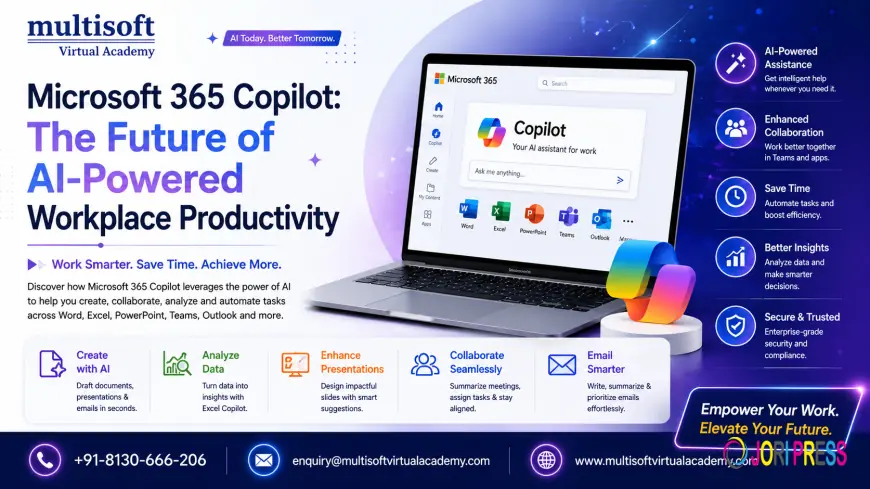
Artificial Intelligence (AI) is reshaping the way organizations operate, collaborate, and innovate. Among the most significant advancements in business productivity is Microsoft 365 Copilot, an AI-powered assistant designed to help professionals work smarter, automate repetitive tasks, and make informed decisions faster. Built on advanced large language models and integrated directly into Microsoft 365 applications, Microsoft 365 Copilot is changing how businesses approach productivity.
Whether you're managing documents in Word, analyzing data in Excel, creating presentations in PowerPoint, collaborating through Teams, or handling emails in Outlook, Microsoft 365 Copilot serves as an intelligent partner that helps streamline daily workflows.
As organizations continue their digital transformation journey, adopting AI-powered productivity tools has become essential rather than optional. Microsoft 365 Copilot empowers employees to reduce manual effort, improve creativity, enhance communication, and accelerate decision-making across every department.
What is Microsoft 365 Copilot?
Microsoft 365 Copilot is Microsoft's AI-powered productivity assistant that combines the capabilities of advanced language models with Microsoft Graph data and Microsoft 365 applications. It understands business context, organizational data, and user intent to generate meaningful responses and automate various workplace tasks.
Unlike traditional virtual assistants, Microsoft 365 Copilot doesn't simply answer questions—it actively helps users create documents, summarize meetings, analyze spreadsheets, draft emails, generate reports, automate workflows, and collaborate more efficiently.
The platform works seamlessly across:
- Microsoft Word
- Microsoft Excel
- Microsoft PowerPoint
- Microsoft Outlook
- Microsoft Teams
- Microsoft OneNote
- Microsoft Loop
- Microsoft Planner
- Microsoft Whiteboard
Its integration with Microsoft Graph allows it to understand emails, calendars, documents, meetings, conversations, and organizational knowledge while respecting enterprise security and compliance.
Why Microsoft 365 Copilot is Becoming Essential
Businesses generate enormous amounts of information every day. Employees spend significant time searching for documents, preparing presentations, responding to emails, attending meetings, and analyzing data.
Microsoft 365 Copilot addresses these productivity challenges by helping users:
- Create content faster
- Reduce repetitive work
- Improve collaboration
- Enhance creativity
- Generate business insights
- Save valuable working hours
- Improve decision-making
- Increase operational efficiency
Organizations adopting AI-powered productivity solutions are witnessing measurable improvements in employee performance and overall business outcomes.
Key Features of Microsoft 365 Copilot
AI-Powered Content Creation
Creating business documents often consumes valuable time. Microsoft 365 Copilot assists users by generating professional-quality content within seconds.
It can:
- Draft reports
- Create proposals
- Generate meeting summaries
- Write business letters
- Produce project documentation
- Rewrite existing content
- Improve grammar and readability
- Adjust writing tone
This enables professionals to focus on strategy rather than repetitive writing tasks.
Intelligent Data Analysis in Excel
Excel users often struggle with large datasets and complex formulas.
Microsoft 365 Copilot simplifies data analysis by helping users:
- Generate formulas
- Create dashboards
- Analyze trends
- Build Pivot Tables
- Forecast business performance
- Identify anomalies
- Produce visual charts
- Explain spreadsheet results
This dramatically improves analytical efficiency for finance, sales, HR, operations, and marketing teams.
Smarter Presentation Design
PowerPoint presentations can now be created in minutes rather than hours.
Copilot assists users by:
- Generating complete presentations
- Designing professional layouts
- Creating speaker notes
- Summarizing lengthy documents
- Suggesting visuals
- Improving storytelling
- Organizing slide content
Professionals can quickly transform ideas into engaging presentations.
Email Productivity in Outlook
Managing emails consumes a significant portion of the average employee's day.
Microsoft 365 Copilot helps by:
- Drafting responses
- Summarizing long email threads
- Prioritizing messages
- Improving email tone
- Creating follow-up messages
- Scheduling meetings
- Extracting action items
This helps users maintain organized communication without being overwhelmed.
AI Meeting Assistant in Microsoft Teams
Virtual meetings generate valuable information that often gets lost.
Copilot automatically:
- Summarizes meetings
- Captures key decisions
- Identifies action items
- Tracks responsibilities
- Creates follow-up notes
- Answers questions about meetings
- Provides discussion highlights
This ensures no important information is missed.
Benefits of Microsoft 365 Copilot
Increased Productivity
Employees spend less time on repetitive work and more time on strategic activities.
Enhanced Creativity
Copilot generates ideas, improves writing, and helps overcome creative blocks.
Better Decision Making
AI-powered insights enable organizations to make informed business decisions.
Improved Collaboration
Teams collaborate more efficiently using shared AI-generated content and meeting summaries.
Faster Project Delivery
Automation reduces project completion time by streamlining workflows.
Higher Employee Satisfaction
Reducing repetitive tasks allows employees to focus on meaningful work.
Microsoft 365 Copilot Use Cases Across Industries
Healthcare
Healthcare organizations use Microsoft 365 Copilot for:
- Clinical documentation
- Meeting summaries
- Administrative automation
- Research assistance
- Policy documentation
Finance
Financial professionals leverage Copilot to:
- Analyze reports
- Forecast revenue
- Create financial summaries
- Generate dashboards
- Improve budgeting
Manufacturing
Manufacturers use AI to:
- Document processes
- Improve collaboration
- Generate compliance reports
- Analyze operational data
- Support quality management
Education
Educational institutions benefit through:
- Lesson planning
- Research summaries
- Student communication
- Administrative documentation
- Presentation preparation
Human Resources
HR departments use Microsoft 365 Copilot for:
- Job descriptions
- Candidate communication
- Performance documentation
- Employee engagement
- HR reporting
Marketing
Marketing professionals use Copilot to:
- Generate content
- Create campaign ideas
- Analyze marketing data
- Produce presentations
- Write email campaigns
Microsoft 365 Copilot Security and Compliance
Security remains one of Microsoft's strongest priorities.
Microsoft 365 Copilot follows enterprise-grade security standards by:
- Respecting user permissions
- Maintaining data privacy
- Following compliance policies
- Protecting organizational information
- Supporting identity management
- Preventing unauthorized data access
Organizations can confidently adopt AI without compromising security.
Microsoft 365 Copilot vs Traditional Productivity Tools
Traditional office applications require manual effort for nearly every task.
Microsoft 365 Copilot introduces intelligent automation by:
- Understanding natural language
- Generating business content
- Automating repetitive tasks
- Providing contextual suggestions
- Learning from organizational knowledge
- Delivering real-time assistance
This creates a fundamentally different and more productive work experience.
Best Practices for Using Microsoft 365 Copilot
Organizations should maximize Microsoft 365 Copilot by following these practices:
Write Effective Prompts
Provide clear instructions to receive better AI-generated results.
Verify AI Responses
Review generated content before sharing externally.
Maintain Data Governance
Ensure organizational data follows security policies.
Train Employees
Help users understand prompt engineering and AI capabilities.
Combine Human Expertise with AI
Use Copilot as an assistant rather than a replacement for professional judgment.
Future of Microsoft 365 Copilot
Microsoft continues to invest heavily in artificial intelligence.
Future developments are expected to include:
- Smarter AI agents
- Advanced workflow automation
- Deeper Microsoft Graph integration
- Personalized AI experiences
- Industry-specific AI capabilities
- Expanded enterprise automation
- Better predictive analytics
- Enhanced collaboration intelligence
As AI evolves, Microsoft 365 Copilot will continue becoming an indispensable workplace assistant.
Why Businesses Should Invest in Microsoft 365 Copilot
Organizations that embrace AI gain significant competitive advantages.
Microsoft 365 Copilot helps businesses:
- Reduce operational costs
- Improve employee productivity
- Accelerate innovation
- Enhance customer service
- Improve knowledge management
- Increase workflow efficiency
- Support digital transformation
- Drive sustainable business growth
AI-powered workplaces are becoming the new standard across industries.
Frequently Asked Questions (FAQs)
What is Microsoft 365 Copilot?
Microsoft 365 Copilot is an AI-powered assistant integrated into Microsoft 365 applications that helps automate tasks, generate content, analyze data, and improve workplace productivity.
Which Microsoft applications support Microsoft 365 Copilot?
It integrates with Microsoft Word, Excel, PowerPoint, Outlook, Teams, OneNote, Loop, Planner, and other Microsoft 365 applications.
Is Microsoft 365 Copilot secure?
Yes. It follows Microsoft's enterprise-grade security, compliance, identity management, and data governance standards while respecting organizational permissions.
Can Microsoft 365 Copilot automate business tasks?
Yes. It can automate content creation, document generation, meeting summaries, email drafting, spreadsheet analysis, workflow assistance, and numerous productivity tasks.
Who should use Microsoft 365 Copilot?
Business professionals, managers, executives, analysts, marketers, HR teams, finance professionals, educators, consultants, developers, and organizations seeking AI-powered productivity improvements can all benefit from Microsoft 365 Copilot.
Final Thoughts
Artificial intelligence is redefining how organizations work, collaborate, and innovate, and Microsoft 365 Copilot is at the forefront of this transformation. By combining advanced generative AI with the familiar Microsoft 365 ecosystem, it enables businesses to automate repetitive tasks, generate high-quality content, analyze complex data, improve communication, and make faster, more informed decisions. As enterprises continue embracing AI-driven digital transformation, investing in Microsoft 365 Copilot can significantly enhance productivity, operational efficiency, and long-term competitiveness.
For organizations and professionals looking to unlock the full potential of Microsoft 365 Copilot, Multisoft Virtual Academy stands out as a trusted learning and training provider. With experienced industry trainers, practical hands-on learning, comprehensive course content, and a commitment to delivering quality professional education, Multisoft Virtual Academy helps learners build the knowledge and skills required to successfully adopt Microsoft 365 Copilot and other cutting-edge Microsoft technologies for real-world business success.
What's Your Reaction?
 Like
0
Like
0
 Dislike
0
Dislike
0
 Love
0
Love
0
 Funny
0
Funny
0
 Angry
0
Angry
0
 Sad
0
Sad
0
 Wow
0
Wow
0