





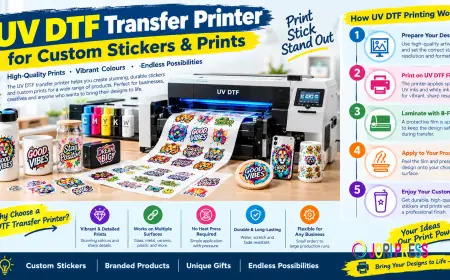






























UV DTF Transfer Printer for Custom Stickers & Prints
Explore how a UV DTF transfer printer helps create detailed product stickers and decals. Learn the process, material checks and application basics.

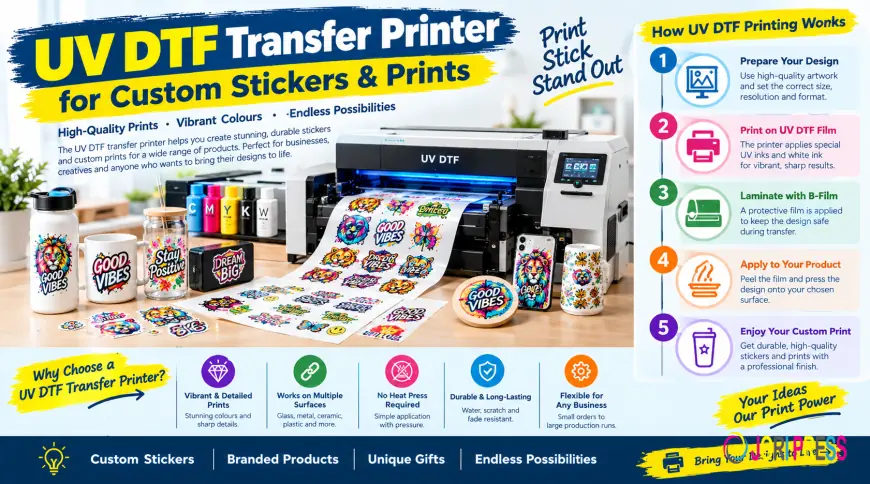
Custom printing gives businesses a practical way to turn ordinary products into personalised, branded items. From company logos on drinkware to colourful designs on packaging, the right printing method can help create products that look distinctive and professional. A UV DTF transfer printer makes this possible by producing detailed, adhesive transfers for application to compatible hard surfaces.
UV DTF printing is particularly useful for businesses that create promotional merchandise, personalised gifts, product labels and branded accessories. It combines full-colour artwork with a transfer process that does not normally require a heat press during application.
What Is a UV DTF Transfer Printer?
A UV DTF transfer printer is a specialised printer that uses ultraviolet-curable inks to create designs on transfer film. UV light cures the ink during printing, helping form a finished graphic that can be transferred onto a compatible hard surface.
UV DTF stands for Ultraviolet Direct-to-Film. Although the name resembles standard direct-to-film printing, the two methods serve different purposes.
How UV DTF Printing Machines Work
A UV DTF printing machine deposits specially formulated inks onto a compatible film. Ultraviolet light cures the ink during the printing process, while the film system helps prepare the design for transfer.
What Can You Make with a UV DTF Transfer Printer?
UV DTF technology suits businesses that want to personalise rigid products without printing directly onto each object. It can support small custom orders, branded merchandise and selected short-run product applications.
UV DTF Stickers for Glass, Metal and Ceramic
UV DTF stickers are commonly used to decorate smooth items such as glass jars, tumblers, mugs, metal containers and ceramic products. They can display logos, illustrations, names and colourful branding.
Custom Branding for Businesses
UV DTF transfers can help businesses add branding to selected promotional products, packaging components and merchandise. A consistent logo or design can give products a more coordinated appearance.
Potential applications include:
-
Branded jars and containers
-
Promotional drinkware and gifts
-
Smooth plastic accessories
-
Product packaging and storage items
-
Selected acrylic and rigid display products
-
Personalised gifts and decorative objects.
Detailed Designs and Colourful Graphics
UV DTF printing can reproduce multicolour artwork, gradients, lettering and detailed illustrations when the source file and printer settings support them.
For the best results, start with a clean, high-resolution design. Inspect small text, thin outlines and fine details at their intended print size. A design that looks sharp on a large monitor may reveal imperfections when printed at a much smaller size.
Key Benefits of UV DTF Printers
The main benefit of UV DTF printing is the ability to prepare detailed adhesive transfers for compatible hard goods. Whether it makes financial sense depends on your order volume, product range and production requirements.
No Heat Press Required for Applying Finished Transfers
One useful feature of UV DTF transfers is their application method. Unlike standard garment DTF transfers, finished UV DTF decals generally do not require a heat press. You position the design on a compatible surface and apply firm, even pressure.
Flexible Designs for Different Products
A suitable UV DTF setup can produce a range of designs, from small logos to larger decorative graphics. Businesses can prepare artwork for different customers and product styles without creating a separate physical printing plate for each design.
Professional-Looking Finishes
Depending on the ink set and print configuration, UV DTF transfers can feature vibrant colour, white ink coverage and a glossy or textured finish. These effects can help logos and illustrations stand out on suitable products.
What Equipment and Materials Do You Need?
Choosing a UV DTF printing machine means considering the complete production setup, not just the printer itself.
UV DTF Printing Machine and Compatible Inks
Choose equipment designed specifically for UV DTF transfer production. Check its supported film types, print width, ink configuration, software compatibility and maintenance requirements.
Many systems use CMYK colour inks, white ink and, where supported, clear varnish. Only use inks approved for your particular machine. Incompatible supplies can affect print quality and may damage the equipment.
A-Film, B-Film and Lamination
UV DTF systems commonly use a two-film process. The printer deposits the design onto the specified printing film, often called A-film. A compatible B-film is then laminated over the printed design to help transfer it to the target surface.
Film compatibility is essential. Different systems may use different materials, adhesives and lamination settings, so follow the manufacturer's specifications rather than assuming all films are interchangeable.
Design Software and Maintenance Supplies
You will also need suitable artwork software and the printer's required production software. Depending on the system, additional supplies may include cleaning materials, replacement components and tools for handling or laminating film.
Plan for routine maintenance as well as initial equipment costs. Printheads, ink systems and film-handling components require appropriate care to maintain reliable output.
How to Get Better Results with UV DTF Stickers
Consistent results start with good artwork and careful preparation. These practical checks can help you avoid common problems.
Prepare Artwork Before Printing
Use high-quality files with clean edges and correctly sized graphics. Check spelling, alignment, transparency and the final dimensions before sending the design to the printer.
For repeat customers, keep approved artwork files and record the dimensions used for previous orders. This makes repeat production easier and reduces the risk of accidental design changes.
Clean the Surface Before Application
Before applying a transfer, make sure the object is clean, dry and compatible with the adhesive. Follow the surface manufacturer's care recommendations when choosing a cleaning product, and allow the surface to dry completely.
Position the transfer carefully before pressing it down. Once the adhesive makes contact, repositioning may be difficult or may damage the design.
Apply Even Pressure and Remove the Film Slowly
Use a suitable squeegee or similar tool to press the transfer firmly against the surface. Work methodically across the design to help reduce trapped air.
Peel the carrier film slowly, following the transfer supplier's instructions. If part of the design lifts, stop and press that area down again before continuing. Always test an unfamiliar surface and transfer combination before fulfilling a large order.
UV DTF Transfer Printer vs Standard DTF Printer
Although the names sound similar, these machines are designed for different applications.
UV DTF printers produce adhesive transfers for compatible rigid surfaces. They use UV-curable inks and a film-based application process.
Standard DTF printers produce transfers for fabric. They typically print with textile pigment inks onto coated film, use heat-activated adhesive powder and require a suitable heat press to apply the transfer to a garment.
How to Choose the Right UV DTF Printing Machine
Before investing in equipment, consider how often you expect to print and which products you plan to decorate.
Assess your production volume. Estimate your average daily or weekly demand. A higher-capacity system may suit a busy production operation, while occasional custom orders may not justify purchasing dedicated equipment.
Check the total cost. Include the printer, compatible inks, film, laminating equipment, maintenance and potential waste. Compare these costs with the price of ordering finished transfers from a supplier.
Review support and specifications. Confirm that the manufacturer provides clear setup instructions, compatible supplies and maintenance guidance. Check the maximum print width and any software requirements against your actual jobs.
Test before scaling up. Produce sample transfers and evaluate their appearance, adhesion and finish on your intended products. This gives you a better basis for estimating production costs and setting customer expectations.
Choose the Right UV DTF Solution for Your Business
A UV DTF transfer printer can help businesses produce colourful adhesive designs for suitable hard goods, from branded drinkware to personalised gifts and promotional products. Good results depend on compatible materials, high-quality artwork, careful surface preparation and correct application.
Before investing, decide which products you want to decorate, how much you expect to produce and whether in-house printing or ready-made transfers better suits your budget. Choosing the right approach can help you manage production more effectively and deliver a consistent finish to your customers.
What's Your Reaction?
 Like
0
Like
0
 Dislike
0
Dislike
0
 Love
0
Love
0
 Funny
0
Funny
0
 Angry
0
Angry
0
 Sad
0
Sad
0
 Wow
0
Wow
0