






































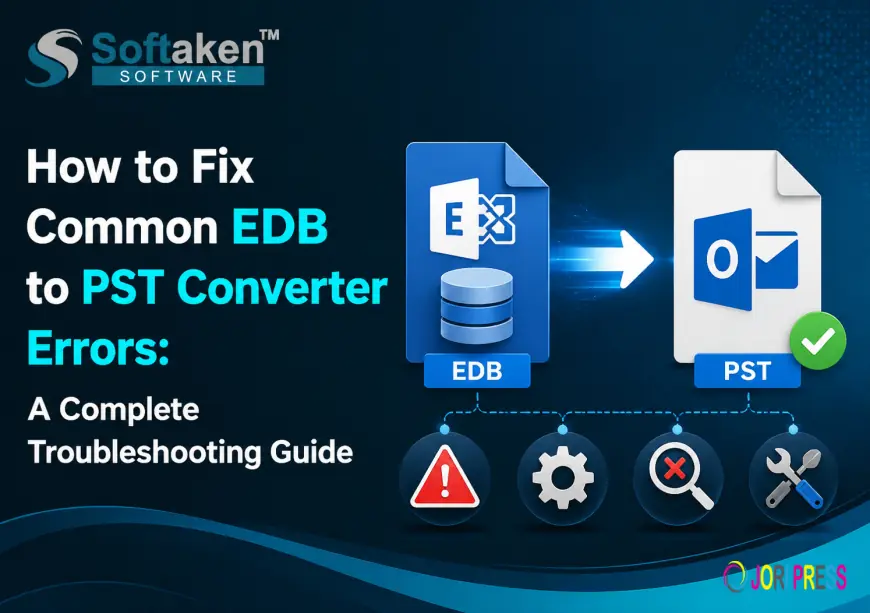
How to Fix Common EDB to PST Converter Errors: A Complete Troubleshooting Guide
EDB to Outlook PST Conversion simplifies Exchange mailbox migration by converting EDB files into Outlook PST format securely. Softaken EDB to PST Converter recovers and exports emails, contacts, calendars, attachments, and mailbox folders while maintaining data integrity. It supports corrupted EDB files, multiple mailboxes, and smooth Exchange-to-Outlook migration.
Summary
EDB files contain the important mailbox data like emails, contacts, calendars, tasks and other Exchange Server items. EDB to Outlook PST conversion is an effective solution for organizations that need to migrate, recover or access Exchange mailbox data in the absence of an active Exchange environment.
But, during the EDB to PST conversion process, users may encounter several errors such as software crash, incomplete conversion, EDB files corruption, missing mailbox items, or export failure. These issues can disrupt migration jobs and jeopardize critical business data.
Softaken EDB to PST Converter is developed to recover and convert Exchange EDB files to PST format, maintaining mailbox structure and data integrity. It supports offline, corrupt and inaccessible EDB files and allows users to export mailbox data to PST, EML, MSG, HTML and other formats.
This troubleshooting guide includes common errors, causes, and practical solutions for EDB to PST Converter.
Common EDB to PST Converter Errors & Their Solutions
1. EDB File Missing or Cannot Load Error Description:
Users may face issues in adding EDB file to the converter software. The application may display errors like:
- Unable to open EDB file.
- no mailbox invalid db file
- Possible causes:
- The compromised Exchange database
- nvalid path to EDB file
- missing files STM or LOG
- Permission denied Solution:
Make sure that the EDB file you selected is valid and accessible.
Copy EDB file to local drive before conversion.
Open the converter software with administrator privileges.
Use a Professional EDB Recovery Tool to repair the corrupt database files.
EDB to PST Converter scans unaccessible or corrupt Exchange EDB files and extracts mailbox data for conversion.
2. EDB to PST Conversion Process stops suddenly Error Description:
Conversion process is not completed and hangs or freezes.
Typical reasons are:
- Big EDB database
- Not enough system resources
- Apps that use memory in the background
- Antivirus interference
- Troubleshooting .
- Turn off unnecessary background processes.
- Make sure there is enough free space on your disk for the output PST file.
- While it's converting, temporarily disable your antivirus program.
- Split large mail box exports into smaller PST files.
A good EDB converter has options to handle large mailboxes and split PST files to avoid large PST issues.
3. Unable to Convert Corrupted EDB File Error Description:
Cannot convert corrupt Exchange database to PST.
- Why:
- Exchange Server unclean shutdown
- Hardware breakdown
- Database corruption.
Transaction logs not available Answer:
Before conversion:
- Verify EDB file health.
- If necessary, repair the corrupted database.
- converter with better scanning features
- Preview your recovered mailbox items prior to exporting.
EDB to PST Converter helps users to recover corrupted/inaccessible EDB files and also preview mailbox data before conversion.
4. Conversion Error: Missing Mails / Mailbox Items
Items that are missing after exporting EDB to PST: User Experience:
- Attachments E-mails
- Contacts Schedules
- Folder structure
- Possible Causes:
- Mailbox chosen incorrectly
- Selective conversion options
- Source data corrupted
Exports all mailbox folders prior to exporting.
Carefully choose necessary mailboxes.
Full mailbox conversion is enabled.
Check PST file using MicrosoftOutlook
The professional converting tools retain the hierarchy of folders, email meta data, attachments and mailbox items while exporting.
5. Unable to Export EDB to PST Format
- Error Message:
- Export failed.
- Could not create PST file
- You do not have access
Reasons:
- Destination folder is not writable
- Little of storage
- Bad output location Fix:
- Select a different destination folder.
- Export PST to Local.
- Ensure you have sufficient free disk space.
- Do not save directly to restricted folders.
6. EDB to PST conversion is slow
- What makes conversion rate slow?
- Very large EDB files
- Limited memory
- HARD DISK SLOW
- Running many applications
- Performance Guide:
- Use SSD storage if you can.
- Add more RAM.
- Close programs you’re not using.
- ailbox conversion (selective)
7. Problem: PST File Fails to Open After Conversion
Can not open converted PST file in Outlook.
Possible causes:
- Large PST file
- Corruption PST:
- Solutions: Outlook version is not supported
- Use Outlook Inbox Repair Tool (scanpst.exe)
- Split large PST files.
- Open Outlook version that is compatible for PST.
- Make sure the conversion went well.
There are some EDB conversion tools that have PST splitting options to handle large output files.
8. Outlook Installation Issue “Error while converting”
Users think Microsoft Outlook can do the conversion.
Resolution
There are many professional EDB to PST converter applications that can convert Exchange EDB files without an active Exchange Server environment.
Always check software compatibility before starting the conversion.
Top Mistakes to Avoid When Converting EDB to PST
1. Save Original EDB Files
Always make a copy of the original Exchange database before you perform a recovery or migration.
2. Check System Requirements
Your computer needs to have:
Enough storage space
Supported Windows Edition Processor and RAM requirements
3. Data Preview Before Exporting
Preview helps to confirm the mailbox contents and avoid exporting wrong data.
4. Use Reliable Conversion Software
Select a tool that allows:
- EDB Repair Corrupt
- Convert multiple mailboxes
- Preserve folder tree
- Select Export Mailbox
Why Choose Softaken EDB to PST Converter?
EDB to PST Converter is the easiest solution to migrate and recover Exchange Database. It allows users to:
EDB to PST Converter Tool
- Restore access to the Exchange mailboxes.
- Export public and private folders
- Maintain folder hierarchy and email properties
- Exports data to PST, EML, MSG and HTML formats
- Direct Export EDB to Office 365 & Live Exchange Server
The software is also available as a free demo version so you can test the conversion functionality before you buy a full license.
Final thoughts
The errors of EDB to PST conversion may be due to a corrupted database, lack of resources, wrong settings or due to system limitations. Understanding these problems and using the correct troubleshooting methods can help users complete Exchange migration successfully.
Softaken EDB to PST Converter is a reliable tool to recover and convert the corrupted EDB files very easily and maintains the mailbox integrity and exports Exchange data safely in Outlook PST file format.
With the right approach and proper conversion software, it is easy for users to recover Exchange mailbox data and migrate without any data loss.
FAQ
Q1. Why my EDB file is not opening in the converter?
Corruption of the EDB file, wrong file location, permission problems or missing database components can cause the EDB file to fail to open. Try copying the file locally, and then run the software as administrator
Q2. Is it possible to convert corrupt EDB file to PST?
Yes. The professional EDB to PST converters can recover the corrupted or inaccessible exchange database files and convert them to PST format.
Q3. Do you need Exchange Server to convert EDB file to PST?
No. Third-party EDB to PST converter tools are capable of converting offline Exchange EDB files without the requirement of an active Exchange Server environment.
Q4. Why some of the emails are disappeared after EDB conversion?
Sometimes you miss e-mail because the scan wasn't complete, the mailbox data is corrupt, or you selected the wrong mailboxes. You can prevent this issue by previewing mailbox data before export.
Q5. How to fix failed EDB to PST conversion?
Verify the EDB file’s health, clear up storage space, shut down unnecessary applications, and select a reliable converter that offers recovery options.
Q6. Is it possible to convert multiple EDB files to PST?
Yes . You can process multiple EDB files and migrate with faster speed using professional EDB conversion tools.
More Info:- softaken.com/edb-to-pst-converter
What's Your Reaction?
 Like
0
Like
0
 Dislike
0
Dislike
0
 Love
0
Love
0
 Funny
0
Funny
0
 Angry
0
Angry
0
 Sad
0
Sad
0
 Wow
0
Wow
0