







































Cloud Computing Deployment Models: A Complete Guide for Beginners (2026)
Learn about Cloud Computing Deployment Models, including Public, Private, Hybrid, and Community Cloud. Understand their features, benefits, use cases, and how to choose the right deployment model for business and IT needs.
Cloud computing has transformed how businesses and individuals store, manage, and access data. Instead of relying on expensive on-premises infrastructure, organizations can use cloud platforms to access computing resources on demand. However, choosing the right cloud environment is just as important as selecting the right cloud service. This is where Cloud Computing Deployment Models play a crucial role.
Deployment models define where cloud infrastructure is hosted, who owns it, and how users access it. Whether you're a student, IT professional, or business owner, understanding these models will help you make informed decisions about performance, security, cost, and scalability.
In this beginner-friendly guide, you'll learn the different deployment models, their features, advantages, disadvantages, and ideal use cases.
What Are Cloud Computing Deployment Models?
Cloud Computing Deployment Models describe the way cloud infrastructure is deployed and managed. They determine how computing resources are shared, secured, and accessed by users.
Each deployment model is designed to meet different business requirements. Some organizations prioritize cost-effectiveness, while others focus on data security, compliance, or flexibility. Understanding these differences is essential before adopting cloud technology.
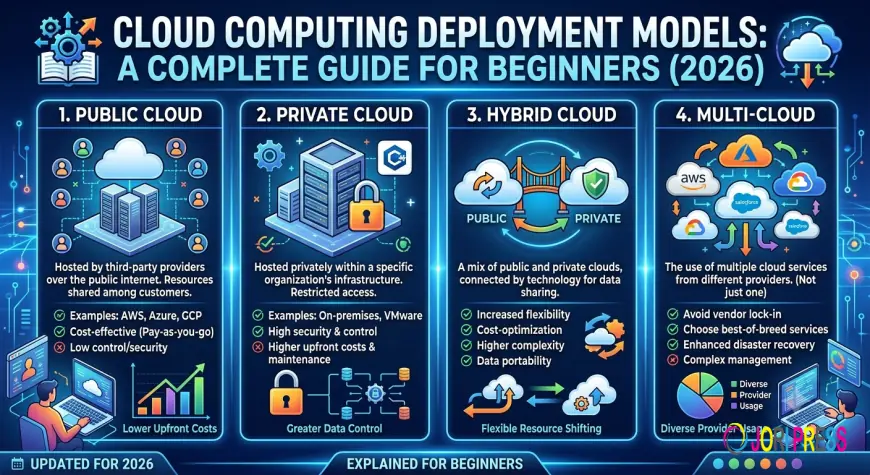
The four primary deployment models are:
-
Public Cloud
-
Private Cloud
-
Hybrid Cloud
-
Community Cloud
Each model offers unique advantages depending on business goals, workloads, and regulatory requirements.
Why Are Deployment Models Important?
Choosing the appropriate deployment model directly impacts an organization's success. The right model helps improve resource utilization, optimize costs, strengthen security, and ensure better performance.
Some of the major reasons deployment models matter include:
-
Improved scalability
-
Better data protection
-
Reduced infrastructure costs
-
Simplified management
-
Enhanced disaster recovery
-
Regulatory compliance
-
Greater operational flexibility
Organizations often evaluate these factors before deciding which cloud environment best supports their long-term objectives.
Types of Cloud Computing Deployment Models
1. Public Cloud
The Public Cloud is the most widely used deployment model. In this model, cloud infrastructure is owned and managed by third-party cloud service providers. Resources such as servers, storage, and networking are shared among multiple customers over the internet.
Popular public cloud providers include Amazon Web Services (AWS), Microsoft Azure, and Google Cloud Platform.
Key Features
-
Shared infrastructure
-
Pay-as-you-go pricing
-
High scalability
-
Global accessibility
-
Fully managed services
Advantages
-
Low initial investment
-
Quick deployment
-
Automatic updates
-
Excellent scalability
-
Minimal maintenance
Limitations
-
Less customization
-
Shared environment
-
May not meet strict compliance requirements for highly sensitive workloads
Best Use Cases
-
Startups
-
Small businesses
-
Website hosting
-
Application development
-
Testing environments
-
Data backup
The public cloud is an excellent choice for organizations looking for flexibility without investing heavily in physical infrastructure.
2. Private Cloud
A Private Cloud provides dedicated cloud infrastructure for a single organization. Unlike the public cloud, resources are not shared with other businesses, offering greater control over security and performance.
Private clouds can be hosted either on-premises or by a third-party provider.
Key Features
-
Dedicated infrastructure
-
Enhanced security
-
Greater customization
-
High performance
-
Improved compliance
Advantages
-
Better data privacy
-
Complete control over resources
-
Easier regulatory compliance
-
Reliable performance
-
Strong security measures
Limitations
-
Higher deployment costs
-
Requires skilled IT professionals
-
Ongoing maintenance responsibilities
Best Use Cases
Private cloud environments are suitable for:
-
Financial institutions
-
Government agencies
-
Healthcare organizations
-
Large enterprises
-
Businesses handling confidential information
Organizations dealing with sensitive customer data often prefer private cloud environments due to their stronger security controls.
3. Hybrid Cloud
A Hybrid Cloud combines both public and private cloud environments into a single infrastructure. This allows businesses to move workloads between environments depending on their needs.
For example, sensitive customer data can remain in the private cloud while less critical applications run in the public cloud.
Key Features
-
Combination of public and private infrastructure
-
Flexible workload management
-
Improved disaster recovery
-
Optimized resource utilization
-
Better business continuity
Advantages
-
High flexibility
-
Better cost optimization
-
Enhanced security
-
Easy scalability
-
Supports digital transformation initiatives
Limitations
-
More complex management
-
Requires proper integration
-
Higher implementation planning
Best Use Cases
Hybrid cloud is ideal for:
-
Large enterprises
-
E-commerce companies
-
Healthcare providers
-
Educational institutions
-
Businesses with seasonal workloads
Many organizations adopt hybrid cloud strategies because they offer the perfect balance between security and scalability.
4. Community Cloud
A Community Cloud is shared by multiple organizations that have similar operational, security, or regulatory requirements. The participating organizations collaborate while sharing infrastructure costs.
This deployment model is commonly used where organizations need standardized security and compliance practices.
Key Features
-
Shared among similar organizations
-
Common compliance standards
-
Collaborative infrastructure
-
Shared costs
-
Industry-specific solutions
Advantages
-
Reduced operational expenses
-
Improved collaboration
-
Better compliance management
-
Enhanced security compared to public cloud
-
Shared expertise
Limitations
-
Less flexibility than private cloud
-
Shared governance
-
Limited customization options
Best Use Cases
Community cloud is commonly adopted by:
-
Universities
-
Government departments
-
Healthcare networks
-
Research organizations
-
Financial consortiums
Organizations with similar regulatory requirements benefit significantly from this collaborative deployment model.
Factors to Consider Before Choosing a Deployment Model
Selecting the right cloud deployment strategy depends on several business and technical factors, including:
-
Budget and operational costs
-
Security requirements
-
Regulatory compliance
-
Business size
-
Scalability needs
-
Performance expectations
-
Existing IT infrastructure
-
Disaster recovery planning
Carefully evaluating these factors helps organizations choose the most suitable cloud environment for long-term growth.
Cloud Computing Deployment Models Comparison
|
Deployment Model |
Security |
Cost |
Scalability |
Best For |
|
Public Cloud |
Moderate |
Low |
Excellent |
Startups, SMEs, Developers |
|
Private Cloud |
Very High |
High |
Moderate |
Large Enterprises, Government, Healthcare |
|
Hybrid Cloud |
High |
Medium |
Excellent |
Growing Businesses, Enterprises |
|
Community Cloud |
High |
Medium |
Moderate |
Educational, Government & Research Organizations |
The table above highlights that each deployment model serves a different purpose. Organizations should evaluate their business goals rather than assuming one model fits every situation.
Benefits of Cloud Computing Deployment Models
Understanding Cloud Computing Deployment Models enables organizations to maximize the value of cloud technology while minimizing risks. Some of the key benefits include:
1. Improved Scalability
Cloud environments allow businesses to increase or decrease computing resources based on demand. This flexibility helps organizations handle traffic spikes without investing in additional hardware.
2. Better Cost Management
Companies only pay for the resources they use, especially in public cloud environments. This reduces capital expenditure and allows businesses to allocate budgets more efficiently.
3. Enhanced Security
Private and hybrid cloud solutions offer advanced security controls, making them suitable for industries handling confidential or regulated data.
4. Faster Deployment
Cloud infrastructure can be deployed within minutes, allowing businesses to launch applications and services much faster than traditional IT environments.
5. Business Continuity
Cloud platforms support data backup and disaster recovery strategies, reducing downtime and ensuring continuous operations even during unexpected events.
6. Global Accessibility
Employees can securely access applications and data from almost anywhere with an internet connection, making remote work and collaboration much easier.
How to Choose the Right Cloud Computing Deployment Model
Selecting the right deployment model depends on your organization's unique requirements. Consider the following questions before making a decision:
Choose Public Cloud if:
-
You have a limited IT budget.
-
You need rapid deployment.
-
Your workloads do not involve highly sensitive data.
-
You want maximum scalability with minimal maintenance.
Choose Private Cloud if:
-
Your organization handles confidential information.
-
Regulatory compliance is a top priority.
-
You require complete control over infrastructure.
-
Performance consistency is essential.
Choose Hybrid Cloud if:
-
You need both security and scalability.
-
Some workloads must remain private while others can run publicly.
-
You want flexibility to optimize costs.
-
Your business is undergoing digital transformation.
Choose Community Cloud if:
-
Multiple organizations share similar compliance requirements.
-
Collaboration is important.
-
Shared infrastructure can reduce costs while maintaining security.
Taking time to evaluate your operational goals will help ensure long-term success with cloud adoption.
Future Trends in Cloud Computing Deployment Models (2026)
Cloud technology continues to evolve, and deployment strategies are becoming more intelligent and business-focused. Some important trends shaping the future include:
-
AI-powered cloud resource management
-
Multi-cloud adoption across enterprises
-
Edge computing integration
-
Zero Trust security architecture
-
Sustainable and energy-efficient cloud infrastructure
-
Automation for cloud operations
-
Industry-specific cloud platforms
-
Stronger compliance and governance tools
These innovations will make cloud environments more secure, efficient, and adaptable for businesses of all sizes.
Best Practices for Implementing Cloud Deployment Models
To get the most from cloud adoption, organizations should follow these best practices:
-
Clearly define business objectives before selecting a deployment model.
-
Assess security and compliance requirements early in the planning process.
-
Implement identity and access management (IAM) policies.
-
Regularly monitor cloud performance and costs.
-
Encrypt sensitive data both at rest and in transit.
-
Train IT teams on cloud security and management.
-
Develop a reliable backup and disaster recovery plan.
-
Review and optimize cloud resources periodically.
Proper planning and governance help organizations maximize the benefits of cloud technology while reducing operational risks.
Conclusion
Choosing the right Cloud Computing Deployment Models is a critical step in building a reliable, secure, and scalable IT infrastructure. Whether you select a public, private, hybrid, or community cloud, the decision should align with your business goals, security requirements, and budget.
As cloud adoption continues to grow in 2026, professionals with a strong understanding of deployment models will be better prepared to design, manage, and optimize modern cloud environments. Learning these concepts not only strengthens technical knowledge but also opens the door to rewarding career opportunities in cloud computing. For learners looking to build practical cloud skills, PM Networking offers industry-focused training designed to help aspiring IT professionals stay ahead of evolving technologies. By mastering deployment models and related cloud concepts, you can confidently contribute to the next generation of digital transformation. PM Networking also emphasizes hands-on learning to prepare students for real-world cloud environments.
Frequently Asked Questions (FAQs)
Q1. What are the four Cloud Computing Deployment Models?
The four primary deployment models are Public Cloud, Private Cloud, Hybrid Cloud, and Community Cloud. Each model offers different levels of security, scalability, and control based on organizational needs.
Q2. Which cloud deployment model is best for beginners?
The Public Cloud is generally the best choice for beginners because it is affordable, easy to access, highly scalable, and requires minimal infrastructure management.
Q3. What is the difference between Public Cloud and Private Cloud?
A Public Cloud shares infrastructure among multiple users and is managed by a cloud provider, while a Private Cloud provides dedicated infrastructure for a single organization, offering greater security and customization.
Q4. Why is the Hybrid Cloud becoming more popular?
Hybrid Cloud combines the flexibility of public cloud services with the security of private infrastructure, enabling businesses to optimize costs, improve scalability, and protect sensitive data.
Q5. Who should learn Cloud Computing Deployment Models?
Students, IT professionals, cloud engineers, system administrators, DevOps engineers, cybersecurity professionals, and business decision-makers should understand deployment models to make informed technology and infrastructure decisions.
What's Your Reaction?
 Like
0
Like
0
 Dislike
0
Dislike
0
 Love
0
Love
0
 Funny
0
Funny
0
 Angry
0
Angry
0
 Sad
0
Sad
0
 Wow
0
Wow
0