





































WooCommerce VPS Hosting Architecture in Practice: Designing a High-Converting Server for 10,000+ Products
Explore how WooCommerce VPS hosting architecture supports large online stores with 10,000+ products. Learn about database optimization, PHP-FPM configuration, NVMe storage, and multi-layer caching to improve catalog loading speed, manage server resources, and build a scalable eCommerce infrastructure.
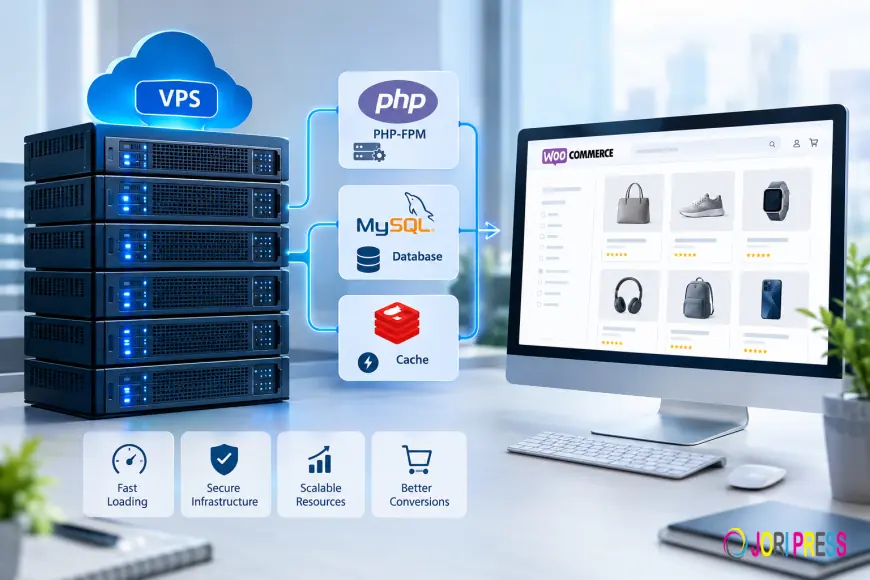
Managing a WooCommerce store that has over 10,000 products is not something that a basic WordPress setup can handle. As the number of products in the catalog increases the database queries get more complicated the product filters need work to function properly and when a lot of people visit the site at the same time the server must do more to keep everything running. All these issues can slow down the pages, make it harder for customers to find products and cause problems during checkout.
A set up WooCommerce VPS hosting setup gives the people who run the store more control over how PHP works, how the database performs, how much storage is available and how caching is handled. By using standard server settings, the people in charge can build the system based on how customers shop, how complicated the catalog is and how many people visit the site.
Understanding WooCommerce Server Requirements for Large Catalogs
WooCommerce works with parts that are connected. These parts include PHP, MySQL or MariaDB, WordPress and a web server. Each part helps with how products show how searches work, how shopping carts function and how checkouts happen.
Big collections of products can make things more complicated because of things like versions of products extra information, ways to navigate and tools that help filter products. A store that has 10,000 products might use less power than a store that has fewer products but many versions and detailed features.
Before choosing server specifications, administrators should evaluate:
- Concurrent visitors and peak traffic patterns.
- Product variations, filters, and search functionality.
- Installed plugins and their database activity.
- Order volume and checkout concurrency.
- CPU, RAM, storage I/O, and database utilization.
These factors help establish a realistic infrastructure baseline rather than relying on product count alone.
Designing an Efficient VPS and Database Architecture
A single VPS can handle WooCommerce stores if resources are managed well. As traffic and activity increase it's better to split the database from the web and PHP tasks. This helps avoid resource conflicts and makes scaling easier.
To improve database performance start by finding heavy queries. Use slow-query logs and monitoring tools to spot issues like filtering repeated lookups of metadata and queries from plugins that use too much power.
Good database design, for ecommerce also means using the indexes managing product attributes efficiently and checking which WordPress options are being autoloaded unnecessarily. Choose indexes carefully. Many indexes take up more space and can slow down writing data.
NVMe storage can cut down on database I/O delays especially when a store gets lots of queries or processes orders. Even the fastest storage won’t fix problems caused by bad query structure or inefficient code.
Optimizing PHP-FPM and Web Server Configuration
PHP-FPM handles PHP processes. Makes it easier to manage multiple requests at the same time. The way PHP-FPM is set up has an impact on how many requests a WooCommerce store can handle without using up all the server memory.
Admins need to figure out how PHP-FPM workers they can run based on the amount of memory available and how much memory each PHP process uses. For example, if 2 GB of RAM is available, for PHP-FPM workers and each worker uses 100 MB the number of workers could go up to 20 in theory. In real use it’s better to set a lower limit to make sure there’s enough memory left for the operating system, the database, the web server and other programs.
Other important configuration considerations include:
- Enabling OPcache to reduce repeated PHP script compilation.
- Setting suitable PHP memory limits based on application requirements.
- Configuring Nginx or OpenLiteSpeed for efficient request handling.
- Monitoring worker saturation and PHP execution time.
- Avoiding excessive concurrent processes that can trigger memory pressure.
Regular monitoring helps administrators adjust configurations as traffic patterns and plugin requirements change.
Building a Multi-Layer Caching Strategy
Catching is essential for improving catalog responsiveness, but WooCommerce requires a careful approach because many pages contain dynamic information.
A multi-layer caching strategy can combine several techniques:
- Page caching: Stores eligible public pages and product listings to reduce repeated PHP processing.
- Object caching: Uses Redis to retain frequently accessed WordPress and WooCommerce data.
- Browser caching: Allows visitors' browsers to reuse static assets such as style sheets and images.
- CDN caching: Distributes static content through geographically distributed delivery networks.
Redis object coaching can help reduce repeated database operations for data that is accessed often. It’s important to set up coaching based on how the application uses data. You shouldn’t assume every query can be safely stored in the cache.
Pages, like the cart, checkout, account and personalized content usually need handling. These areas often depend on real-time data. Should not be caught in a way that causes issues. When inventory levels change, product prices update or promotions go live the cache must be cleared away. If not, users might see wrong information, which leads to confusion and potential problems.
Scaling and Monitoring a WooCommerce Store
Infrastructure optimization must always be an effort. A VPS that is set up properly can still face performance problems when more people visit new plugins are. The list of products is getting bigger.
Administrators need to keep an eye on how the CPU is being used, how much memory is left, how fast the disk is reading and writing how long the database takes to respond and how the PHP-FPM workers are working. These numbers can show if a slowdown is coming from the code itself from the database from the storage or from not having resources, on the server.
Load testing needs to act out customer experiences like looking through product categories using search options checking product details, putting items in a cart and finishing a purchase. Running these steps in a test environment can find problems before they hurt users.
When a single VPS reaches its practical limits, administrators can consider separating database services, introduce additional application servers, or expand CDN coverage. Scaling decisions should be based on measured resource consumption and application compatibility.
Regular backups, software updates, and performance reviews are equally important for maintaining operational stability as an online store grows.
Conclusion: Building a Stable Foundation for eCommerce Growth
Supporting a WooCommerce store with than 10,000 products means that the server architecture must be in good balance. The database should run smoothly the PHP‑FPM workers must be the size the storage should be quick, and the settings need to be carefully set up. All of these help the WooCommerce store feel fast when shoppers click around.
If just buying new hardware the owner of a WooCommerce store should look for the places where the site slows down. Then step by step the owner can fix those parts. A well‑designed server environment makes product browsing smoother checkout easier to do. Gives the WooCommerce store the flexibility it needs when customer demand changes.
What's Your Reaction?
 Like
0
Like
0
 Dislike
0
Dislike
0
 Love
0
Love
0
 Funny
0
Funny
0
 Angry
0
Angry
0
 Sad
0
Sad
0
 Wow
0
Wow
0