


































Safeguarding Valuable Digital Records in the Modern Music Industry Through Reliable Data Recovery Solutions
Jet Data Recovery recovers lost files from hard drives, SSDs, phones, RAID arrays, servers and memory cards for homes and businesses in San Antonio and, by mail, across the U.S. Every case starts with a free evaluation and a clear quote, and if the data can't be recovered there's no recovery fee. Call (830) 205-3255, 24/7.

The music industry has undergone a remarkable transformation as recording studios, independent artists, music producers, and entertainment companies increasingly depend on digital technology. Songs that once required extensive collections of physical recording equipment can now be produced, edited, mixed, and mastered through powerful computer systems. Alongside these developments, digital storage has become an essential part of preserving creative projects, managing business operations, and maintaining valuable audio libraries.
However, the growing reliance on digital production also introduces new challenges. A damaged hard drive, corrupted project file, accidental deletion, or unexpected computer failure can put hours of creative work at risk. For musicians and recording professionals, losing access to original recordings may mean losing carefully arranged tracks, detailed editing decisions, custom sound designs, and important production notes. Understanding the importance of data protection and professional recovery can help creative businesses manage these risks more effectively.
Why Digital Recording Projects Require More Careful Protection Than Ordinary Computer Files
A professional music project often contains far more information than the final audio track heard by listeners. A single production may include dozens of individual instrument recordings, vocal takes, effect settings, automation instructions, MIDI arrangements, and multiple versions of the same composition. These elements allow producers to revise a song, adjust its sound, correct mistakes, or prepare different versions for distribution.
When a project becomes inaccessible, the final exported audio file may not contain everything needed to continue editing. Producers could lose the ability to separate individual instruments, modify vocal processing, or reproduce the exact mix approved by a client. In commercial studios, the consequences can extend to delayed release schedules, missed deadlines, and additional production expenses.
Independent artists face similar difficulties because their recording computers often contain personal creative work that cannot easily be recreated. Original performances, experimental arrangements, and early songwriting sessions may be particularly valuable. Protecting these files requires a combination of careful storage practices, organized project management, and a plan for responding to unexpected technical failures.
How Storage Failures and Software Errors Can Interrupt Important Music Production Workflows
Recording environments place considerable demands on computer storage. High-resolution audio files can consume substantial space, and large projects may require frequent reading and writing while multiple tracks are played simultaneously. External drives are also commonly used to move projects between recording rooms, home studios, mastering facilities, and collaborators.
Over time, storage devices can develop faults that prevent files from opening correctly. A hard drive may experience mechanical problems, while a solid-state drive can suffer electronic or controller-related failures. USB connection issues, interrupted transfers, damaged file systems, and unexpected shutdowns can create additional complications. In some situations, the files remain physically present but the operating system can no longer access them normally.
Music production software may also save projects in formats that depend on linked audio files or supporting folders. If those components are moved, deleted, or damaged, a session might open with missing tracks or display errors. This is why producers should understand how their recording software organizes projects instead of relying exclusively on the final exported song.
Recognizing the difference between a software issue and a storage failure is important. Repeatedly attempting repairs without understanding the cause can sometimes make the situation worse, especially when a device is physically damaged or important files have already been deleted.
When Professional Data Recovery Becomes Important for Recording Studios and Independent Artists
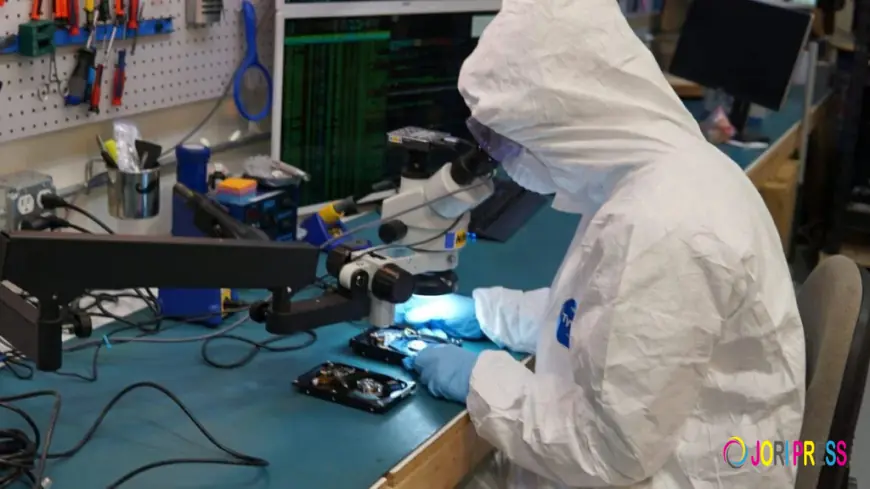
When valuable recording material suddenly becomes inaccessible, the right recovery approach depends on the type of failure and the condition of the affected device. Professional technicians can assess the storage medium, identify possible causes, and determine whether a suitable recovery method is available. Depending on the situation, this may involve recovering deleted files, addressing logical corruption, or working with damaged hardware using specialized procedures.
Artists and studios searching for data recovery san antonio can investigate professional assistance when audio projects, sample libraries, session backups, or other important digital records become inaccessible. A recovery assessment can help establish the likely scope of the problem and explain the available options before further action is taken.
It is important to understand that successful recovery cannot be guaranteed. Results depend on factors such as the extent of the damage, whether data has been overwritten, the type of storage device, and previous attempts to repair it. A professional evaluation helps clarify the situation without relying on unrealistic promises.
For studios working with clients, restoring access to original recordings may also support project continuity. Recovered session files can potentially allow producers to resume editing, prepare alternate mixes, or complete revisions without rebuilding every element from the beginning.
Protecting Original Audio Takes, Custom Sound Libraries, and Years of Creative Development
Many music professionals accumulate extensive collections of digital assets throughout their careers. These may include original vocal recordings, drum samples, synthesizer presets, instrument libraries, custom sound effects, rehearsal recordings, and unfinished compositions. Some resources are purchased commercially, while others are developed through years of experimentation and personal creative work.
Losing access to a specialized sound library can slow down future projects, particularly when the original installation files or license information are no longer available. Similarly, losing an unprocessed vocal recording may limit the ability to correct performance issues or produce a new version of a song. These risks make it worthwhile to treat creative assets as long-term business resources rather than temporary files.
Organizing projects into clearly labeled folders can make them easier to protect. Artists can separate original recordings from edited versions, preserve important project settings, and maintain a consistent naming system for different mixes. Storing essential information alongside each project also helps collaborators understand which files are current and which versions should remain untouched.
A well-organized digital library does not prevent every technical failure, but it makes backup management more practical and can simplify recovery when a problem occurs.
Practical Backup Strategies That Help Producers Preserve Their Work Before Problems Arise
A dependable backup strategy should protect both completed work and projects that are still in production. Saving a song to one external drive is not necessarily enough because the original computer and the backup device may both be affected by theft, electrical damage, or other incidents. Maintaining separate copies in different locations can provide stronger protection.
One useful approach is to keep a working copy on the production computer, a separate backup on an external storage device, and another copy in a secure off-site location or suitable cloud storage service. The best arrangement depends on project size, internet speed, confidentiality requirements, and the frequency of recording sessions. Large audio projects may require scheduled local backups, while smaller documents and finished masters may be easier to synchronize online.
Producers should also decide how often backups need to run. A studio recording several sessions each day may need more frequent protection than someone who works on music occasionally. Automated backup tools can reduce the chance that important updates will be forgotten during busy production periods.
Testing backups is equally important. A drive that appears to contain copied files may still have missing folders, damaged data, or outdated versions. Periodically opening selected projects from backup storage helps confirm that the files are usable. Maintaining more than one backup generation can also be helpful if a project becomes corrupted and the damaged version is copied automatically over the only backup.
Preventing Accidental Deletion and Confusion When Multiple People Share Studio Projects
Collaborative music production frequently involves several people handling the same project. Producers, engineers, session musicians, vocal editors, and mastering specialists may exchange files or work from shared storage. Without clear procedures, someone can unintentionally delete an important take, overwrite an approved mix, or move an audio folder that another session depends on.
A straightforward file management policy can reduce these problems. Studios should establish consistent folder structures, identify the current project version, and decide who has permission to modify or delete original files. When possible, collaborators should work from designated project copies instead of changing the only original session.
Version naming also deserves attention. Labels such as “final,” “final-new,” and “final-revised” can quickly become confusing when several revisions are created. A consistent system that includes the project name, revision number, and date can make it easier to identify the correct file. Important milestones, including approved mixes and final masters, should be preserved separately from ongoing edits.
These practices are especially useful when clients return months later to request changes. Clear records and protected source files can help engineers respond efficiently without depending on guesswork or searching through poorly organized folders.
Keeping Studio Computers Reliable Through Routine Maintenance and Sensible Storage Management
Regular maintenance can help recording professionals identify potential problems before they interrupt an important session. Storage devices should have sufficient free space, computers should receive appropriate software and security updates, and external drives should be disconnected safely when transfers are complete. Reliable power protection can also help reduce the risk of abrupt shutdowns during recording or file transfers.
It is sensible to pay attention to warning signs such as repeated read errors, unusually slow file access, unexpected disconnections, or storage devices that suddenly disappear from the operating system. These symptoms do not always mean that a drive is failing, but they should not be ignored when the device contains irreplaceable recordings.
When an important drive shows signs of physical damage, minimizing further use is generally safer than repeatedly testing it with unfamiliar applications. If the information is valuable, a professional assessment may help determine the appropriate next step.
Storage planning matters as well. High-resolution recordings, video content, virtual instruments, and sample libraries can quickly consume available capacity. Monitoring storage usage and archiving completed projects to appropriate media can keep working systems organized and reduce pressure on active production drives.
Managing Confidential Client Recordings and Ownership Information Across Digital Workspaces
Recording studios may handle unreleased songs, confidential commercial projects, private voice recordings, and materials belonging to multiple clients. Protecting these files involves more than preventing hardware failure. Access permissions, secure file transfers, and responsible storage practices are also important parts of studio management.
Studios should restrict access to sensitive projects according to job responsibilities and avoid leaving client files on shared computers longer than necessary. External drives used to transport recordings should be handled carefully, and cloud-sharing permissions should be reviewed before links are sent to collaborators. Clear project agreements can also explain how recordings are stored, how long files are retained, and how completed work is delivered.
When recovery services are needed, studio owners should ask how recovered information will be handled, who may access it, and how files will be returned securely. These questions can help establish appropriate expectations and protect the trust between artists, producers, and their clients.
Responsible data handling becomes particularly important when a recovery involves several unrelated projects stored on the same device. Clear communication and appropriate confidentiality measures can help ensure that the process respects the interests of everyone whose work is involved.
Creating a Reliable Recovery Plan That Helps Studios Continue Working During Technical Disruptions
Even well-maintained recording environments can experience unexpected failures, so it is useful to prepare a response plan before an emergency occurs. The plan should identify the location of backups, the person responsible for technical decisions, and the steps employees should take when a storage device stops working.
Studios can also establish procedures for keeping projects moving while a problem is investigated. For example, an engineer may be able to continue working on a separate project stored on an unaffected system, while the damaged device remains untouched for assessment. Client communication can be managed through a separate computer or approved backup of essential business documents.
A written inventory of storage devices, project locations, and backup schedules can reduce confusion when a problem arises. Contact information for relevant technical support providers should be readily available, and staff members should understand that they should not format or reinstall software on an affected drive without considering the risk to existing files.
Once normal operations resume, reviewing the incident can reveal practical improvements. A missing backup, unclear folder structure, or unreliable external connection may point to a preventable weakness. Making targeted changes after an incident can strengthen the studio's ability to protect future projects.
Conclusion: Preserving Musical Creativity Through Smarter Digital Storage and Recovery Planning
Digital technology has given musicians and producers powerful tools for creating, editing, and distributing music, but it has also made reliable information management an essential part of the creative process. Recording sessions, original audio takes, sound libraries, client files, and production settings can represent substantial investments of time and expertise.
By recognizing early warning signs, organizing project files, maintaining tested backups, and seeking appropriate technical assistance when storage failures occur, music professionals can reduce the disruption caused by unexpected data loss. Careful access controls and clear recovery procedures can further protect confidential work while helping studios maintain dependable service.
Preparing for technical problems does not need to interrupt creativity. With consistent file management and a practical recovery strategy, artists and recording businesses can spend less time worrying about inaccessible projects and more time developing new ideas, refining their sound, and completing meaningful musical work.
Files
What's Your Reaction?
 Like
0
Like
0
 Dislike
0
Dislike
0
 Love
0
Love
0
 Funny
0
Funny
0
 Angry
0
Angry
0
 Sad
0
Sad
0
 Wow
0
Wow
0