









































Building a Dual HDMI Embedded Computing Solution with RK3568
Explore how the RK3568 Ubuntu Board with Dual HDMI supports embedded computing, industrial monitoring, digital signage, and dual-display applications.

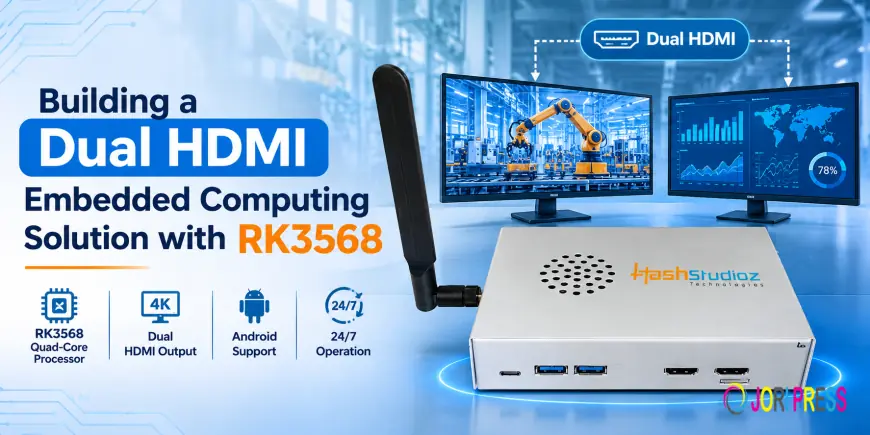
Modern embedded computing systems require reliable processing power, flexible connectivity, and efficient display management. Applications such as industrial automation, digital signage, smart kiosks, and monitoring systems often need multiple displays to present different types of information simultaneously.
A single-display setup may not be sufficient for applications that require real-time monitoring, data visualization, and interactive user interfaces. This is where a dual HDMI embedded computing solution becomes useful.
The RK3568 Ubuntu Board with Dual HDMI offers a practical platform for developing embedded applications that require dual-display output, stable computing performance, and flexible hardware integration.
Understanding the Need for Dual HDMI Embedded Computing
Many modern embedded applications need to display multiple types of information at the same time. For example, an industrial monitoring system may need one screen for machine performance and another for operational data.
Similarly, digital signage applications may require multiple screens to display different content from a single computing platform.
Traditional embedded systems with limited display connectivity can create integration challenges. Developers may need additional hardware, separate computing units, or complex configurations to manage multiple displays.
A dual HDMI embedded computing platform helps address these requirements by supporting two HDMI display connections through one board.
Some common applications include:
-
Industrial Automation: Display machine status, production data, and control interfaces.
-
Digital Signage: Manage content across multiple displays.
-
Smart Kiosks: Separate customer-facing information from internal monitoring interfaces.
-
Embedded Monitoring: Show real-time system information on different screens.
-
Edge Computing: Combine local processing with multiple visual interfaces.
Project Overview: Building a Dual-Display Embedded Computing System
Consider an industrial automation project where operators need to monitor machine performance while viewing production reports on a separate screen.
The development team needs a compact computing platform that can:
-
Run Ubuntu-based embedded applications.
-
Support two HDMI display connections.
-
Connect external USB peripherals.
-
Provide a practical platform for software development and testing.
-
Fit into industrial and commercial embedded systems.
To address these requirements, an RK3568-based Ubuntu board can serve as the central computing unit.
The following is an illustrative implementation scenario showing how this hardware can be used. It is not a report of a verified customer deployment.
The Challenge: Managing Multiple Displays with One Computing Unit
In a multi-display embedded project, developers often face several challenges during hardware selection and system integration.
1. Limited Display Connectivity
A single HDMI output makes it difficult to connect multiple displays without additional display hardware or computing devices.
2. Hardware Integration Complexity
Adding separate computing units can increase installation requirements, wiring, and overall system complexity.
3. Operating System Compatibility
Embedded applications may depend on Ubuntu-based development environments, making operating system compatibility an important consideration.
4. Peripheral Connectivity
Developers also need suitable interfaces to connect USB devices, debugging equipment, and other external peripherals.
The objective is to select a compact computing board that addresses these requirements while keeping the overall system architecture manageable.
The Solution: RK3568 Ubuntu Board with Dual HDMI
The RK3568 Ubuntu Board with Dual HDMI provides a suitable hardware foundation for developing embedded computing applications that require multiple display connections.
Powered by the Rockchip RK3568 processor, the board supports Ubuntu-based embedded applications and offers two HDMI ports for display connectivity.
Its USB connectivity also makes it convenient to connect external devices during development and system integration.
Key Hardware Features
|
Feature |
Description |
|
Processor |
Rockchip RK3568 |
|
Operating System |
Ubuntu |
|
HDMI Connectivity |
2 × HDMI ports |
|
USB Type-C |
1 × Type-C for power and debugging |
|
Additional USB |
2 × USB ports |
|
Product Type |
Single Board Computer |
These features provide a practical starting point for embedded Linux development, industrial computing, and multi-display applications.
IoTStudioz
How the Dual HDMI Solution Works
A dual HDMI embedded computing system uses one computing board to provide display connectivity for two monitors.
The basic implementation can be divided into the following steps.
Step 1: Setting Up the Computing Board
The RK3568 Ubuntu Board acts as the central processing unit of the system.
Developers connect the board to an appropriate power source through its USB Type-C port and prepare the Ubuntu environment for application development.
Step 2: Connecting Two HDMI Displays
The board provides two HDMI ports for connecting compatible display devices.
For example, an industrial monitoring setup could use:
-
Display 1: Machine performance and operational status.
-
Display 2: Production reports, system information, or monitoring dashboards.
The actual simultaneous display configuration depends on the supported graphics drivers, Ubuntu image, and software configuration.
Step 3: Configuring Ubuntu Applications
Once the hardware is connected, developers can configure the Ubuntu environment according to application requirements.
They can develop and run embedded applications, monitoring dashboards, graphical interfaces, and other Linux-compatible software.
Step 4: Integrating USB Peripherals
The additional USB ports support external USB devices.
These connections can be used for compatible keyboards, mice, storage devices, debugging accessories, and other development peripherals.
Step 5: Testing the Complete System
Before deployment, the complete setup should be tested for:
-
Display detection and compatibility.
-
Application performance.
-
Ubuntu software compatibility.
-
Peripheral connectivity.
-
Power stability.
-
Long-duration operating performance.
This process helps developers identify integration issues before moving the system into its intended application.
Real-World Applications of an RK3568 Dual HDMI Solution
A dual HDMI computing platform can support different industrial and commercial applications.
1. Industrial Automation
Display machine performance, operational parameters, production information, and monitoring dashboards through a connected display setup.
2. Digital Signage Systems
Use a centralized computing platform for display-based information systems, advertisements, and commercial content applications.
3. Smart Kiosks
Develop embedded kiosk applications that combine user-facing interfaces with additional display-based information.
4. IoT and Edge Computing
Build local computing systems that run Ubuntu-based applications and provide visual interfaces for monitoring connected devices.
5. Embedded Linux Development
Use the board as a development platform for testing Linux applications, hardware interfaces, and custom embedded solutions.
Benefits of Using an RK3568 Ubuntu Board
Selecting the right development board can simplify hardware integration and support future application requirements.
Here are some important benefits of using this solution.
1. Dual HDMI Connectivity
Two HDMI ports provide display connection options for applications that require multiple screens.
2. Ubuntu-Based Development
Ubuntu support provides a familiar Linux environment for developers working on embedded software and custom applications.
3. Flexible USB Connectivity
The available USB ports support external peripherals and development accessories.
4. Simplified Hardware Architecture
A single computing board can act as the central platform for applications requiring multiple display connections, potentially reducing the need for separate computing units.
5. Multiple Application Possibilities
The board can be considered for industrial computing, IoT development, digital display systems, and custom embedded projects.
Important Considerations Before Implementation
Although dual HDMI connectivity offers flexibility, developers should evaluate a few technical requirements before selecting the board for a project.
-
Display Resolution: Check whether the board and software image support the required resolution of each connected display.
-
Simultaneous Display Support: Verify whether both HDMI outputs can operate together in the intended display configuration.
-
Ubuntu Compatibility: Confirm that the available Ubuntu image supports the required applications and hardware interfaces.
-
Power Requirements: Select a suitable power supply for stable board operation and connected peripherals.
-
Thermal Management: Consider the operating environment and cooling requirements for continuous operation.
-
Software Requirements: Test the required drivers, graphical applications, and display management configuration before deployment.
These checks help ensure that the selected hardware matches the actual requirements of the embedded application.
Why Choose IoTStudioz for Embedded Computing Solutions?
Developing an embedded computing system requires more than selecting a processor or development board. Hardware compatibility, interface requirements, operating system support, and application needs all play an important role.
At IoTStudioz, we offer electronic components, IoT development boards, embedded hardware, and connectivity solutions for developers, engineers, system integrators, and businesses.
Our product range supports different development requirements, from embedded Linux applications to industrial IoT and display integration projects.
The RK3568 Ubuntu Board with Dual HDMI is one of the available solutions for developers looking to build embedded applications with Ubuntu support and multiple HDMI connections.
Conclusion
Building a dual HDMI embedded computing solution requires a suitable combination of processing capabilities, display connectivity, operating system support, and peripheral integration.
The RK3568 Ubuntu Board with Dual HDMI provides a practical foundation for projects involving industrial monitoring, digital signage, smart kiosks, IoT applications, and embedded Linux development.
With two HDMI ports, Ubuntu support, USB Type-C connectivity, and additional USB interfaces, it offers developers a flexible platform for exploring different embedded computing applications.
Whether you are developing a new embedded product or upgrading an existing display-based system, choosing the right computing board can make hardware integration more straightforward.
What's Your Reaction?
 Like
0
 Dislike
0
 Love
0
 Funny
0
 Angry
0
 Sad
0
 Wow
0