










































WordPress Website Security vs Performance: Finding the Right Balance
Learn how to balance WordPress website security and performance with practical tips to protect your site while improving speed, stability, and user experience.
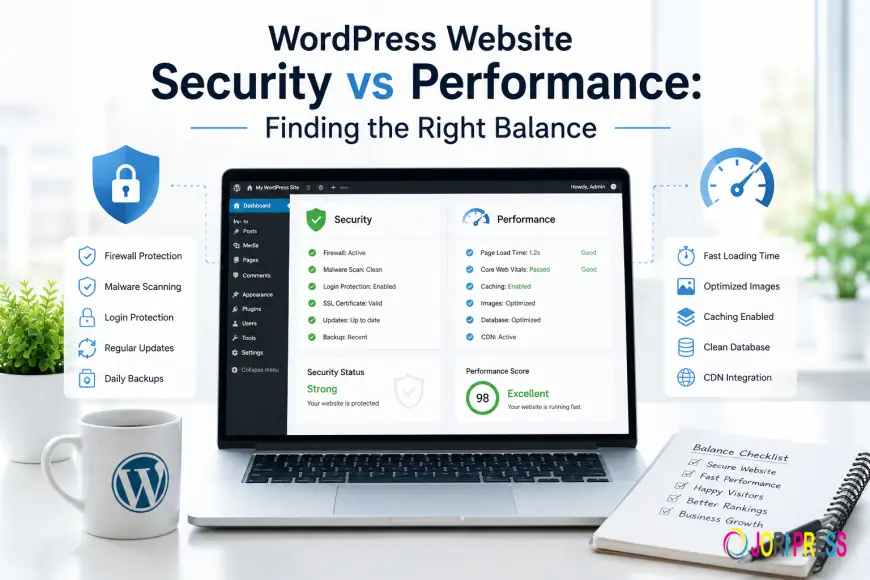
WordPress Website Security vs Performance: Finding the Right Balance for a Faster and Safer Website
WordPress website security and performance are two important factors that determine the success of any website. Security protects your website from hackers, malware, and vulnerabilities, while performance ensures visitors get a fast and smooth browsing experience. The best approach is not choosing one over the other but creating a balance where your website remains secure without sacrificing speed.
Many website owners face the same challenge. They want stronger security but worry that extra protection will slow their website down. Others focus only on speed and remove important security features that protect their business.
Both approaches can create problems.
A slow website can reduce user engagement, increase bounce rates, and affect conversions. A vulnerable website can lead to malware infections, downtime, damaged reputation, and loss of customer trust.
The right strategy combines security, optimization, and regular maintenance to create a website that is fast, reliable, and protected.
Why Website Security and Performance Matter Together
A WordPress website is not a single system. It is made up of multiple components that work together, including:
-
WordPress core
-
Plugins
-
Themes
-
Hosting environment
-
Database
-
Custom code
-
Security tools
Every component can influence both website speed and protection.
For example:
-
An outdated plugin can create security risks and slow down your website.
-
Too many unnecessary plugins can increase loading time.
-
Malware can consume server resources and reduce performance.
-
Poor hosting can affect both website speed and security.
This is why website security and performance should be managed together instead of treating them as separate tasks.
A secure website that loads slowly creates a poor user experience, while a fast website without proper protection creates unnecessary risks.
Understanding WordPress Website Security
WordPress security refers to the methods used to protect your website from online threats, unauthorized access, and technical vulnerabilities.
Although WordPress is a secure platform, websites can become vulnerable because of poor maintenance practices, outdated software, weak passwords, or unsafe third-party tools.
A secure WordPress website helps protect:
-
Business information
-
Customer data
-
Website content
-
Brand reputation
-
Revenue opportunities
Common WordPress Security Risks
Outdated Plugins and Themes
Plugins and themes add important functionality to WordPress websites, but outdated software can become a security weakness.
Developers regularly release updates to improve:
-
Security
-
Compatibility
-
Performance
-
Stability
When website owners ignore updates, attackers may exploit known vulnerabilities.
Keeping plugins and themes updated is one of the simplest ways to improve website protection.
Weak Login Protection
Login pages are common targets for automated attacks.
Common security mistakes include:
-
Using simple passwords
-
Sharing administrator accounts
-
Keeping inactive users
-
Not limiting login attempts
Strong passwords, user permission management, and additional login protection reduce the risk of unauthorized access.
Malware and Hacking Attempts
A hacked website may show different warning signs, including:
-
Unexpected redirects
-
Unknown files
-
Spam pages
-
Sudden speed problems
-
Security warnings
Regular security monitoring helps identify suspicious activity before it causes serious damage.
Understanding WordPress Website Performance
Website performance describes how quickly your website loads and responds when visitors interact with it.
A high-performing website improves:
-
User experience
-
Mobile browsing
-
Visitor engagement
-
Conversion opportunities
Modern users expect websites to load quickly. If a website takes too long, visitors may leave before exploring products, services, or content.
Factors That Affect WordPress Performance
Poor Hosting Quality
Your hosting provider plays an important role in website performance.
Low-quality hosting can create problems such as:
-
Slow server response
-
Limited resources
-
Frequent downtime
-
Poor website stability
A reliable hosting environment creates a stronger foundation for both speed and security.
Too Many Plugins
Plugins are useful because they add extra features to WordPress websites.
However, installing too many plugins can negatively affect performance.
Every plugin adds additional code that your website needs to process.
Too many unnecessary plugins can cause:
-
Slower loading pages
-
Database issues
-
Compatibility problems
-
More maintenance work
Using fewer, reliable plugins is usually better than installing many tools with overlapping features.
Large and Unoptimized Media Files
Images and videos improve website design, but large files can slow down loading times.
Image optimization helps by:
-
Reducing file sizes
-
Improving page speed
-
Reducing server usage
A well-optimized website can maintain visual quality while loading quickly.
WordPress Website Security vs Performance: Which One Should You Prioritize?
Many website owners believe they must choose between security and performance.
In reality, both are necessary.
Security protects your website from threats, while performance ensures visitors have a positive experience.
A common mistake is adding too many security solutions without considering their impact on speed.
For example, installing multiple security plugins that perform the same functions can increase server load without providing significant additional protection.
A better approach is using a carefully planned security setup combined with performance optimization.
How Security Measures Can Affect Website Performance
Security features are important, but some security practices can influence website speed.
Understanding this relationship helps you make better decisions.
Security Scanning
Security scanners check websites for:
-
Malware
-
Suspicious files
-
Vulnerabilities
-
Unauthorized changes
Frequent full scans can use server resources.
Scheduling scans during low-traffic periods can reduce performance impact.
Website Firewall Protection
A firewall helps block harmful traffic before it reaches your website.
A properly configured firewall improves security while maintaining speed.
However, poorly configured firewall rules may create unnecessary delays.
Login Security Features
Features such as:
-
Two-factor authentication
-
Login attempt restrictions
-
User monitoring
help protect websites from unauthorized access.
When configured correctly, these features usually have minimal effect on performance.
How Performance Optimization Supports Security
Improving website performance can also strengthen security.
Removing Unused Plugins
Unused plugins increase maintenance requirements and create additional security risks.
Removing unnecessary software helps:
-
Reduce vulnerabilities
-
Improve speed
-
Simplify website management
Keeping Website Software Updated
Updates often include both security improvements and performance fixes.
Regularly updating:
-
WordPress core
-
Plugins
-
Themes
helps maintain a healthier website environment.
Choosing Reliable Hosting
Quality hosting improves:
-
Website speed
-
Server protection
-
Reliability
A strong hosting environment supports better overall website management.
Best Practices to Balance WordPress Security and Performance
Use Quality Security Solutions
Avoid installing multiple security plugins that provide similar features.
Choose security tools that offer essential protection without unnecessary performance overhead.
A simple and well-managed security setup is often more effective.
Keep WordPress Updated
Regular updates improve:
-
Security
-
Compatibility
-
Stability
-
Performance
Before major updates, create backups and test changes whenever possible.
Optimize Your Plugin Setup
Review your plugins regularly.
Remove:
-
Unused plugins
-
Duplicate tools
-
Outdated software
Choose plugins that have active development and regular updates.
Enable Performance Optimization Features
Performance improvements may include:
-
Website caching
-
Image optimization
-
Database cleanup
-
Code optimization
These improvements help websites load faster while maintaining stability.
Monitor Website Health Regularly
Regular monitoring helps detect problems early.
Important areas to monitor include:
-
Website speed
-
Security alerts
-
Downtime
-
Broken functionality
-
Update issues
Preventive maintenance is always better than fixing major problems after they happen.
Security and Performance Needs Based on Website Type
Different websites require different levels of protection and optimization.
Business Websites
Business websites need both strong security and reliable performance.
A slow website can reduce leads, while a security problem can damage customer trust.
Ecommerce Websites
Online stores require extra attention because they handle:
-
Customer information
-
Payments
-
Orders
Security is essential, but performance is equally important because slow checkout experiences can reduce sales.
Content Websites
Blogs and information websites depend on speed to keep readers engaged.
However, security protection is still necessary to prevent content loss and website attacks.
How Professional WordPress Maintenance Helps Maintain Balance
Managing WordPress security and performance requires continuous attention.
A professional maintenance approach includes:
-
Security monitoring
-
Safe updates
-
Website backups
-
Performance optimization
-
Plugin reviews
-
Technical troubleshooting
Many website issues happen because maintenance is ignored until something breaks.
A proactive approach helps identify risks early and keeps websites stable.
WPAegis helps businesses maintain secure and optimized WordPress websites through structured monitoring, technical support, and ongoing website management.
For businesses that want reliable protection, professional WordPress maintenance support can help manage updates, security checks, backups, and performance improvements without unnecessary technical stress.
You can also explore WPAegis WordPress solutions to learn how professional website management can help keep your website secure, fast, and reliable.
Frequently Asked Questions
Does improving WordPress security slow down a website?
Not always. Properly configured security solutions can protect your website without creating major performance issues.
Should I focus on security or speed first?
Both are important. A successful website needs strong protection and fast performance to provide a reliable user experience.
Can security plugins slow down WordPress?
Yes, some poorly optimized or unnecessary security plugins can affect speed. Using quality tools and correct configuration reduces this risk.
How can I improve WordPress speed without reducing security?
Use reliable hosting, optimize images, remove unnecessary plugins, keep software updated, and use proper caching methods.
How often should WordPress security and performance be checked?
Website owners should regularly review security, updates, backups, and performance as part of ongoing maintenance.
Conclusion
WordPress website security and performance are not competing goals. A successful website requires both strong protection and excellent speed.
Security keeps your website safe from threats, while performance ensures visitors enjoy a smooth browsing experience. The right balance comes from using reliable tools, maintaining updates, optimizing resources, and monitoring website health.
A proactive maintenance strategy helps prevent problems before they affect visitors or business operations.
If you want to keep your WordPress website secure, fast, and reliable, professional maintenance support can help you manage updates, security, and performance with confidence.
What's Your Reaction?
 Like
0
Like
0
 Dislike
0
Dislike
0
 Love
0
Love
0
 Funny
0
Funny
0
 Angry
0
Angry
0
 Sad
0
Sad
0
 Wow
0
Wow
0