









































WordPress at Scale: Linux VPS vs Windows IIS for Better Website Performance
Compare WordPress hosting on Linux VPS and Windows IIS. Learn how Nginx, PHP-FPM, Redis, caching, and server resources affect website performance.
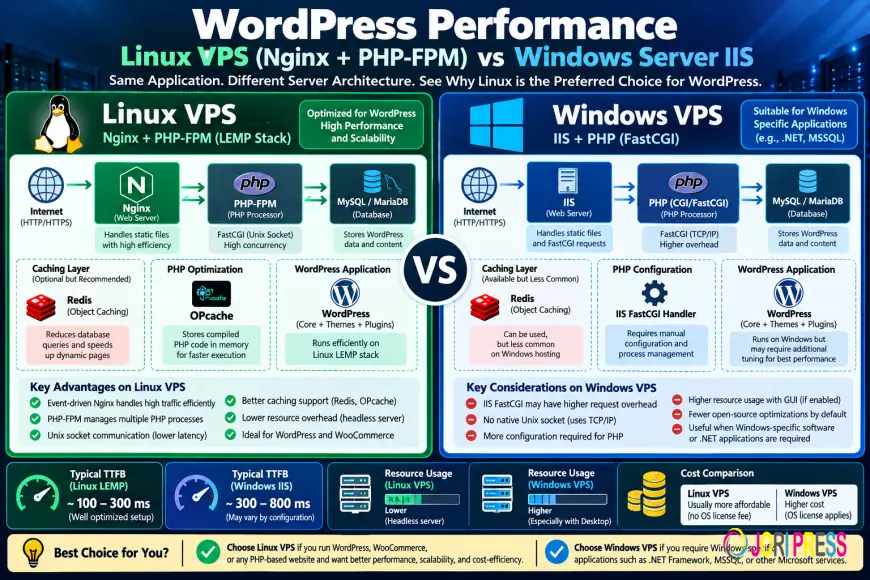
WordPress performance depends on how efficiently a server handles PHP requests, database queries, caching, and incoming traffic. Both Linux and Windows VPS hosting can run WordPress, but their server configurations and management requirements differ.
Linux VPS with Nginx, PHP-FPM, and MySQL or MariaDB is generally a practical choice for WordPress websites. It provides flexible caching, resource management, and compatibility with widely used PHP hosting tools. Windows Server with IIS can also host WordPress, particularly when businesses already depend on Microsoft infrastructure.
The best platform depends on the application's requirements, server configuration, and actual workload.
WordPress on Linux vs Windows VPS
Linux VPS hosting commonly uses Ubuntu or Debian with Nginx, PHP-FPM, and a database server. This setup is often called a LEMP stack.
Nginx handles incoming web requests, PHP-FPM executes WordPress scripts, and MySQL or MariaDB stores website content and application data.
Windows VPS typically uses Internet Information Services (IIS) with PHP running through FastCGI. It supports WordPress but requires appropriate PHP handler settings, URL rewriting, and permissions.
Both environments can deliver reliable performance when configured correctly.
Why Linux VPS Is Popular for WordPress
1. Nginx Request Handling
Nginx uses an event-driven architecture to manage network connections efficiently. It can serve static files, such as images and stylesheets, without processing every request through PHP.
For dynamic WordPress pages, Nginx communicates with PHP-FPM using FastCGI.
This separation helps administrators manage web requests and PHP workloads independently.
2. PHP-FPM Process Management
PHP-FPM manages the PHP worker processes responsible for executing WordPress code.
Administrators can configure worker limits based on available RAM, application activity, and concurrent traffic.
Too few PHP workers can cause requests to queue during busy periods. Too many workers can exhaust server memory.
Monitoring actual worker utilization is more useful than applying the same PHP-FPM settings to every VPS.
3. Redis Object Caching
WordPress frequently retrieves information from its database. Redis object caching can store reusable application data in memory, reducing repeated database queries.
This is particularly helpful for database-intensive WordPress and WooCommerce websites.
Redis is optional, and its benefits depend on workload and correct integration.
4. PHP OPcache
OPcache stores compiled PHP bytecode in memory, reducing repeated script compilation.
It can improve PHP execution efficiency on WordPress websites with multiple plugins and themes.
OPcache works on both Linux and Windows, so it is not an exclusive Linux advantage.
How Windows IIS Handles WordPress
Windows IIS processes WordPress PHP requests through the FastCGI module.
When someone visits a dynamic WordPress page, IIS forwards the request to PHP. The application then processes the request and accesses the database when required.
Administrators can configure FastCGI process settings, request timeouts, and application behavior.
Windows VPS may be useful when an organization already manages IIS applications or relies on Windows-based administration tools.
For a WordPress-only website without Microsoft-specific dependencies, Linux often provides a more familiar hosting environment.
Unix Sockets vs TCP Connections
On Linux, Nginx can communicate with PHP-FPM through Unix-domain sockets or TCP connections.
Unix sockets are commonly used when both services run on the same server. They can avoid some local networking overhead.
TCP connections are also supported and may be appropriate for specific application architectures.
The communication method alone does not determine WordPress speed. Database queries, plugins, caching, and PHP worker availability often have a greater effect on response times.
Improving WordPress Time to First Byte (TTFB)
Time to First Byte (TTFB) measures the time required for a browser to receive the first byte of the server's response.
A high TTFB can result from slow PHP execution, database activity, overloaded server resources, network delays, or ineffective caching.
Website administrators should investigate these factors before changing operating systems.
Useful optimization steps include checking slow database queries, enabling suitable caching, monitoring PHP workers, and reviewing expensive plugins.
For WooCommerce, cart and checkout pages require careful cache handling because they contain customer-specific information.
Linux vs Windows VPS Performance: What Matters?
A fair WordPress performance comparison requires similar hardware, software versions, database configurations, and application workloads.
For example, two VPS instances with equivalent CPU, RAM, and storage resources could be configured with Linux/Nginx and Windows/IIS.
Administrators can then compare TTFB, CPU usage, memory consumption, and request handling under controlled traffic.
Linux is not automatically faster in every test. A properly configured Windows IIS server may outperform a poorly configured Linux VPS.
Performance results should come from actual measurements rather than assumptions about operating systems.
Which VPS Is Better for WooCommerce?
WooCommerce websites often handle more dynamic operations than standard WordPress blogs.
Shopping carts, customer sessions, inventory updates, and order processing can generate frequent database queries and PHP activity.
Linux VPS hosting is generally a convenient choice because it supports familiar PHP optimization tools, persistent object caching, and widely used database servers.
However, performance still depends on the resources available and how the application is configured.
For businesses operating busy online stores, monitoring database activity and PHP worker usage is particularly important.
Choosing the Right VPS for WordPress
Choose Linux VPS when your website primarily uses WordPress, WooCommerce, PHP, Nginx, Apache, or MySQL.
Choose Windows VPS when the hosting environment depends on IIS, Windows-specific applications, or established Microsoft administration workflows.
Before selecting a VPS, consider available RAM, CPU performance, storage latency, backup requirements, and server management responsibilities.
Increasing server resources may help with capacity issues, but it cannot automatically fix inefficient plugins or database queries.
Frequently Asked Questions
Can WordPress run on Windows VPS?
Yes. WordPress can run on Windows Server using IIS, PHP through FastCGI, and a compatible MySQL or MariaDB database.
Is Linux VPS faster than Windows VPS for WordPress?
Linux provides a widely supported environment for PHP applications, but actual performance depends on hardware, caching, database activity, and server configuration.
Does Redis improve WordPress performance?
Redis can reduce repeated database queries through persistent object caching. Its effectiveness depends on the application's caching behavior.
Is Nginx better than IIS for WordPress?
Nginx is commonly used for PHP-based hosting and offers flexible caching and request-handling options. IIS remains a valid option for organizations relying on Windows infrastructure.
Wrapping Up
Linux VPS with Nginx and PHP-FPM is often a practical choice for WordPress and WooCommerce hosting. It supports flexible resource management, caching, and widely used PHP tools.
Windows IIS can also run WordPress effectively when configured correctly, particularly in Microsoft-based environments.
The right hosting choice depends on application compatibility, server resources, maintenance requirements, and measured performance.
What's Your Reaction?
 Like
0
Like
0
 Dislike
0
Dislike
0
 Love
0
Love
0
 Funny
0
Funny
0
 Angry
0
Angry
0
 Sad
0
Sad
0
 Wow
0
Wow
0