
































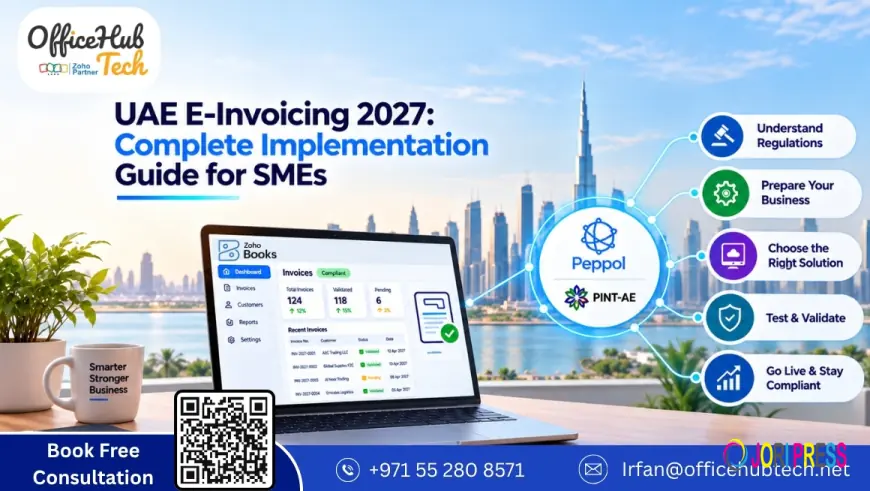
UAE E-Invoicing 2027: Complete Implementation Guide for SMEs
UAE e-Invoicing 2027 guide for SMEs: understand PINT-AE, Peppol, ASPs, software requirements and implementation. Get expert help from OfficeHub Tech.

UAE E-Invoicing 2027: What SMEs Need to Do Now
The UAE’s e-invoicing programme introduces structured electronic invoice exchange for businesses within its scope. Unlike traditional PDF invoices or scanned documents, eInvoices contain structured data that can be processed and exchanged between connected business systems.
For SMEs, preparation involves reviewing existing invoicing processes, improving financial data quality, evaluating technology, selecting an Accredited Service Provider (ASP), and integrating accounting or ERP systems.
A successful implementation should connect invoicing with existing financial and operational processes rather than create another disconnected application.
Start With a Readiness Assessment
Before selecting e-invoicing software, review how invoices are generated, where customer and supplier information is stored, how VAT is configured, how credit notes are processed, and how invoice errors are resolved.
Identify manual data entry, spreadsheet dependencies, disconnected applications, and gaps in reconciliation. This assessment establishes the technical and operational requirements for implementation.
Businesses requiring implementation assistance can consult e-invoicing implementation solution providers in UAE.
UAE E-Invoicing 2027 Deadlines: Build Your SME Implementation Calendar
For businesses with annual revenue below AED 50 million that fall within the applicable implementation phase, the current deadlines are:
- 31 March 2027: Appoint an Accredited Service Provider.
- 1 July 2027: Complete e-invoicing implementation.
Businesses with revenue of AED 50 million or more and government entities follow separate timelines. SMEs should confirm their applicable category and requirements.
A practical SME implementation calendar
- Assess: Confirm scope, systems, and processes.
- Prepare: Clean financial data and identify gaps.
- Select: Evaluate technology and an ASP.
- Integrate: Connect accounting, ERP, and other applications.
- Test: Validate invoices, credit notes, and exceptions.
- Train: Prepare finance, operations, and IT teams.
- Go live: Activate the production workflow.
- Monitor: Track errors, transactions, and reconciliation.
How the UAE E-Invoicing System Works
The UAE framework uses a decentralized e-invoicing model based on Peppol, with an additional reporting component for the Federal Tax Authority.
Understanding the architecture helps SMEs identify how their accounting software, service provider, and integration layer work together.
The UAE 5-Corner E-Invoicing Model
The process involves the supplier’s business system, the supplier’s ASP, the Peppol network, the buyer’s ASP, and the buyer’s business system. Relevant invoice information is also reported through the framework’s fifth-corner mechanism.
A simplified architecture is:
Supplier system → Supplier ASP → Peppol network → Buyer ASP → Buyer system
The accounting or ERP system supplies invoice data, the ASP facilitates the required processing and exchange, and Peppol provides the interoperability framework.
Step 1 — Determine Whether Your SME Falls Within the E-Invoicing Scope
Before purchasing software, establish whether the business and its transactions fall within the UAE framework.
Review:
- Annual revenue and implementation phase.
- Legal entity and business structure.
- B2B and B2G transactions.
- VAT status and applicable tax requirements.
- Relevant exclusions and transaction types.
- Transactions involving multiple legal entities.
Not every transaction necessarily falls within the same requirements. SMEs should confirm their obligations against the latest applicable UAE regulations and implementation decisions.
Step 2 — Map Your Current Invoicing Process
Document the complete invoice lifecycle:
Order received → Customer data captured → Tax calculated → Invoice generated → Invoice approved → Invoice transmitted → Payment received → Records reconciled
For every stage, identify the application involved, responsible employee, manual activities, data transfers, common errors, and correction procedures.
For example, sales information may reside in a CRM while invoice generation takes place in accounting software. Without integration, employees may need to enter the same information repeatedly.
Mapping these dependencies helps determine how e-invoicing should fit into the existing business environment.
Step 3 — Perform a UAE E-Invoicing Readiness Gap Analysis
Compare existing systems and processes with the requirements for structured electronic invoicing.
|
Area |
What to Check |
|
Customer and supplier data |
Accuracy and completeness |
|
Product and service data |
Descriptions, codes, and tax treatment |
|
Tax configuration |
Applicable VAT information |
|
Invoice fields |
Required structured data |
|
Accounting system |
Compatibility and configuration |
|
Integration |
APIs, connectors, and data exchange |
|
Credit notes |
Correction and processing procedures |
|
Security |
Access controls and data protection |
|
Reporting |
Transaction visibility and reconciliation |
|
Employees |
Training and operational readiness |
Use the findings to classify requirements as ready, requiring configuration, or needing technical changes. This also helps determine whether existing software can be extended or additional E-Invoice Management Software in the UAE is necessary.
Step 4 — Prepare Your Financial and Master Data
Incomplete or inconsistent data can cause validation errors and manual corrections.
Customer data: Verify legal business names, addresses, tax registration details, and required identification information.
Supplier data: Review supplier records for accuracy and completeness.
Product and service data: Check descriptions, pricing, units, applicable tax treatment, and required codes.
Tax configuration: Ensure tax information is consistent across connected systems.
Invoice numbering: Maintain a controlled numbering approach aligned with accounting procedures.
Clean master data before configuring integrations or transmitting structured invoices.
Step 5 — Choose the Right E-Invoicing Technology
Evaluate whether the selected technology supports the complete invoicing lifecycle, not simply electronic document generation.
Important capabilities include:
- PINT-AE support: Compatibility with applicable UAE structured invoice requirements.
- Peppol connectivity: Support for electronic document exchange through the required network.
- Structured invoice generation: Creation of machine-processable invoice data rather than PDFs alone.
- Integration: Connectivity with existing accounting, ERP, and business applications.
- Validation: Identification of missing or invalid information.
- Error management: Visibility into rejected invoices and failed transmissions.
- Credit notes: Support for applicable correction workflows.
- Security and scalability: Appropriate protection and capacity for business growth.
The right solution should fit the SME’s existing technology environment and operational requirements.
Step 6 — Choose a Registered Service Provider
An Accredited Service Provider plays a central role in the UAE e-invoicing ecosystem. SMEs should verify a provider’s current accreditation and assess its technical capabilities before signing an agreement.
Ask whether the provider supports PINT-AE, Peppol connectivity, existing accounting or ERP integrations, secure data exchange, credit-note processing, rejection handling, and implementation support.
Also evaluate pricing, transaction limits, scalability, service availability, and procedures for integration failures.
Zoho is among the providers businesses may evaluate for their e-invoicing requirements. The suitability of any provider depends on the applicable regulatory requirements, existing systems, and intended implementation architecture.
Step 7 — Design the Integration Architecture
E-invoicing often requires connections between sales, accounting, ERP, and service-provider systems.
A simplified architecture is:
CRM / Sales system → Accounting or ERP → E-invoicing layer → ASP → Peppol network → Buyer
Integration may use native connectors, APIs, middleware, custom connectors, or ERP integrations.
Define how invoice data moves between systems, how validation responses return, and how transaction status updates are recorded.
For example:
Invoice created → Data validated → Invoice transmitted → Response received → Status updated → Records reconciled
This approach reduces duplicate entry and prevents e-invoicing from becoming an isolated application.
Step 8 — Configure Your Accounting System
Configure the accounting or ERP environment according to the approved implementation design.
Key areas include tax settings, customer and supplier records, product mapping, invoice numbering, required invoice fields, credit-note workflows, user permissions, approval procedures, integration settings, and reporting.
Where Zoho Books Can Fit
For SMEs using Zoho Books, begin by reviewing the existing configuration and identifying the changes required for the e-invoicing workflow.
Zoho Peppol integration may form part of the architecture, depending on the available capabilities, selected ASP, transaction requirements, and other connected systems.
The objective is to incorporate structured invoicing into the existing financial process instead of maintaining a separate manual workflow.
Step 9 — Build and Test the E-Invoicing Workflow
Complete end-to-end testing before production deployment.
Standard invoices: Verify required data, invoice generation, transmission, receipt, and status updates.
Credit notes: Confirm correct creation, transmission, and accounting records.
Invalid information: Test missing customer details, incorrect tax information, and invalid invoice fields.
Rejected invoices: Define who receives errors, corrects the information, resubmits the invoice, and updates accounting records.
System failures: Test API interruptions, network failures, ASP unavailability, duplicate transactions, and delayed responses.
Testing normal and exceptional scenarios helps ensure that employees can manage issues without disrupting financial operations.
Step 10 — Prepare Your Finance Team for Go-Live
Employees responsible for creating, approving, monitoring, and reconciling invoices must understand the new procedures.
Training should cover invoice creation, data validation, status monitoring, rejection handling, credit notes, technical escalation, reconciliation, and record management.
Assign clear responsibilities:
- Finance: Invoice and tax processes.
- IT: Integrations and technical support.
- Management: Approvals and governance.
- Sales and operations: Customer and transaction data.
- Implementation partner or ASP: Technical support.
Defined ownership reduces confusion during daily operations.
Step 11 — UAE E-Invoicing Go-Live Checklist for SMEs
Before production deployment, confirm the following.
Business readiness
- Scope and applicable deadline confirmed.
- Internal project owner assigned.
- Responsibilities documented.
Data readiness
- Customer and supplier records reviewed.
- Product and service information mapped.
- Tax information validated.
- Invoice numbering reviewed.
Technology readiness
- Accounting or ERP system configured.
- ASP selected and onboarded.
- Required integrations completed.
- Peppol connectivity and structured invoice requirements tested.
Operational readiness
- Finance team trained.
- Credit-note and error-handling procedures documented.
- Reconciliation process established.
- Support contacts identified.
Final testing
- Standard invoices and credit notes tested.
- Rejections and duplicate transactions tested.
- End-to-end transaction flow validated.
What Happens After UAE E-Invoicing Goes Live?
Implementation continues after the first successful transaction.
Monitor accepted and rejected invoices, failed transmissions, delayed responses, and correction requirements. Reconcile e-invoicing transactions against accounting records, payments, customer information, and relevant tax data.
Repeated errors may indicate problems with master data or system configuration. APIs, connectors, and accounting platforms also require ongoing maintenance.
Businesses should monitor regulatory updates and adjust their processes when applicable requirements change.
Common UAE E-Invoicing Implementation Mistakes SMEs Should Avoid
- Waiting until the deadline: Late preparation leaves less time for configuration and testing.
- Treating PDFs as eInvoices: A PDF alone does not qualify as a structured eInvoice under the UAE framework.
- Choosing software before mapping processes: Unclear requirements can lead to unsuitable technology.
- Ignoring master data: Inaccurate customer, supplier, or tax information creates validation problems.
- Selecting an ASP based only on price: Integration, security, support, and scalability also matter.
- Testing only successful invoices: Rejections, corrections, and technical failures require testing.
- Neglecting employee training: Teams need clear procedures for exceptions.
- Treating go-live as the finish line: Monitoring, reconciliation, maintenance, and regulatory updates remain necessary.
How Zoho Books Can Support UAE E-Invoicing
Businesses using Zoho Books may be able to incorporate e-invoicing into their existing accounting processes rather than introduce a separate invoicing environment.
The implementation approach should be based on the organization’s configuration, transaction requirements, integrations, and applicable service-provider arrangements.
Preparing Zoho Books for UAE E-Invoicing
Review registered business information, Tax Identification Number, TRN, organization address, customer records, product and service details, tax configuration, and invoice information.
Complete the applicable organizational and service-provider setup, then validate the configuration against the intended e-invoicing workflow.
What Happens When an Invoice Is Sent?
A typical workflow is:
Create invoice → Validate information → Submit through Peppol → Network validation → Buyer ASP → Buyer
Monitor invoice status and investigate validation failures. Correct errors before resubmission and maintain appropriate transaction references for reconciliation and audit purposes.
UAE E-Invoicing Implementation Cost: What SMEs Should Consider
Implementation costs vary according to the existing technology environment and business complexity.
Key factors include:
- Accounting software and number of legal entities.
- Invoice volume and ASP charges.
- Integration and API development.
- Data migration and customization.
- Testing and employee training.
- Ongoing maintenance and support.
Businesses should evaluate the total implementation cost rather than comparing software subscription prices alone.
UAE E-Invoicing vs Traditional PDF Invoicing
|
Traditional PDF Invoice |
Structured UAE eInvoice |
|
Primarily designed for human reading |
Designed for machine processing |
|
Shared as a document |
Exchanged as structured data |
|
May require manual data entry |
Supports system-to-system processing |
|
Limited interoperability |
Uses standardized electronic exchange |
|
May be emailed manually |
Exchanged through the applicable framework |
A PDF invoice is not automatically a compliant eInvoice. When evaluating E-Invoice Management Software in the UAE, confirm that it supports the required structured data and exchange processes.
Recently Published UAE E-Invoicing Guidance: What SMEs Should Take From It
The UAE Ministry of Finance published its UAE Electronic Invoicing Guidelines on 23 February 2026 to support business preparation for the national rollout.
The guidance addresses system readiness, process alignment, governance, transaction scenarios, tax codes, implementation phases, penalties, and stakeholder responsibilities.
SMEs should use this guidance to assess their existing processes, identify technical gaps, and plan implementation before their applicable deadlines.
Conclusion
UAE e-invoicing requires coordinated preparation across compliance, financial data, accounting systems, integrations, and employee workflows.
Businesses with annual revenue below AED 50 million that fall within the applicable phase should plan around the current deadlines of 31 March 2027 for ASP appointment and 1 July 2027 for implementation.
A practical roadmap is:
Assess → Prepare → Select → Configure → Integrate → Test → Train → Go Live → Monitor
Starting early gives SMEs time to resolve data and integration gaps and incorporate structured invoicing into their regular operations.
For businesses requiring assistance, E-invoicing implementation and Zoho integration in UAE may include system assessment, Zoho Books configuration, data migration, integration, workflow customization, testing, and ongoing support.
How OfficeHub Tech Can Help SMEs Implement UAE E-Invoicing
OfficeHub Tech can support SMEs with:
- E-invoicing readiness assessments.
- Financial system and process analysis.
- Zoho Books configuration.
- Zoho Peppol integration.
- ASP and accounting-system integrations.
- Financial data migration.
- Custom e-invoicing workflows and portals.
- Testing, validation, and post-go-live support.
For businesses evaluating E-Invoicing Software For UAE Business, implementation should begin with their existing processes and technology requirements.
Preparing Your Business for UAE E-Invoicing
Assess your current Zoho Books setup, financial data, integrations, and invoicing procedures to identify the changes required for implementation. OfficeHub Tech can help evaluate these areas and plan a suitable transition.
What's Your Reaction?
 Like
0
Like
0
 Dislike
0
Dislike
0
 Love
0
Love
0
 Funny
0
Funny
0
 Angry
0
Angry
0
 Sad
0
Sad
0
 Wow
0
Wow
0