








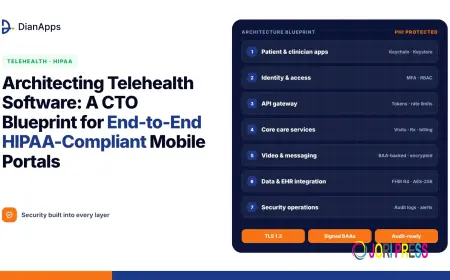































Architecting Telehealth Software: A CTO Blueprint for End-to-End HIPAA-Compliant Mobile Portals
A CTO’s blueprint for building HIPAA-compliant telehealth mobile portals in 2026: architecture layers, security controls, EHR integration, video, AI and launch checklist.

Quick answer: A HIPAA-compliant telehealth mobile portal needs security built into every layer, not added at the end. That means encrypted data on the device, in transit and at rest; strong identity with multi-factor authentication; role-based access and audit logs; cloud, video and messaging vendors that sign Business Associate Agreements (BAAs); standards-based EHR integration through FHIR; and continuous risk analysis, testing and monitoring. Technology alone doesn’t make an app compliant, so CTOs must pair the architecture with policies, training and vendor governance.
Telehealth is no longer a pandemic workaround. It’s a permanent part of how care is delivered, from virtual follow-ups and mental health sessions to remote patient monitoring and chronic care management. For US providers, Medicare’s temporary telehealth flexibilities have been extended through 31 December 2027, giving organisations a clearer runway to invest.
But the risks have grown too. According to the HIPAA Journal’s 2025 Healthcare Data Breach Report, at least 61.5 million people had protected health information exposed or impermissibly disclosed in breaches reported in 2025. A telehealth app that handles video consultations, prescriptions and medical records is a high-value target.
For a CTO, the challenge is building a portal that patients find easy to use, clinicians trust, and regulators and auditors can’t fault. This blueprint walks through the architecture, security controls and decisions that make that possible.
What Makes a Telehealth App HIPAA-Compliant?
A telehealth app is subject to HIPAA when it creates, receives, stores or transmits protected health information (PHI) on behalf of a covered entity (such as a provider, health plan or clearinghouse) or a business associate.
HIPAA compliance rests on three main rules:
|
HIPAA rule |
What it requires from your app |
|
Privacy Rule |
Use and share PHI only as permitted; follow the “minimum necessary” standard; support patient rights such as access to records |
|
Security Rule |
Administrative, physical and technical safeguards for electronic PHI (ePHI): risk analysis, access control, audit controls, integrity and transmission security |
|
Breach Notification Rule |
Notify affected individuals, HHS and sometimes the media after a breach of unsecured PHI, within set timeframes |
Two important points for CTOs:
- There’s no official “HIPAA certification” for software. Compliance comes from how the system is designed, configured, operated and governed.
- Consumer tools are no longer a safe shortcut. HHS’s pandemic-era enforcement discretion for non-compliant telehealth platforms ended in August 2023. Any vendor that touches PHI must sign a BAA.
The rules are getting stricter
In January 2025, HHS proposed the biggest update to the HIPAA Security Rule in more than two decades. It would remove the “addressable” flexibility for many safeguards and require, among other things, encryption of ePHI at rest and in transit, multi-factor authentication, network segmentation, a technology asset inventory, vulnerability scanning every six months and annual penetration testing. The final rule has been delayed and is now expected around July 2027.
The smart move is to design for these requirements now. Retrofitting MFA, encryption and segmentation later is far more expensive.
What Does an End-to-End Telehealth Architecture Look Like?
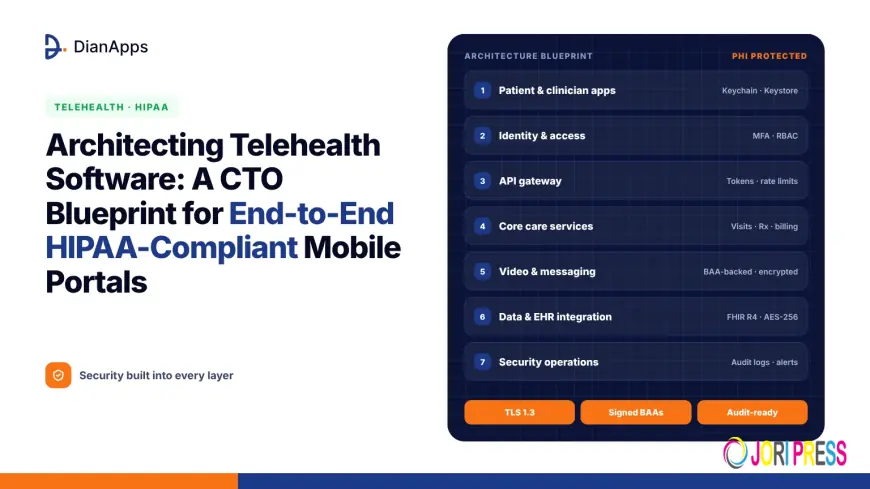
A secure telehealth portal typically has seven layers:
|
Layer |
Key components |
|
1. Mobile apps |
Patient app, clinician app (iOS and Android), secure local storage |
|
2. Identity and access |
Authentication, MFA, roles, session management |
|
3. API gateway |
Rate limiting, request validation, token checks, logging |
|
4. Core services |
Scheduling, consultations, messaging, prescriptions, billing, notifications |
|
5. Real-time communication |
HIPAA-ready video, voice and chat infrastructure |
|
6. Data and integration |
Encrypted databases, file storage, FHIR/HL7 integration with EHRs |
|
7. Security operations |
Audit logs, monitoring, alerting, backups, incident response |
Let’s look at each.
1. How Should You Secure the Mobile App Itself?
The phone is the least controlled part of the system. It can be lost, shared, jailbroken or infected, so the app must assume a hostile environment.
- Store as little PHI on the device as possible. Fetch data when needed and avoid caching sensitive records.
- Use secure platform storage (iOS Keychain and Android Keystore) for tokens and keys, and encrypt any local database.
- Encrypt all traffic with TLS 1.2 or higher (preferably TLS 1.3), and consider certificate pinning for critical endpoints.
- Protect the screen. Hide sensitive content in the app switcher, and consider blocking screenshots on high-risk screens.
- Set session timeouts and require re-authentication after inactivity.
- Support biometric unlock (Face ID, fingerprint) as a convenient second factor.
- Detect risky devices, such as rooted or jailbroken phones, and limit access accordingly.
- Keep PHI out of push notifications. Send “You have a new message” rather than test results or diagnoses.
- Avoid PHI in logs, analytics and crash reports. Configure third-party SDKs carefully, and don’t use analytics tools that won’t sign a BAA for any data containing PHI.
2. How Should Identity and Access Be Designed?
Most breaches involve stolen or misused credentials, so identity is the heart of the architecture.
- Multi-factor authentication for clinicians and admins, and strongly encouraged for patients
- Standards-based identity using OAuth 2.0 and OpenID Connect, ideally through a healthcare-ready identity provider
- Role-based access control (RBAC) for patients, doctors, nurses, front-desk staff, billing and admins
- The minimum necessary rule: each role sees only the data it needs
- Short-lived access tokens with secure refresh and server-side revocation
- Delegated access for parents, guardians and caregivers, with clear consent records
- Break-glass access for emergencies, with extra logging and review
3. How Do You Build HIPAA-Ready Video and Messaging?
Video consultations are the centrepiece of telehealth and one of its biggest risks.
- Use video and messaging providers that sign a BAA, and confirm which of their features are covered.
- Encrypt media streams and signalling. WebRTC encrypts media by default; confirm how recording, transcription and relay servers handle data.
- Use unique, expiring session links and virtual waiting rooms, so only the right people join.
- Control recording. Disable it by default, get consent when it’s needed, and store recordings encrypted with strict access.
- Secure chat with end-to-end or strong transport and at-rest encryption, message retention policies and file scanning.
- Plan for poor networks with adaptive bitrate and audio-only fallback, which also supports rural and older patients.
4. How Should Data Storage and Cloud Hosting Work?
- Choose a cloud provider that signs a BAA. Major providers such as AWS, Google Cloud and Microsoft Azure offer BAAs, but only specific services are covered, so check each one you use.
- Encrypt ePHI at rest (for example, AES-256) using managed key services, with key rotation and restricted key access.
- Segment networks so databases holding PHI aren’t directly reachable from the internet.
- Separate environments. Never use real patient data in development or testing; use synthetic or properly de-identified data.
- Back up regularly, encrypt backups and test restores.
- Plan disaster recovery with clear recovery time and recovery point targets.
- Consider data residency if you serve patients outside the US, where laws like GDPR or India’s DPDP Act also apply.
5. How Do You Integrate With EHRs and Other Systems?
A telehealth portal is only useful if it connects to the wider care ecosystem.
- Use HL7 FHIR APIs (typically FHIR R4) to exchange patient data, appointments, notes and results with EHRs.
- Use SMART on FHIR for secure app launch and authorisation within EHR systems.
- Support e-prescribing, lab orders, pharmacy and insurance eligibility checks through certified partners.
- Respect patient access rights and US information-blocking rules under the 21st Century Cures Act.
- Map and validate data carefully, as integration errors can be clinical safety issues, not just bugs.
6. How Do You Add AI Without Breaking Compliance?
AI is now common in telehealth: symptom checkers, visit note drafting, triage, summarisation and remote monitoring alerts. To use it safely:
- Only send PHI to AI providers that sign a BAA, or use de-identified data.
- Prefer on-device AI for simple tasks to keep data local.
- Keep clinicians in the loop. AI should support decisions, not make them.
- Log AI inputs and outputs for review and quality checks.
- Be transparent with patients about where AI is used.
For more on how AI is changing care delivery, see this guide to AI in healthcare and digital health solutions.
7. How Do You Monitor, Log and Respond to Incidents?
- Audit logs for every access to PHI: who, what, when and from where. Make logs tamper-resistant and keep them for the period your policies require.
- Centralised monitoring and alerting for unusual activity, such as mass record access or logins from new locations.
- Vulnerability scanning and penetration testing on a regular schedule, ideally aligned with the proposed six-month and annual cycles.
- An incident response plan covering detection, containment, investigation and breach notification.
- Regular risk analysis whenever you add features, vendors or integrations.
What Should a CTO’s HIPAA Compliance Checklist Include?
|
Area |
Must-have |
|
Governance |
Security officer, policies, workforce training, annual risk analysis |
|
Vendors |
Signed BAAs with cloud, video, messaging, AI, email and support tools |
|
Identity |
MFA, RBAC, minimum necessary access, session timeouts |
|
Encryption |
TLS 1.2+ in transit, AES-256 at rest, secure key management |
|
Mobile |
Secure storage, no PHI in notifications or logs, device risk checks |
|
Network |
Segmentation, firewalls, private endpoints |
|
Data |
Backups, disaster recovery, de-identified test data |
|
Integration |
FHIR APIs, SMART on FHIR, validated data mapping |
|
Monitoring |
Audit logs, alerts, vulnerability scans, penetration tests |
|
Response |
Incident response and breach notification plan |
Build vs Buy: What’s Right for Your Telehealth Platform?
|
Option |
Best for |
Trade-offs |
|
Off-the-shelf telehealth platform |
Small practices that need to launch fast |
Limited customisation and branding; data control depends on the vendor |
|
Platform plus custom apps |
Growing providers wanting their own branded experience |
Requires integration work and vendor governance |
|
Fully custom build |
Health systems, digital health startups, specialty care |
Higher upfront cost and responsibility, but full control |
Many organisations start with a hybrid approach: proven HIPAA-ready components for video, identity and cloud, combined with custom mobile apps and workflows. For a broader look at features and trends shaping this space, see this guide to telemedicine app development and the future of healthcare.
How Should You Plan the Build?
- Discovery and risk analysis: map users, workflows, data flows and PHI touchpoints.
- Architecture and vendor selection: choose BAA-backed cloud, video, identity and messaging providers.
- UX design: design simple, accessible flows for patients of all ages, and efficient workflows for clinicians.
- MVP build: launch core features such as scheduling, video visits, secure messaging and records.
- Security testing: code reviews, penetration testing and HIPAA-focused assessments.
- Pilot: start with one clinic or service line and gather feedback.
- Scale: add integrations, remote monitoring, AI features and new specialties.
- Operate: continuous monitoring, updates, training and annual risk reviews.
Because the stakes are high, many organisations work with specialists in healthcare software and app development who have experience designing secure, compliant architectures and integrating with EHR systems.
Common Mistakes to Avoid
- Using video, chat or analytics tools that won’t sign a BAA
- Sending PHI in push notifications, emails or crash logs
- Storing sensitive data on devices without encryption
- Giving every staff member access to every record
- Using production patient data in testing
- Treating compliance as a one-time checklist rather than an ongoing process
- Waiting for the final HIPAA Security Rule before adding MFA and encryption
Frequently Asked Questions
What makes a telehealth app HIPAA-compliant?
A HIPAA-compliant telehealth app protects PHI with encryption, access controls, audit logs and secure hosting, uses vendors that sign Business Associate Agreements, and is backed by policies, training and regular risk analysis. Compliance depends on both the technology and how the organisation operates it.
Do telehealth video tools need a Business Associate Agreement?
Yes. Any vendor that creates, receives, stores or transmits PHI on your behalf, including video, messaging, cloud and AI providers, must sign a BAA. HHS’s pandemic-era flexibility for non-compliant tools ended in August 2023.
What is changing in the HIPAA Security Rule?
HHS has proposed making encryption, multi-factor authentication, network segmentation, asset inventories, regular vulnerability scans and annual penetration tests mandatory. The final rule is expected around July 2027, so organisations should start implementing these controls now.
How do telehealth apps integrate with EHR systems?
Most modern integrations use HL7 FHIR APIs, typically FHIR R4, to exchange patient records, appointments and results. SMART on FHIR handles secure authorisation so apps can launch within EHR systems and access only permitted data.
Can a telehealth app use AI and still be HIPAA-compliant?
Yes, if PHI is only shared with AI providers that sign a BAA or is properly de-identified, clinicians review AI outputs, and AI activity is logged. On-device AI can keep some processing local for extra privacy.
Should we build or buy a telehealth platform?
Small practices often buy an existing platform to launch quickly. Health systems and digital health companies usually choose custom or hybrid builds for branding, deeper EHR integration, specialty workflows and more control over data and security.
Conclusion
Building telehealth software is as much a security and governance challenge as a product one. The CTO’s job is to make compliance part of the architecture: encrypted everywhere, identity-first, vendor-governed, standards-based and continuously monitored. With HIPAA requirements tightening and telehealth demand here to stay, the organisations that invest in strong foundations now will be the ones patients and clinicians trust for years to come.
What's Your Reaction?
 Like
0
 Dislike
0
 Love
0
 Funny
0
 Angry
0
 Sad
0
 Wow
0