




































Mobile App Testing for Retail: Protecting the Customer Journey from Browse to Payment
Learn how mobile app testing for retail protects product discovery, inventory, checkout, payment reliability and the complete customer journey.
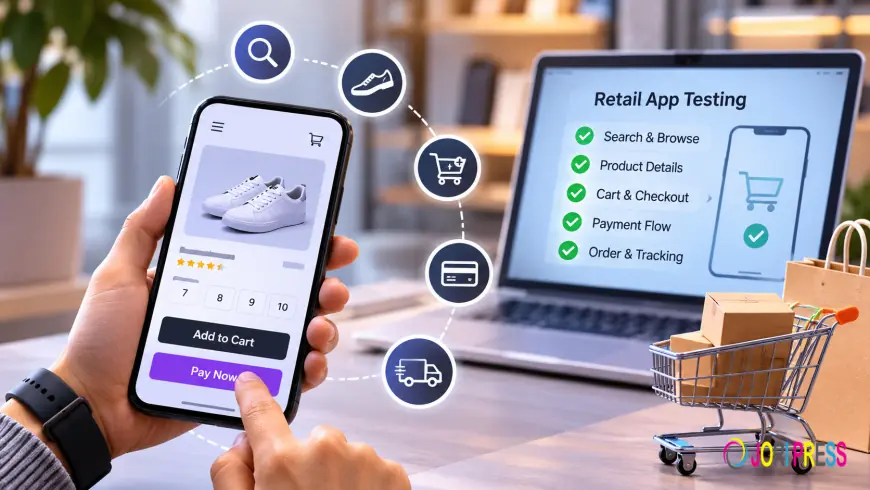
A customer opens a retail app, searches for a product, checks its availability and adds it to the shopping cart. Everything works until the payment screen freezes or the order confirmation fails to appear. Even after spending several minutes selecting products, the customer may abandon the purchase because of one technical issue.
This is a challenge for retailers that depend on mobile applications to generate sales and maintain customer relationships. A shopping app connects product discovery, inventory, pricing, checkout, payment gateways and order management. Every part of this journey must work correctly to provide a consistent shopping experience.
Mobile app testing helps identify technical issues before they affect customers. It also helps businesses evaluate application performance, security, compatibility and usability under different conditions.
What Is Mobile App Testing for Retail?
Mobile app testing for retail is the process of checking whether a shopping application works correctly across its features, devices, operating systems and network environments. It verifies the complete customer journey, from the first product search to payment confirmation and order tracking.
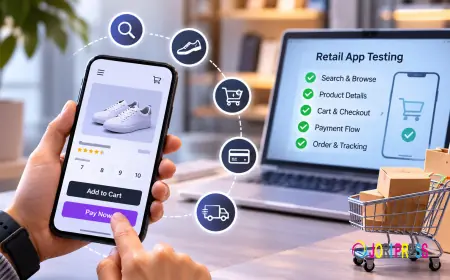
A typical retail app testing process covers:
-
Product search, filters and category navigation.
-
Product descriptions, images, pricing and availability.
-
Shopping cart and promotional code functionality.
-
Checkout, delivery details and tax calculations.
-
Payment gateway integrations and transaction handling.
-
Customer accounts, order history and notifications.
-
Returns, cancellations and refund workflows.
Testing individual features is important, but retailers also need to verify how these features interact. For example, a product may display the correct price on its details page but show a different amount in the shopping cart. End-to-end testing helps identify such inconsistencies.
Why Is Mobile App Testing Important for Retail Businesses?
Customers expect shopping applications to respond quickly and provide accurate information. When an application becomes slow, displays incorrect stock details or fails during payment, customers may switch to another retailer.
Several areas deserve particular attention.
1. Product Discovery and Search
Product discovery is the starting point of most shopping journeys. Search suggestions, filters and category navigation should help customers find relevant products without unnecessary steps.
QA teams should test:
-
Search results for product names, categories and common spelling variations.
-
Autocomplete suggestions and search response times.
-
Multiple filters applied together.
-
Sorting by price, popularity and availability.
-
Product recommendations and related items.
-
Search results when a product is unavailable.
2. Product Information and Inventory Accuracy
Retail applications often connect with inventory management systems that update product availability in real time. Testing should verify that stock levels, product variants, descriptions and prices remain consistent.
Consider a customer adding the last available product to the cart while another customer purchases it. The application should handle the inventory change correctly and communicate any availability issue before completing the order.
3. Shopping Cart and Checkout
The shopping cart connects product selection with the final purchase. Errors in quantities, discounts, delivery charges or taxes can create confusion and reduce checkout completion.
Important test scenarios include:
-
Adding, removing and updating products.
-
Applying and removing promotional codes.
-
Recalculating discounts, taxes and shipping charges.
-
Changing delivery addresses.
-
Preserving cart contents after an app interruption.
-
Handling products that become unavailable during checkout.
Payment Gateway Testing: Protecting the Final Transaction
Payment is one of the most sensitive stages of a retail application. A transaction may involve the mobile app, payment gateway, bank, authentication service and order management system.
Testing should cover successful payments as well as declined, cancelled, delayed and interrupted transactions.
What Should Retail Payment Testing Include?
-
Credit and debit card payments.
-
UPI and supported digital wallets.
-
Payment authentication and verification.
-
Transaction timeouts and network interruptions.
-
Duplicate payment prevention.
-
Correct order confirmation after successful payment.
-
Refund and transaction status updates.
Handling interrupted payments
One important scenario occurs when a customer completes a payment but the app does not receive an immediate response. The application must verify the transaction status before allowing another payment attempt. Otherwise, customers may face duplicate charges or incorrect order records.
Retailers should use payment gateway sandbox environments to test these scenarios before production releases.
Essential Types of Mobile App Testing for Retail
A reliable testing strategy combines several methods. Each method identifies a different category of application risk.
Functional Testing
Functional testing checks whether features work according to their requirements. It covers registration, login, product search, cart management, checkout, payments and order tracking.
Performance and Load Testing
Retail apps can experience sudden traffic increases during festive seasons, promotional campaigns and product launches. Load testing helps identify response-time problems, server limitations and failures under concurrent user activity.
Key performance indicators include:
-
Screen and API response times.
-
Application crash frequency.
-
Server response under concurrent requests.
-
Memory and battery usage.
-
Recovery after traffic spikes.
Compatibility Testing
Customers use different smartphones, screen sizes, operating systems and device configurations. Compatibility testing verifies that application features and layouts behave consistently across supported Android and iOS devices.
Security Testing
Retail applications handle customer accounts, personal information and transaction-related data. Security testing should evaluate authentication, authorization, session management, secure data storage and communication.
Usability and Accessibility Testing
An application can function correctly and still be difficult to use. Usability testing evaluates navigation, button placement, readable content, error messages and checkout simplicity. Accessibility testing checks support for screen readers, larger text and other assistive features.
How to Test the Complete Retail Customer Journey
A journey-based testing approach helps QA teams identify problems that individual feature checks may miss.
Step 1: Test Product Discovery
Simulate a customer searching for products. Verify search accuracy, filters, category navigation, product images and stock information.
Step 2: Test Product Selection
Check product variants such as sizes and colours. Confirm that selected options, prices and availability carry forward into the shopping cart.
Step 3: Validate Cart Calculations
Add multiple products, change quantities, remove items and apply promotional codes. Verify that discounts, taxes and delivery charges are calculated correctly.
Step 4: Test Checkout and Payment
Run successful, declined, cancelled and interrupted payment scenarios. Confirm that transaction status, order status and customer notifications remain consistent.
Step 5: Verify Post-Purchase Activities
Check order history, shipment updates, cancellation requests, return workflows and refund status. The customer journey continues after payment, so these features also require testing.
Retail App Testing Across Different Markets
Retail applications may serve customers across different countries, where payment preferences, delivery processes, languages and device usage patterns vary.
For example, businesses evaluating Mobile App Testing for Retail in Kuwait should consider the payment methods, customer expectations, supported devices and delivery workflows relevant to their target audience. The testing process should reflect actual market conditions rather than relying only on standard test environments.
Similarly, businesses exploring Mobile App Development Services in India need to consider device diversity, network conditions, regional language support and payment integrations when planning application quality assurance.
Retail platforms may also connect with AI-powered product recommendations, customer support and personalised shopping features. An AI App Development Company in Saudi Arabia working on retail solutions should consider how these features interact with search, product discovery and customer data. In projects involving Custom AI Application Development in Dubai, testing should also examine recommendation accuracy, response consistency, data handling and integration with existing retail systems.
These considerations help businesses evaluate applications in the context of their intended customers and operating markets.
How Does Mobile App Testing Improve Retail ROI?
Mobile app testing supports business performance by reducing preventable defects and protecting transactions that might otherwise fail.
Retail businesses can evaluate its impact through:
-
Checkout completion rate.
-
Payment success rate.
-
Cart abandonment rate.
-
Application crash rate.
-
Average screen response time.
-
Production defect rate.
-
Customer support requests related to app issues.
For example, if checkout abandonment increases during a promotional campaign, testing and application monitoring can help determine whether the cause is slow loading, incorrect pricing, payment integration errors or confusing checkout steps.
The financial benefit should be evaluated against testing costs and actual improvements in transaction performance, maintenance effort and customer experience. Testing does not automatically increase revenue, but it helps reduce technical issues that can prevent customers from completing purchases.
Direct Questions Retail Businesses Ask About Mobile App Testing
What is the most important test for a retail shopping app?
End-to-end checkout and payment testing is essential because it verifies the connection between product selection, cart calculations, transaction processing and order confirmation. Search, inventory and post-purchase functions also require attention.
How often should a retail mobile app be tested?
Retail applications should be tested before significant releases, after major integrations or configuration changes, and through regular regression testing. Critical checkout and payment journeys should receive particular attention.
Can automated testing prevent retail app failures?
Automated testing can identify recurring defects and verify important workflows across supported devices and configurations. However, manual exploratory testing and production monitoring are also necessary to identify unexpected user experience and integration issues.
How can retailers reduce mobile app cart abandonment?
Retailers can address avoidable cart abandonment by testing checkout speed, payment reliability, pricing transparency, discount handling, form usability and error recovery. Analytics can help identify the exact stage where customers leave the purchase journey.
Does mobile app testing improve customer experience?
Yes. Testing helps identify navigation problems, slow screens, incorrect product information and transaction failures. Resolving these issues makes it easier for customers to browse, select and purchase products.
Building a Reliable Retail Shopping Experience
A retail application depends on several connected features working together. Customers expect accurate product information, reliable inventory, responsive navigation and secure payments throughout their shopping journey.
A structured mobile app testing strategy helps development teams identify defects early, validate integrations and improve application reliability. By combining functional, performance, compatibility, security and usability testing, retailers can protect important customer interactions.
The goal is to make every stage of shopping work as expected, from the first product search to the final payment confirmation. A consistent testing process gives retail businesses a stronger foundation for customer confidence and sustainable digital commerce.
What's Your Reaction?
 Like
0
 Dislike
0
 Love
0
 Funny
0
 Angry
0
 Sad
0
 Wow
0