







































Understanding Deposit and Withdrawal Processes on Lotus365
Managing deposits and withdrawals is an important part of understanding any online account that provides wallet-based payment functionality.
Managing deposits and withdrawals is an important part of understanding any online account that provides wallet-based payment functionality. On Lotus365, users may encounter different payment methods, verification requirements, transaction statuses, and account records depending on the current payment system available to them. Understanding how these processes work can make it easier to identify a successful transaction, recognize a pending payment, and know what information to keep for future reference.
Users accessing Lotus365 through a browser or a Lotus365 Apk should pay attention to the payment information displayed inside their current account. Payment methods, limits, verification requirements, and interface options can change, so older screenshots or instructions received from unofficial sources should not automatically be treated as current. Published Lotus365 payment guidance similarly recommends checking the live payment section for the latest available methods and requirements.
What Are Deposits and Withdrawals?
A deposit generally refers to adding funds to an account through an available payment method. A withdrawal is a request to transfer eligible funds from the account to a supported payment destination.
Although the two processes appear similar, they are not identical. Deposits usually begin with selecting a payment method and completing an external payment, while withdrawals can involve additional account, identity, or payment-method verification before the request is processed.
For both types of transactions, the account's transaction history is important. It can provide information about the amount, date, payment method, reference number, and current status.
Getting Started Through Lotus365 Login
Before accessing payment functionality, users generally need to complete their account sign-in. Whether the account is accessed through a browser or supported Lotus365 Apk, the first priority should be confirming that the correct account and legitimate access route are being used.
After login, users can look for sections such as Wallet, Cashier, Payments, Deposit, or Withdrawal. The exact naming can differ according to the current interface.
Users should avoid entering their login credentials into pages received through unknown messages or unofficial contacts. Account access and payment activity should be handled through trusted channels.
Understanding the Lotus365 Deposit Process
A deposit begins when a user decides to add funds through one of the payment methods currently displayed in the account.
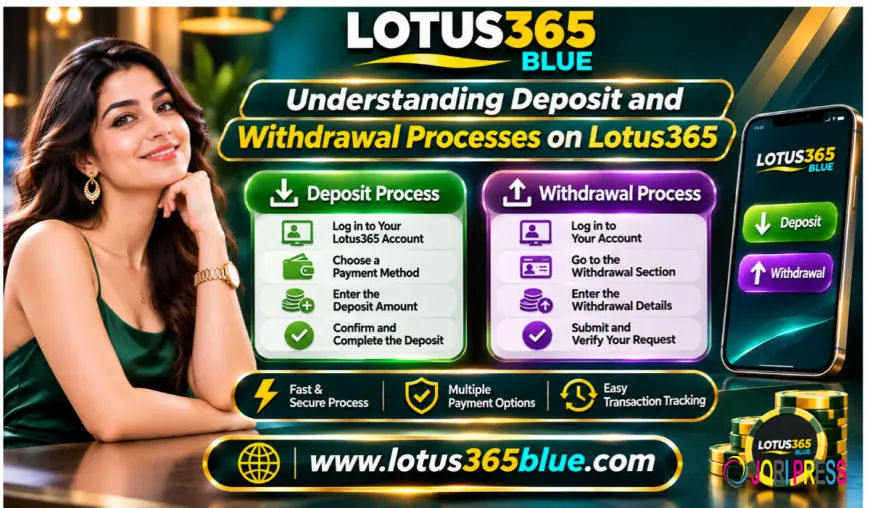
The general process can be understood as a sequence of account selection, payment-method selection, amount confirmation, external payment authorization, and transaction verification.
1. Open the Payment or Wallet Section
After signing in, locate the Wallet, Cashier, Deposit, or Payments area.
The section may display the payment methods currently available for the account. Do not assume that every method mentioned on another website will necessarily be available in your account.
2. Review Available Payment Methods
Depending on current availability, users may see options such as UPI, bank-based payments, digital payment services, or other supported methods.
The available methods can change based on payment-provider availability, account status, verification requirements, and other conditions.
Before selecting a method, check the displayed instructions carefully.
3. Enter the Deposit Amount
Enter the amount you intend to deposit according to the requirements shown in the account.
Before confirming, review the amount carefully. A simple review can help prevent mistakes caused by entering an incorrect figure.
4. Complete the Payment
Follow the payment instructions provided through the account's payment flow.
If the transaction opens a UPI or banking application, verify the recipient and amount before approving the payment. Never approve an unexpected payment request simply because someone claims it is connected to your account.
NPCI states that UPI transactions require the user to authorize the payment, and users should protect their UPI PIN.
5. Check the Result
After completing the payment, return to the Lotus365 account and check the transaction history or wallet status.
Do not assume that a successful payment screen from the external payment application automatically means the account balance has already been updated. Check both sides of the transaction.
Understanding Deposit Status
A deposit can appear under different statuses depending on the payment system.
Successful or completed generally indicates that the payment has been processed and credited according to the transaction record.
Pending means the transaction has not yet reached a final confirmed state.
Failed means the attempted transaction was not completed successfully.
Processing may indicate that the payment is still moving through the required payment or verification stages.
UPI documentation distinguishes successful, pending, and failed transactions and explains that a pending payment can occur when confirmation has not yet been received.
If money has already been deducted from a bank or UPI account while the Lotus365 transaction remains pending, users should avoid immediately submitting the same payment again. Instead, they should check the external transaction record and retain the reference number.
What to Do When a Deposit Is Pending
A pending deposit does not necessarily mean that the payment has permanently failed.
Start by checking the payment application or bank account used for the transaction. Look for the corresponding amount, date, time, and transaction reference.
Then compare those details with the Lotus365 transaction history.
If the external payment is also pending, allow the payment system to update the status according to its normal process. If the external payment shows a successful debit but the Lotus365 balance has not been updated, retain the transaction reference and use the appropriate official support process.
NPCI guidance notes that transaction history can be used to check transaction status and that UPI Help can be used for eligible transaction-related complaints.
Understanding the Lotus365 Withdrawal Process
A withdrawal works in the opposite direction. Instead of adding funds, the user submits a request to transfer eligible available funds through a supported payment method.
The withdrawal process can involve additional checks because the system may need to confirm account ownership, payment-method details, identity information, or other requirements.
1. Open the Withdrawal Section
After completing the account login, open the Wallet, Cashier, or Withdrawal section.
Review the information shown on the page before submitting a request.
2. Check Your Available Balance
Review the balance displayed in the account and make sure the requested amount meets the current withdrawal conditions.
Do not rely on fixed limits found in old articles because limits can change by payment method and account configuration.
3. Select an Available Withdrawal Method
Choose a withdrawal method currently displayed in the account.
A payment method available for deposits may not necessarily be available for withdrawals. Published payment guidance specifically notes that deposit and withdrawal options can differ.
4. Enter the Required Information
Enter the requested withdrawal amount and any payment information required by the current account interface.
Review the information carefully before submitting the request.
5. Complete Verification if Required
Some withdrawal requests may require additional verification. This can include account ownership, payment-method ownership, identity checks, or other security procedures.
Only provide requested documents through the legitimate account or verified support process.
6. Submit and Track the Request
After confirming the request, check whether the account generates a transaction record or confirmation.
The withdrawal should not be considered completed simply because the request has been submitted. The transaction status should be checked until the payment reaches its final state.
Why Withdrawal Verification Can Be Required
Verification is an important distinction between deposits and withdrawals.
A platform may need to confirm that the payment method belongs to the account holder and that the transaction is consistent with account information.
Some published Lotus365-related policies state that payment methods may need to be registered in the user's name and that third-party payment accounts can create verification or withdrawal complications.
For this reason, users should avoid attempting to move funds through another person's payment account unless the current account terms explicitly permit it.
Common Withdrawal Statuses
A withdrawal can move through several stages.
A submitted status can indicate that the request has been created.
A pending status means the request has not yet reached its final outcome.
A processing status can indicate that the payment is being handled by the relevant payment system.
A completed status generally means the account has recorded the withdrawal as completed.
A rejected or failed status means the request was not completed and may include a reason that needs to be reviewed.
The exact labels can vary, so users should focus on the explanation displayed beside the transaction.
Why a Withdrawal May Remain Pending
Several factors can contribute to a pending withdrawal.
These may include account verification, payment-method checks, banking delays, incorrect payment details, payment-provider processing, security reviews, or technical issues.
If a withdrawal remains pending, users should first open the transaction record and read any message displayed by the account.
Avoid submitting multiple withdrawal requests for the same intended transaction simply because the original request has not yet completed.
Published Lotus365 support guidance also recommends checking the existing transaction status and verification requirements before submitting another request.
Deposit vs Withdrawal: Key Differences
|
Feature |
Deposit |
Withdrawal |
|
Main purpose |
Add funds to the account |
Transfer eligible funds out |
|
Starting point |
Deposit/Wallet section |
Withdrawal/Wallet section |
|
Payment direction |
External payment → account |
Account → supported payment destination |
|
Verification |
May be required |
May involve additional checks |
|
Status tracking |
Transaction history |
Transaction history |
|
Important record |
Payment reference |
Withdrawal reference |
|
Main precaution |
Avoid duplicate payments |
Avoid duplicate requests |
Understanding this distinction can prevent confusion when reviewing account records.
Using a Lotus365 Apk for Payments
Some users may prefer accessing their account through a Lotus365 Apk or mobile-oriented interface. A mobile interface can make wallet and transaction sections easier to access, but the same payment-safety principles apply.
Before using an APK, users should verify its source and authenticity. Avoid installing APK files received through unknown messaging accounts, unofficial file-sharing pages, or suspicious advertisements.
An application should not be treated as trustworthy simply because it uses the Lotus365 name or logo.
When making a payment from a mobile device, carefully review the amount and recipient information before authorizing the transaction.
UPI Deposits and Payment Safety
UPI can be convenient when it is available as a payment method, but users should understand that UPI authorization is separate from simply opening a banking or payment application.
Before approving a UPI payment, verify the recipient, amount, and transaction details.
Never share a UPI PIN with another person. NPCI specifically advises users not to disclose their UPI PIN and provides transaction-history tools for reviewing payment activity.
Users should also be cautious with unexpected collect requests. Only approve a payment request when the details are understood and expected.
What If Money Is Deducted but the Deposit Is Missing?
This situation requires careful comparison rather than immediately making another payment.
First, open the bank or UPI application's transaction history.
Next, confirm whether the payment shows as successful, pending, or failed.
Then open the corresponding Lotus365 transaction record and compare the amount, date, and reference.
If the external payment was successfully debited but the account has not reflected the deposit, retain the transaction reference and contact the appropriate support channel.
Published Lotus365 support guidance recommends keeping information such as transaction amount, date and time, payment method, status, reference or UTR number, wallet balance, and any pending verification details available when contacting support.
What If a Withdrawal Is Rejected?
If a withdrawal is rejected, do not immediately submit another request.
First, open the transaction record and check the reason provided. The issue could relate to payment details, verification, account information, payment-method ownership, or another requirement.
Correct the relevant issue through the legitimate account process and only submit a new request when appropriate.
If you are unsure why the request was rejected, use the official support channel rather than relying on instructions from an unknown individual.
Protecting Your Account During Payment Activity
Payment security is as important as understanding the process itself.
Never share your:
-
Lotus365 password
-
OTP
-
UPI PIN
-
Banking password
-
Card PIN
-
Full payment security information
with another person claiming to be support.
Lotus365-related support guidance specifically warns against sharing passwords, OTPs, UPI PINs, and other confidential credentials.
Be especially cautious if someone asks you to make an additional private payment to “unlock” a withdrawal or promises guaranteed approval after receiving a fee. Such instructions should be verified through the legitimate support process.
Keeping Good Transaction Records
Maintaining basic transaction information can make future troubleshooting much easier.
For every significant payment, keep the transaction reference, amount, date, time, payment method, and final status.
If you save screenshots, remove sensitive information such as OTPs, PINs, passwords, and complete card details. Keep only the information needed to identify the transaction.
This approach provides useful evidence without unnecessarily exposing confidential information.
Responsible Payment Management
Understanding deposits and withdrawals should not be viewed only as a technical process. Users should also keep track of how much money is being moved through an account.
Set a personal spending limit before using any online gaming or entertainment platform, and avoid using money needed for essential expenses. Do not borrow money or increase deposits to recover previous losses.
If account activity starts becoming difficult to control, taking a break and using available account-management tools can be a safer approach.
Final Thoughts
The deposit and withdrawal processes on Lotus365 involve more than simply selecting an amount and pressing a confirmation button. Users should understand the payment method, transaction status, verification requirements, account records, and security precautions associated with each transaction.
A typical deposit involves opening the wallet or payment section, selecting an available method, confirming the amount, completing the external payment, and checking the resulting transaction status. A withdrawal generally involves checking the available balance, selecting an eligible payout method, entering the required information, completing verification where necessary, submitting the request, and monitoring its status.
Whether accessing the platform through a browser or a Lotus365 Apk, the safest approach is to rely on the current information displayed within the account, verify payment details before authorization, keep transaction references, and avoid duplicate payments when an earlier transaction is still pending.
Most importantly, never share sensitive credentials such as passwords, OTPs, or UPI PINs with people claiming to provide payment assistance. For unresolved payment issues, use the appropriate verified support process and provide only the transaction information necessary to identify the problem.
What's Your Reaction?
 Like
0
 Dislike
0
 Love
0
 Funny
0
 Angry
0
 Sad
0
 Wow
0