











































Website Migration SEO: How KWT Spider and Screaming Frog Help Protect Search Visibility
Master your next website migration with our comprehensive technical SEO checklist. Compare KWT Spider and Screaming Frog to audit staging sites, map redirects, and protect rankings.

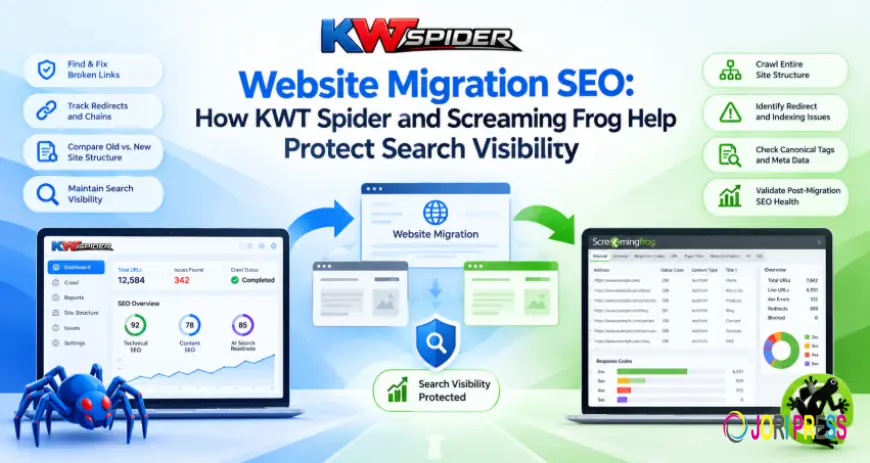
Whether you are changing your domain name, URL structure, content management system, hosting provider, or design, website migrations touch many moving parts. While these changes can improve performance and usability, if key details are overlooked, it can lead to technical SEO issues. Broken links, missing pages, wrong redirects, and indexing issues can affect how search engines crawl and index the website after launch.
A structured technical SEO audit helps teams identify possible problems before a migration and check the website after it goes live. KWT Spider provides a desktop-based crawling workflow to support this process, with an added focus on AI search readiness. Another established option for gathering technical website data and investigating SEO issues is Screaming Frog.
Companies need to view migration not as a one off launch job but as a process that includes preparation, testing, implementation and post-launch validation. Conducting thorough reviews at key milestones helps clarify what has changed and what still requires attention.
The Importance of Technical SEO During Website Migration
A website migration involves much more than simply updating the visual design. Changes to URLs, page templates, navigation, internal links or server configuration can alter how search engines access existing content.
For example, a product page that had one URL might now be moved to a different URL on the new platform. If the old URL is not properly redirected, it will result in an error to the users and the search engines. Similarly a page that was previously indexable, may get a noindex directive accidentally whilst in development.
These issues can be hard to detect when browsing manually, especially on sites with hundreds or thousands of pages. Crawlers allow teams to crawl multiple URLs systematically and discover technical changes that are worth investigating.
KWT Spider can be integrated into this workflow to allow SEO professionals to review crawl data before and after migration and use the findings to guide their checks.
1. Set Up a Baseline Crawl Before Migrating
Before you make any changes, document the current technical condition of a web site. This baseline serves as a benchmark for evaluating the new site post-launch.
Use KWT Spider to crawl your current website and review the data available for your migration. This can include URLs, response codes, page titles, meta descriptions, internal links and other technical details depending on the audit needs and available reports.
Pay special attention to key landing pages, product or service pages, category pages and any content that is driving in organic traffic. Teams can record these URLs to help identify pages that need to be accessible after migration.
A useful pre-migration checklist is:
- List of important existing URLs and their current status codes
- Audit title, meta description and heading structures.
- Detecting existing broken internal links and redirect chains.
- Reviewing canonical tags and indexability signals on key pages.
- Tracing how internal links connect and outlining your main navigation routes.
- Naming current problems that are not to be confused with migration-related problems.
Screaming Frog is also handy for creating a baseline crawl. The key is to keep the results and document the settings so the pre and post migration checks are as comparable as possible.
2. Create a URL Mapping and Redirect Plan
A big part of a migration is ensuring that your old URLs point to the right places on the new site. If URLs change, set up a mapping from the old address to its intended destination.
For example, an old service page might be changed from /services/old-name/ to /services/new-name/. The migration plan should specify the appropriate destination and ensure that the old address is properly redirected if a permanent move is intended.
Try not to route every dead URL back to the homepage by default. Redirects should point to relevant replacement content whenever possible. If a page has no suitable replacement, choose the appropriate answer depending on what the page was for.
A crawler can be handy to see how redirects are handled and to find URLs that return unexpected status codes. Once the redirect scheme is in place, crawl the URLs in question and verify the output is as expected.
The KWT Spider can be included in this review as part of a wider technical validation process. Screaming Frog is another tool to check URLs and redirects. The best workflow is one that enables the team to catch wrong destinations, unnecessary redirect hops, and broken URLs before they affect a large part of the website.
3. Test the staging site before launch
Testing a new site in a staging environment before it goes live is standard practice, giving you a chance to catch technical glitches before launch day. If access and configuration permit, crawl the staging website and review the elements that are expected to stay consistent or change during the migration. Make sure key pages load properly, internal links lead to the correct destinations and page metadata has been either transferred or updated correctly. Check canonical tags, robots directives and other indexing signals to ensure the staging configuration will not be carried into production incorrectly. Staging environments often intentionally block search engines so don't remove those protections too early. Instead, identify which restrictions are temporary and prepare a clear checklist for the production launch.
You can use KWT Spider to streamline your technical review by crawling and inspecting your staging site beforehand. The exact checks available will be dependent on the configuration and capabilities of the installed version. It’s super helpful to do a crawl before launch when a redesign involves new templates, navigation elements, or URL patterns that might impact many pages at once.
4. Check the Website Immediately After Launch
Once the migrated website goes live, repeat the appropriate crawl checks. The objective is to verify that the live website functions correctly, rather than treating successful deployment as the end of the migration process. First, make sure that the important URLs are responding to you as expected. Audit redirects, broken internal links, page titles, metadata, canonical signals, and indexing directives.
Compare against the baseline crawl to find significant differences in the results. There will be some deliberate changes. Still, others may argue that a page was missed, a redirect was set up wrong or a technical setting was not moved over as it should have been. Focus on issues impacting key pages and important URL sets. For example, a page title missing on a single low-priority URL may be less urgent than a site-wide noindex directive that prevents important pages from being indexed.
KWT Spider can be involved in this post-launch audit workflow, helping teams review crawl data and investigate issues. Screaming Frog can also be used for similar technical checks depending on the reporting and configuration required.
5. Compare crawl results before and after migration
This makes the migration audit more useful, and teams should compare the old vs. new website instead of relying on a post-launch crawl. Review the URL inventories and technical signals collected before and after the move. Look for unexpected decreases in accessible pages, changes in status codes, missing metadata, differences in internal linking and changes to canonical or indexing settings.
For example, if you had a group of important category pages before the migration that are not found in the new crawl, check if those pages were removed, renamed, disconnected from navigation, or excluded by the new site configuration.
Likewise, if many URLs start returning errors post-launch, check whether the issue is due to missing redirects, changed routing rules, or issues with the new server.
KWT Spider’s desktop workflow can assist in these investigations by providing crawl data for review. Where possible, try to keep the crawl scope and settings the same so that meaningful comparisons can be made, and note any differences that were planned. In addition to analytics, you should also look at crawler data, search performance information, server logs and search engine tools. A crawl alone can’t account for every organic traffic or indexing change.
6. Check Internal Links, Canonicals and Indexability
Website migrations can include changes to navigation, page templates, and URL structures. Even if the pages seem to be loading fine, these changes can still cause technical issues. Internal links should link directly to the target URLs, not through old redirects unnecessarily. Canonical tags should point to the correct preferred version of pages and indexing instructions should align with the desired search visibility of the site. Be sure to check important pages that have moved to new URLs. Make sure that internal links, canonical tags and redirect rules are consistent and not confusing search engines.
KWT Spider can be used in this investigation when the required checks are available. Before any changes are made, the results should be checked against the live page, the source code and any other relevant technical evidence. This is also a good time to ensure that key content is still linked to the rest of the website. If a page’s internal links were stripped out in a redesign, it might still exist but be hard to find.
7. Include AI Search Readiness in Migration Review
When a website is migrated, it can change the layout of content, the structured data, the internal links and the presentation of important information. These changes are worth noting next to the typical technical SEO checks. KWT Spider is not just a technical website analysis tool . It is a tool focused on AI search readiness. This provides another area for teams to consider in the migration review as they consider how their sites communicate information to different search experiences. Make sure important content is still accessible, page structures are clear, and any structured data that is relevant has been retained or implemented correctly. After migration, product details, service information, and other key content should be correct and consistent. These should be part of wider content quality and performance reviews. While neither a crawler nor an AI-readiness score can guaranty rankings or inclusion of content in AI-generated answers, technical validation can help identify problems that need attention.
A Hands-On Website Migration SEO Checklist
Before You Start:
- Crawl the current website and save a baseline report
- Log important URLs and match old addresses with new destinations.
- Review the existing redirects, internal links, metadata and canonical signals.
- Crawl staging site when access is allowed.
- Ensure temporary staging restrictions are documented for launch.
After launch:
- Crawl the live website for unexpected status codes.
- Verify redirects and check for redirect chains or loops.
- Compare key URLs and page-level signals to the baseline.
- Review internal linking, canonical tags and indexability.
- Ensure important content and structured data are still present.
- Monitor analytics and search performance for changes
- Re-crawl after fixes to verify that the identified issues have been resolved.
Conclusion
Website migrations need to be carefully planned from a technical perspective, both before launch and validated after. A structured crawling workflow helps teams see what existing URLs are, review the new website, spot unexpected changes, and decide what to fix first.
KWT Spider is worth considering in this process, especially for teams looking for desktop-based technical SEO analysis with an AI search readiness focus. Its cross-platform availability and database crawl mode will also come in handy when planning audits across different environments and bigger URL inventories.
Screaming Frog is another well-established option for technical crawling and migration checks. Instead of assuming that either tool is the best for every project, think about the reports, settings, and workflows in relation to the needs of your own website.
The most reliable migration process is a combination of crawl data, URL mapping, manual validation, monitoring and follow-up testing. Looking at migration as an ongoing SEO quality process allows teams to catch technical issues earlier and makes the transition more manageable.
For current product details, visit the official KWT Spider website: kwtspider.com
Frequently Asked Questions
1. Why is a technical SEO crawl important before a website migration?
A pre-migration crawl records the existing website's URLs and technical signals. This creates a baseline that helps teams identify important pages and compare the old website with the new one.
2. How can KWT Spider help with website migrations?
KWT Spider can support website crawling and technical analysis before and after migration. Teams can use the available crawl data to investigate URLs, identify potential issues, and validate changes.
3. What should be checked immediately after migration?
Check important URLs, redirects, response codes, internal links, metadata, canonical tags, and indexing directives. Also verify that critical content and structured data remain available.
4. Should every old URL redirect to the homepage?
No. When a page has moved, redirect it to the most relevant replacement where appropriate. Redirecting unrelated pages to the homepage can create a poor user experience and may not preserve the intended signals.
5. How long should migration monitoring continue?
Monitoring should continue beyond launch. The duration depends on the site's size, migration complexity, and observed changes. Continue reviewing crawl results, analytics, and search performance until the new site is stable.
6. Can a crawler guarantee that a migration will preserve rankings?
No. Crawlers help identify technical issues, but rankings depend on many factors, including content, competition, indexing, and search engine processing. A careful audit reduces avoidable technical risks but cannot guarantee a particular outcome.
What's Your Reaction?
 Like
0
Like
0
 Dislike
0
Dislike
0
 Love
0
Love
0
 Funny
0
Funny
0
 Angry
0
Angry
0
 Sad
0
Sad
0
 Wow
0
Wow
0
\