






































How Business Automation Can Reduce Manual Work and Improve Operational Efficiency
Discover how business automation reduces manual work, streamlines workflows, improves productivity, and helps businesses operate more efficiently.

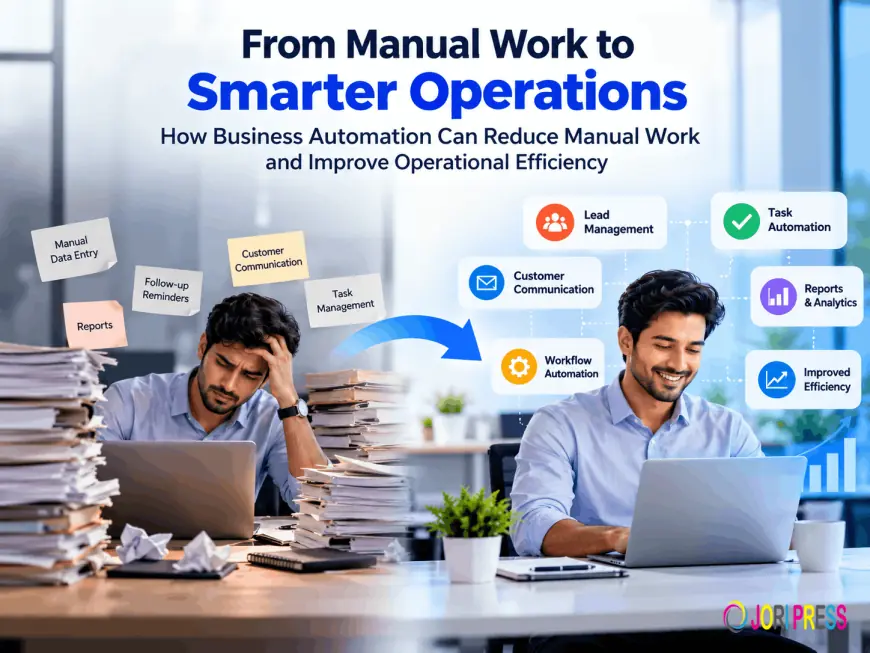
In many businesses, employees spend a surprising amount of time on tasks that do not directly create value. They copy information between spreadsheets, send routine reminders, update multiple systems, prepare recurring reports, and follow up on work that could have been tracked automatically.
These tasks may appear small individually, but together they can slow operations and distract employees from customer service, problem-solving, and strategic work. As businesses grow, manual processes also become harder to control. More customers, transactions, and employees can mean more delays, duplicate records, and avoidable errors.
Business automation offers a practical way to address these challenges. By using software to perform repetitive, rule-based activities, companies can reduce manual work, improve coordination, and make better use of employee time. The goal is not to remove human involvement from business operations. It is to allow people to focus on decisions and responsibilities that require experience, judgment, and communication.
What Is Business Automation?
Business automation is the use of software and technology to complete recurring business tasks with limited manual involvement. A system follows defined instructions, triggers an action when a specific event occurs, and records the result for future tracking.
For example, when a customer submits a form on a company website, an automated workflow may create a lead record, send an acknowledgement email, assign the lead to a sales employee, and schedule a follow-up task. Without automation, each step might depend on someone noticing the form submission and entering the information manually.
Business process automation can be used for simple tasks or connected workflows involving several departments. Common examples include:
-
Sending invoices and payment reminders.
-
Assigning tasks to employees.
-
Updating customer records.
-
Approving expenses or leave requests.
-
Generating recurring reports.
-
Notifying teams about deadlines.
-
Moving information between connected applications.
-
Sending marketing messages based on customer actions.
Automation software may be built into a CRM, accounting platform, project management application, ERP system, or dedicated workflow tool.
Common Areas for Business Automation
Lead Management and Follow-Ups
Sales teams often lose time reviewing enquiries, assigning leads, and remembering follow-up dates. CRM automation can organize these activities.
When a prospect submits an enquiry, the CRM can capture the contact details, record the source of the lead, assign it to a representative, and create a follow-up task. If the prospect does not respond, the system can send a reminder or notify the responsible employee.
This does not replace the personal side of selling. It helps ensure that employees have the information and reminders needed to communicate consistently.
Customer Communication
Businesses can automate routine messages while keeping important conversations personal. Automated communication may include order confirmations, appointment reminders, service updates, welcome emails, and feedback requests.
A clinic, for instance, can automatically send appointment confirmations and reminders. Staff can then spend more time assisting patients instead of making every reminder call manually.
Automated messages should be reviewed carefully. The timing, wording, and customer data must be accurate, and customers should have appropriate choices about communication preferences.
Task and Workflow Management
Workflow automation can help businesses route work from one stage to the next. A new project request might create a project record, assign tasks to team members, set deadlines, and notify a manager when approval is required.
A construction company could use an automated workflow to move a project through quotation, approval, scheduling, procurement, and completion. Each department can see its responsibility, while managers can identify work that is delayed.
The value comes from making handoffs visible. Employees no longer need to rely entirely on informal conversations or personal reminders.
Data Entry and Information Management
Repeated data entry is one of the clearest opportunities for process automation. If a customer’s details are entered into a CRM, the same information may be passed to billing, support, or fulfilment systems through integration.
This reduces the need to copy names, addresses, order details, or reference numbers into multiple applications. It can also reduce inconsistencies, provided that the original data is accurate.
Businesses should define which system is the primary source for each type of information. Otherwise, automation may spread incorrect or outdated data across connected platforms.
Reports and Analytics
Many teams spend hours collecting information for weekly or monthly reports. Automation can gather data from approved sources, update dashboards, and send reports to managers on a schedule.
A sales manager might receive a report showing new leads, conversion stages, follow-up status, and revenue activity. An operations manager may monitor open tasks, delivery delays, and service requests.
Automated reporting improves access to information, but it does not guarantee useful analysis. Reports should be designed around clear business questions and reviewed regularly to ensure that the underlying data remains reliable.
Employee Processes
Human resource and administrative activities can also benefit from automation. Businesses may automate leave requests, onboarding checklists, document collection, approval workflows, training reminders, and equipment requests.
For example, when a new employee joins, an automated process can notify HR, IT, and the manager. IT can prepare access and devices, HR can provide required documents, and the manager can receive an onboarding checklist.
This creates greater consistency while preserving human involvement where guidance or judgment is needed.
Marketing Activities
Marketing automation can help businesses organize campaigns, segment audiences, and respond to customer behaviour. A customer who downloads a product guide may receive a relevant follow-up message, while an existing customer may receive information about renewal or support.
Automation should support a useful customer experience rather than create a stream of irrelevant messages. Businesses should maintain accurate contact data, define communication rules, and provide clear options for unsubscribing.
How Automation Reduces Manual Work
Reducing Repetitive Tasks
The most immediate benefit of business automation is reducing routine work. When a system can send a reminder, update a record, or create a task automatically, employees no longer need to perform that action each time.
A small distribution company may save employees from manually checking order status and sending the same update to customers. The system can send notifications when an order reaches a defined stage, while staff handle exceptions.
Minimizing Manual Data Entry
Entering the same information into several systems consumes time and increases the likelihood of mistakes. Integrated tools can transfer approved information from one application to another.
For example, a completed sale in a CRM may trigger an update to billing and fulfilment systems. This makes the process faster and gives departments access to the same transaction details.
Standardizing Workflows
Automation makes business processes more consistent by applying defined steps and rules. Every new enquiry can follow the same initial process, regardless of which employee receives it.
Standardization is useful for quality control, compliance, training, and management review. It also makes it easier to identify where a process is failing.
Reducing Avoidable Errors
Automated workflows can reduce mistakes caused by forgetting a step, using an outdated template, or entering information in the wrong field. However, automation does not eliminate errors. Incorrect rules or poor-quality data can produce incorrect results at scale.
For this reason, businesses should include validation, approval points, and exception handling where necessary.
Focusing on Higher-Value Activities
When employees spend less time on routine administration, they can focus on customer relationships, analysis, product improvement, problem-solving, and strategic planning.
A manager who previously prepared a recurring report manually may use that time to discuss performance with the team and address the causes behind the numbers.
How Automation Improves Operational Efficiency
Automation improves operational efficiency by helping work move faster and more visibly through the organization. Employees can see what has been completed, what is waiting, and who is responsible for the next step.
It can improve coordination between sales, finance, operations, and customer service. For example, a confirmed order can notify fulfilment, update inventory, generate billing information, and create a customer communication task without separate emails between departments.
Automated workflows also make tracking easier. Managers can review pending approvals, overdue tasks, processing times, and exceptions from a dashboard. This creates a clearer view of business operations and helps leaders respond to bottlenecks earlier.
The greatest improvements often come from combining automation with process simplification. Automating an unnecessarily complicated workflow may not create meaningful efficiency. Businesses should remove unnecessary steps before digitizing them.
The Role of CRM and Business Software
A CRM can bring lead management, follow-ups, calls, meetings, tasks, sales activities, and reports into one environment. CRM automation can assign leads, schedule reminders, update sales stages, and notify teams when an opportunity requires attention.
Integrated business platforms extend this capability. A CRM may connect with accounting, email, marketing, inventory, support, and project management systems. This allows customer and operational information to move between departments more reliably.
For example, when a sales opportunity becomes a confirmed order, the system may notify the delivery team, generate a billing task, and update the customer’s record. Employees have less administrative work, while managers can track the full customer journey.
Challenges Businesses Should Consider
Automation is valuable, but it requires planning. Businesses should consider several realistic challenges before implementation.
Choosing the Right Processes
Not every process should be automated. The best starting points are usually repetitive, high-volume, rule-based tasks with clear ownership. Complex activities requiring frequent judgment may need human review.
Employee Adoption
Employees may resist automation if they do not understand its purpose or believe it will make their work more difficult. Involving users early, explaining the expected benefits, and providing training can improve adoption.
Initial Implementation Effort
Mapping a process, configuring software, connecting systems, cleaning data, and testing workflows requires time. Businesses should plan for this effort rather than expecting immediate results.
Data Quality and Integration
Automation depends on accurate information. Duplicate customer records, inconsistent formats, and incomplete fields can cause workflows to fail. Existing applications may also lack suitable integration capabilities.
Security and Access Control
Automated systems may process customer, financial, or employee information. Businesses should use appropriate permissions, authentication, monitoring, and data protection controls. Automation should not give users more access than they need.
Ongoing Maintenance
Business processes change. Employees change roles, services are updated, and regulations may evolve. Automated workflows must be reviewed and maintained so they continue to match current operations.
How Businesses Can Start With Automation
A practical implementation approach can follow these steps:
-
Identify repetitive tasks that consume time or create delays.
-
Document how the process currently works, including exceptions.
-
Prioritize a task with clear value and manageable complexity.
-
Select automation software that fits existing systems and skills.
-
Define the rules, owners, approvals, and expected outcomes.
-
Test the workflow with realistic examples.
-
Train employees and explain when manual review is required.
-
Monitor performance, errors, adoption, and user feedback.
-
Improve the workflow before expanding automation to other areas.
Starting with one high-value process is often safer than attempting to automate the entire business at once. A successful pilot can provide useful lessons for future projects.
The Future of Business Automation
Automation is becoming more capable as artificial intelligence, analytics, and connected business systems develop. Future workflows may classify incoming requests, identify unusual transactions, recommend next steps, or summarize information for employees.
Intelligent workflows can support decision-making, but they should not be treated as a substitute for accountability. Businesses will still need clear rules, human oversight, privacy protections, and ways to review automated decisions.
The broader direction is toward connected operations in which CRM, finance, support, marketing, and workforce systems exchange information through coordinated processes.
Conclusion
Business automation can reduce repetitive manual work, improve consistency, and give employees more time for valuable responsibilities. Workflow automation helps tasks move between teams, CRM automation supports customer follow-ups, and integrated business platforms improve visibility across operations.
Successful process automation begins with careful planning. Businesses should choose suitable processes, improve data quality, involve employees, protect access, and monitor results after implementation. Companies such as Infoz IT Solutions provide software and IT solutions that can help businesses streamline processes and adopt digital technologies, but every organization should choose an approach based on its own operational needs.
When introduced thoughtfully, business automation becomes more than a productivity tool. It becomes a practical way to create clearer workflows, stronger coordination, and more sustainable business productivity.
What's Your Reaction?
 Like
0
Like
0
 Dislike
0
Dislike
0
 Love
0
Love
0
 Funny
0
Funny
0
 Angry
0
Angry
0
 Sad
0
Sad
0
 Wow
0
Wow
0