







































How AV System Integrators Can Manage Field Management Using a Zoho Ecosystem
Discover how a Custom Field Service Management Platform built on Zoho Creator helps AV System Integrators automate workflows, technician scheduling, customer support, and field operations.

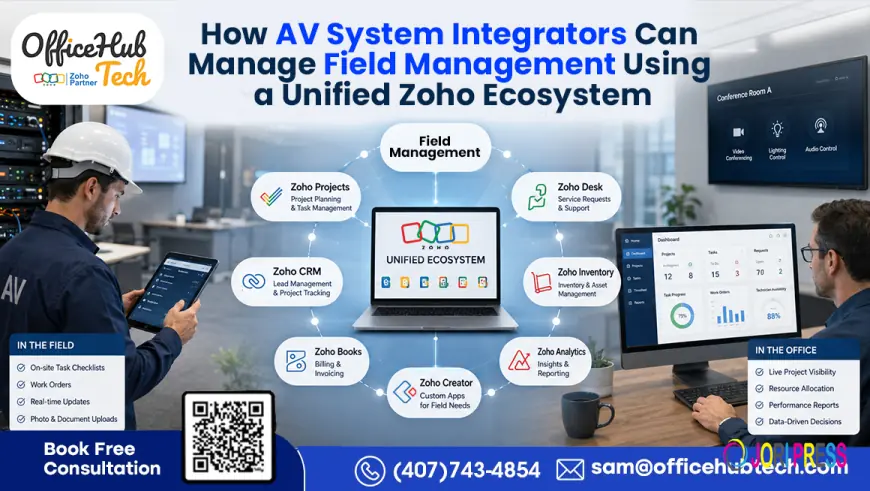
Managing Modern AV Field Operations Through a Connected Zoho Ecosystem
Field service is one of the most coordination-intensive areas of an AV integration business. A single service request may involve customer records, installed equipment, support tickets, technician availability, inventory, scheduling, site information, service documentation, and billing.
When these activities are managed across spreadsheets, emails, standalone applications, and disconnected databases, even routine service work can become difficult to coordinate.
A Unified Zoho Ecosystem provides a different approach. Instead of replacing every application an AV company already uses, businesses can connect customer management, service operations, field workflows, inventory, project activities, communication, and finance through automated processes.
At the center of this model, a Custom Field Service Management (FSM) Platform built on Zoho Creator for AV system integrators can function as the operational layer connecting field teams with the rest of the business.
Why Field Service Management Is Challenging for AV Integrators
AV field operations are rarely limited to sending a technician to a customer location. Residential and commercial integrators may need to coordinate:
- Installation and commissioning
- Preventive maintenance
- Troubleshooting and repair
- Conference room support
- Home automation service
- Audio and video system upgrades
- Networking and structured cabling
- Digital signage maintenance
- Replacement equipment and spare parts
- Multi-site service operations
The complexity increases when technicians, project managers, service coordinators, sales teams, and finance teams depend on different sources of information.
A service coordinator may need to check a CRM for customer information, another system for service history, an inventory platform for replacement equipment, a calendar for technician availability, and accounting software for billing.
This creates several operational problems:
- Duplicate data entry
- Delayed technician dispatch
- Incomplete site information
- Scheduling conflicts
- Poor visibility into technician workloads
- Unnecessary repeat visits
- Delayed invoicing
- Limited management visibility
The underlying issue is not always the software itself. The bigger problem is the absence of a connected workflow between the systems.
Why a Connected Field Service Workflow Matters
A connected field service environment allows information to move from one operational stage to another without requiring employees to repeatedly recreate the same data.
For example, a service request can follow a structured path:
Customer Request → Service Ticket → Work Order → Inventory Check → Technician Assignment → Field Execution → Service Documentation → Billing
Each stage can trigger the next action automatically.
Instead of asking employees to manually coordinate every step, automation can handle routine activities while teams focus on decisions that require human input.
This approach can help AV businesses improve:
- Operational visibility
- Technician coordination
- Response management
- Customer communication
- Service documentation
- Inventory readiness
- Billing turnaround
- Scalability
Building the Field Operations Hub with Zoho Creator
Zoho Creator can serve as the customizable operational layer for an AV-specific field management environment.
Rather than forcing an integrator to adapt its processes to a generic field service application, a custom Creator application can be designed around the company's actual workflow.
The platform can bring together information such as:
- Customers and contacts
- Customer sites
- Installed AV systems
- Service requests
- Work orders
- Technician assignments
- Appointment schedules
- Service history
- Inventory requirements
- Project tasks
- Labor records
- Service documentation
- Billing status
A centralized dashboard gives service managers and operations teams a common view of active work.
Technician Portal
A mobile-friendly technician interface can provide field personnel with access to the information they need at the job site.
Depending on the workflow, technicians can:
- View assigned jobs
- Access customer and site information
- Review service history
- Update job status
- Add service notes
- Upload site photographs
- Record labor
- Capture customer approvals
- Complete work orders
This reduces dependence on phone calls, email updates, and manual paperwork between the field and office.
Customer Portal
A connected customer portal can also provide customers with visibility into their service relationship.
Depending on the implementation, customers can access:
- Service requests
- Project status
- Quotations
- Invoices
- Support updates
- Service information
This gives customers a structured communication channel while reducing repetitive status requests handled by service teams.
AI-Assisted Project and Work Order Creation
A custom platform can also incorporate AI-assisted workflows.
For example, an AI prompt interface can allow an authorized user to describe a project or service requirement in natural language. The system can then translate the request into structured information used to create project records, work orders, or other operational data.
This can reduce repetitive data entry while accelerating administrative setup.
Connecting the Zoho Applications
The value of a Unified Zoho Ecosystem comes from connecting specialized applications instead of treating each one as an isolated tool.
Zoho CRM: Customer and Site Context
Zoho CRM can provide the customer information required before and during service execution.
Relevant information may include:
- Customer details
- Contacts
- Sites and locations
- Sales history
- Installed systems
- Service-related information
- Customer relationships
When field teams can access the right customer context, technicians can arrive better prepared for the job.
Zoho Desk: From Support Ticket to Field Work
Zoho Desk can manage incoming service requests and support tickets.
A workflow can connect an eligible ticket to the custom FSM platform so that a service request becomes a field work order without requiring service coordinators to enter the same information again.
The process can support:
Ticket → Qualification → Work Order → Dispatch → Resolution
This creates a clearer connection between customer support and field operations.
Zoho Inventory: Checking Equipment Before Dispatch
Inventory availability is an important part of field service.
If a repair requires a replacement device, spare component, cable, or other material, the system can verify availability before the technician is dispatched.
This can help reduce situations where technicians arrive without the required materials and need another visit.
Zoho Projects: Connecting Projects and Field Activities
Installation projects often continue into service and maintenance.
Zoho Projects can help coordinate project tasks, milestones, installation activities, and team responsibilities while the custom FSM platform manages field-specific workflows.
This is particularly useful for commercial AV deployments involving multiple teams and locations.
Zoho Books: Connecting Completed Work to Billing
Once a work order is completed, relevant service information can feed downstream financial workflows.
Depending on the business process, this may include:
- Billable labor
- Service charges
- Materials
- Expenses
- Invoices
- Payment tracking
Connecting service completion with financial processes reduces the gap between work performed and billing.
Zoho Mail and Calendar: Keeping Everyone Updated
Automated communication can be triggered throughout the service lifecycle.
Examples include:
- Appointment confirmations
- Schedule changes
- Technician notifications
- Customer updates
- Completion notifications
- Internal alerts
Calendar integration can also help synchronize technician appointments and reduce scheduling conflicts.
A Typical AV Field Service Workflow
A connected AV field operation can be structured into the following stages.
Step 1: Capture the Service Request
A customer submits a request through a support channel, portal, email, or service desk.
The request is recorded as a structured ticket.
Step 2: Retrieve Customer and Site Information
The workflow retrieves relevant CRM information, including the customer, site, installed systems, and previous service records.
Step 3: Create the Work Order
The custom FSM platform converts the qualified service request into a work order containing the information required for execution.
Step 4: Check Equipment and Inventory
The system verifies whether required replacement equipment, parts, or materials are available.
Step 5: Assign the Technician
The platform can evaluate business rules such as:
- Availability
- Skillset
- Workload
- Service priority
- Location
- Certification requirements
The dispatcher can then assign the appropriate technician.
Step 6: Schedule and Notify
The appointment is synchronized with the technician's calendar, while automated notifications keep the customer and internal teams informed.
Step 7: Execute the Job
The technician accesses the job through the field portal, performs the required work, records service information, and uploads supporting documentation.
Step 8: Close the Work Order and Trigger Billing
Once the work is approved and completed, the system updates service history and initiates the relevant billing workflow.
The result is a connected process rather than a series of isolated administrative tasks.
Integrating Existing AV Software Instead of Replacing It
A Unified Zoho Ecosystem does not have to mean that an AV company abandons its existing technology stack.
Many integrators already rely on specialized applications for proposals, project management, accounting, procurement, documentation, or AV-specific operations.
The better question is often:
How can the existing systems exchange the right information at the right stage of the workflow?
A custom integration layer can connect the FSM platform with external applications using APIs, webhooks, automation platforms, or custom connectors.
For example:
CRM → Proposal System → Project Management → Field Service → Inventory → Finance
This architecture allows each system to continue performing its specialized role while the integration layer coordinates information between them.
Low Voltage Software Connectors
For AV and low-voltage businesses, specialized applications often contain important project, proposal, equipment, or operational data.
Low Voltage Software Connectors can help bridge these systems with the wider business ecosystem, reducing repetitive data entry and creating more consistent workflows.
This integration-first approach can be especially useful when an integrator has already invested heavily in industry-specific software.
AI and Intelligent Technician Dispatch
Scheduling becomes increasingly complex as an AV service operation grows.
A dispatcher may need to consider technician availability, expertise, location, workload, appointment windows, urgency, and required certifications.
A custom FSM platform can apply these rules to assist with technician assignment.
AI can add another layer by helping interpret service requirements, identify relevant information, summarize job history, or assist users in creating structured work orders.
The objective is not simply to automate scheduling. It is to make operational information easier to use and reduce the amount of repetitive coordination required from service teams.
Designing a Scalable AV Field Management Architecture
A scalable architecture can be organized into several layers:
Customer & Support Layer
Zoho CRM + Zoho Desk + Customer Portal
↓
Field Operations Layer
Custom FSM Platform on Zoho Creator
↓
Execution Layer
Technician Portal + Scheduling + Maps + Mobile Updates
↓
Business Operations Layer
Zoho Inventory + Zoho Projects + Zoho Books
↓
Integration Layer
APIs + Webhooks + Connectors + Automation Platforms
This structure allows AV businesses to add new applications or workflows without redesigning the entire operational environment.
How OfficeHub Tech Approaches AV Field Management
Every AV System Integrator has different processes, software, service models, and customer requirements. A field service solution therefore needs to be designed around the business rather than treated as a one-size-fits-all implementation.
OfficeHub Tech helps AV businesses develop customized workflow solution for AV businesses that connects field service operations with CRM, project management, inventory, finance, support, and external applications.
The approach can include a Custom Field Service Management (FSM) Platform built on Zoho Creator for AV system integrators, technician and customer portals, automated dispatch workflows, AI-assisted operations, third-party integrations, and custom connectors.
Existing AV applications can remain part of the technology stack while automated workflows connect them to the broader business environment.
This makes it possible to modernize field operations without forcing the organization to replace every system it already depends on.
Conclusion
Field service management for AV System Integrators is not simply a scheduling problem. It involves coordinating customers, sites, service requests, technicians, equipment, projects, documentation, communication, and billing across multiple operational stages.
A Unified Zoho Ecosystem can bring these processes together through a connected workflow architecture.
Zoho Creator can provide the customizable field operations layer, while Zoho CRM, Desk, Inventory, Projects, Books, Mail, and external applications contribute specialized capabilities. APIs, connectors, and automation workflows then allow information to move between systems without unnecessary manual intervention.
For growing Residential and Commercial AV System Integrators, this approach can create a more connected operating environment while preserving existing technology investments.
OfficeHub Tech provides customized workflow solution provider for AV businesses and an authorized Zoho Partner and n8n partner in the USA, India & UAE, helping AV businesses design, integrate, and automate field service workflows around their existing operational requirements.
If your AV business is dealing with disconnected service systems, manual technician coordination, repeated data entry, or limited field visibility, a connected Zoho-based architecture can provide a practical foundation for modernizing field operations.
What's Your Reaction?
 Like
0
Like
0
 Dislike
0
Dislike
0
 Love
0
Love
0
 Funny
0
Funny
0
 Angry
0
Angry
0
 Sad
0
Sad
0
 Wow
0
Wow
0