





































4over WooCommerce Integration: Fixing the Manual Order Entry Problem
Managing print orders through WooCommerce can become complicated when businesses rely on manual order entry. Customer details, product specifications, quantities, artwork, and shipping information often need to be transferred between different systems, creating extra work for employees and increasing the chance of errors.
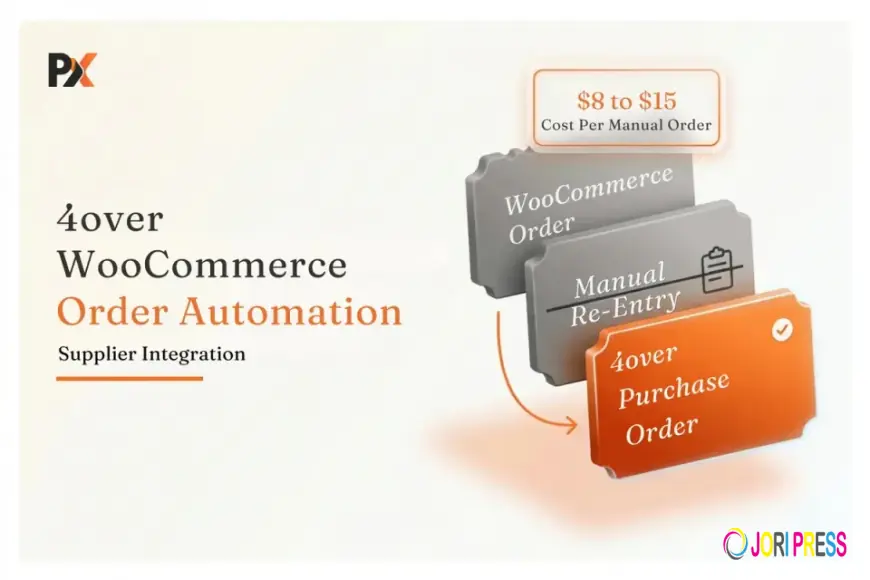
Managing print orders through WooCommerce can become complicated when businesses rely on manual order entry. Customer details, product specifications, quantities, artwork, and shipping information often need to be transferred between different systems, creating extra work for employees and increasing the chance of errors.
As order volume grows, a 4over WooCommerce Integration can help connect the online storefront with the supplier workflow and reduce repeated data entry. Instead of manually recreating every customer order, businesses can create a more connected process for handling products, specifications, artwork, and fulfillment.
For print resellers using 4over as their production partner, the goal is not simply to display supplier products online. The important part is creating a workflow where customer orders can move from the WooCommerce storefront toward fulfillment with as little manual intervention as possible.
Why Manual Order Entry Becomes a Problem
A typical print reseller may receive orders through WooCommerce and then enter the same information into a supplier portal or internal system.
This can involve:
- Product selection
- Quantity
- Size and specifications
- Paper or finishing options
- Customer shipping details
- Artwork files
- Special production instructions
When order volume is low, this process may seem manageable. As orders increase, however, employees spend more time copying information instead of handling customer service, sales, or production coordination.
Manual entry also creates another problem: every additional step creates an opportunity for something to be entered incorrectly.
A wrong quantity, missing artwork, incorrect finish, or incorrect shipping address can affect the entire order.
What Should a 4over WooCommerce Integration Do?
A useful integration should connect more than the product catalog.
The first layer is product information. Relevant 4over products can be made available through the WooCommerce store with their specifications and purchasing options.
The second layer is order processing.
When a customer completes checkout, the information collected by WooCommerce needs to be converted into a format that can be used for supplier fulfillment.
This can include product specifications, quantities, customer information, shipping details, and production-related data.
The purpose is simple: the information entered by the customer should not need to be entered again by an employee.
The Difference Between Catalog Sync and Order Automation
This is an important distinction when evaluating an integration.
Catalog synchronization can bring supplier products into an online store. It may update product information, pricing, images, and available options.
But catalog synchronization alone does not solve the manual order-entry problem.
Imagine a customer purchases business cards from your WooCommerce store. The product appears correctly, the customer pays, and WooCommerce records the order.
If an employee still has to open another system and recreate that order manually, the main operational problem remains.
A complete workflow should connect the customer's order with the supplier purchasing process.
This is where PrintXpand Connect can act as the integration layer between WooCommerce and 4over. It provides a pre-built 4over connection and supports automated purchase orders with job specifications attached.
How the Automated Workflow Can Work
A connected workflow can be organized into several stages.
1. Customer Selects a Product
The customer visits the WooCommerce store and chooses a 4over product.
They can select the available specifications required for the job, such as size, quantity, paper, finish, or turnaround.
2. Customer Uploads Artwork
For print products, the artwork is an essential part of the order.
The store can collect the required artwork during the ordering process so the production file travels with the order rather than being requested later through email.
3. WooCommerce Creates the Order
Once checkout is completed, WooCommerce stores the customer and product information.
Instead of treating this as the end of the process, the integration can use the order information for the next stage.
4. Order Information Moves to the Supplier
The integration translates the WooCommerce order into the information required for 4over.
This reduces the need for employees to manually recreate the same order.
5. Purchase Order Is Generated
With an automated connection, the relevant order information can be used to generate a purchase order for 4over.
The supplier can then process the job according to the submitted specifications.
Managing Product Specifications Correctly
Print products are not simple one-size products.
A single product can have multiple combinations of size, paper, finish, quantity, and turnaround. If these options are not mapped correctly, an order may contain information that does not match the supplier's requirements.
This is why product mapping should be handled before launching the integration.
The goal is to make the WooCommerce product options meaningful to both the customer and the supplier.
For example, a customer should see understandable choices such as:
- Paper type
- Finished size
- Quantity
- Coating
- Turnaround
- Finishing options
The integration then needs to translate those selections into the corresponding supplier specifications.
Keeping Pricing Under Control
Supplier pricing and customer pricing are two different things.
A reseller normally purchases products at trade pricing and then applies its own markup before selling to customers.
An automated workflow should therefore allow businesses to establish pricing rules rather than manually calculate every product price.
This becomes particularly important when a catalog contains hundreds or thousands of products.
If supplier costs change, maintaining prices manually across a large WooCommerce catalog can become difficult. A connected supplier workflow can make pricing management more manageable by keeping supplier information and storefront pricing rules connected.
What Happens to Inventory?
Print resellers do not necessarily need to keep every product in their own warehouse.
Using a supplier such as 4over allows businesses to offer a broader selection while relying on the supplier for production and fulfillment.
PrintXpand Connect's supplier network is designed around this type of workflow, with supplier catalog synchronization, inventory information, automated purchasing, and fulfillment connections.
This can help businesses expand their product range without taking on the cost and complexity of holding physical inventory for every item.
Common Problems to Watch For
Even with an integration, there are several areas worth checking before going live.
Incorrect Product Mapping
If WooCommerce options do not match the supplier's specifications, orders may require manual correction.
Missing Artwork
An order without the required print file cannot move smoothly into production. Make sure the artwork collection process is connected to the appropriate product.
Incorrect Markup
Never assume that supplier pricing should automatically become the customer-facing price. Establish your pricing rules separately.
Incomplete Customer Information
Shipping information, contact details, and other required fields should be transferred correctly so employees do not need to fill them in again.
Testing Only the Catalog
A product appearing correctly in WooCommerce does not prove that order automation works.
The most important test is a complete order—from customer checkout through supplier submission.
How to Test Before Going Live
Before moving the integration into production, place several test orders.
Use different product types and combinations so you can identify mapping problems early.
Check:
- Product information
- Product options
- Customer details
- Artwork files
- Pricing
- Order status
- Purchase-order information
- Supplier submission
Testing the complete workflow is much more useful than checking only whether products successfully imported into WooCommerce.
Why Automation Matters as Your Business Grows
Manual order entry may not seem like a major issue when you process a few orders each week.
The situation changes when order volume increases.
More orders mean more copying, more checking, and more opportunities for mistakes. Employees can end up spending a significant amount of time transferring information between systems.
Automating this process allows the team to spend more time on activities that actually require human attention.
It can also create a more consistent customer experience because orders follow the same process instead of depending on individual employees to remember each step.
Final Thoughts
A 4over WooCommerce Integration should do more than place supplier products in an online catalog. Its real value comes from connecting the complete order workflow.
When customer selections, artwork, pricing, product specifications, and order information can move between WooCommerce and the supplier with less manual intervention, businesses can reduce repetitive work and make fulfillment easier to manage.
For print resellers using 4over, the key question is not simply “Can I connect 4over to WooCommerce?” It is “Can I eliminate the manual steps between customer checkout and supplier fulfillment?”
That is where a properly designed integration can make the biggest difference.
Files
What's Your Reaction?
 Like
0
Like
0
 Dislike
0
Dislike
0
 Love
0
Love
0
 Funny
0
Funny
0
 Angry
0
Angry
0
 Sad
0
Sad
0
 Wow
0
Wow
0