










































3D Character Animation Software for Beginners: A Complete Guide
Discover beginner-friendly 3D character animation tools, essential features, learning tips, rigging basics, keyframes, and practical workflows.
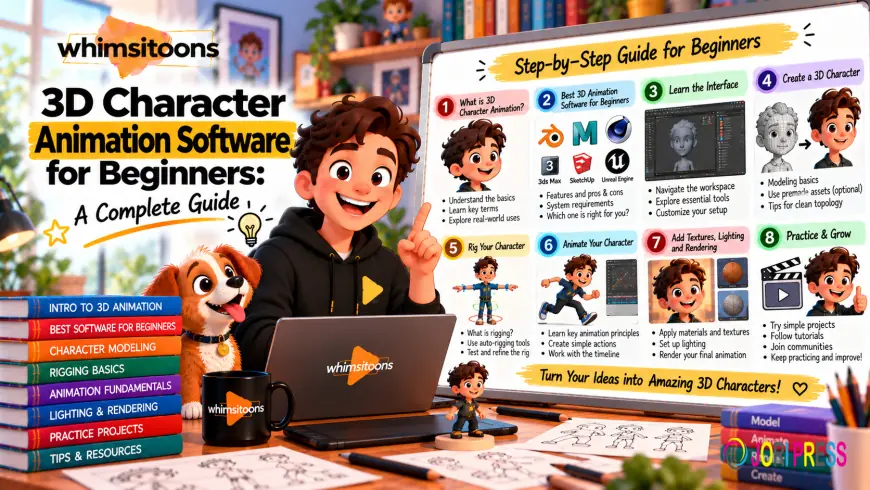
Creating animated characters in three dimensions can seem complicated when you are starting out. Modern programs make modeling, rigging, keyframing, lighting, and rendering more accessible to new artists. Choosing the right 3d character animation software for beginners can make the learning process easier and help you develop practical skills without feeling overwhelmed.
Whether you want to create characters for games, short films, educational videos, or marketing content, learning the fundamentals is more important than mastering every feature immediately. Whimsitoons combines animation knowledge and visual storytelling to create engaging character experiences.
What Should Beginners Look For?
Before selecting a program, consider what you want to create. Some beginners are interested in game characters, while others want to produce animated films, advertisements, social media content, or educational projects.
Look for an easy-to-understand interface, useful tutorials, character tools, animation controls, and strong learning resources. Community support can also be valuable when you encounter technical problems.
A complicated program is not automatically better. Beginners should prioritize tools that allow them to understand fundamental animation principles while gradually introducing advanced features.
Start With 3D Modeling
Modeling is the process of creating a character's digital form. Beginners can start with simple shapes such as spheres, cylinders, and cubes before progressing to detailed character models.
Pay attention to proportions and topology. Clean geometry becomes especially important when a character needs to bend, twist, or make expressive movements.
Avoid trying to create an extremely detailed character immediately. A simple model is often a better practice subject because you can focus on learning the workflow instead of worrying about small visual details.
Learn Basic Rigging
Rigging adds a digital skeleton and controls to a character. These controls allow you to move the arms, legs, spine, head, and other parts of the body.
Beginners should understand basic concepts such as bones, joints, controllers, and weight distribution. A properly prepared rig makes animation easier because the character responds predictably to movement.
Many modern programs provide automatic rigging options. These can help beginners get started quickly, but learning how the rig works will make it easier to solve problems later.
Understand Keyframes
Keyframes define important positions at different points in time. For example, one keyframe can show a character standing while another shows the character raising a hand. The software creates the movement between these positions.
Start with simple actions such as waving, turning, jumping, or sitting. These exercises teach important concepts such as timing, spacing, poses, and transitions.
When practicing with 3d character animation software for beginners, avoid creating too many unnecessary keyframes. A smaller number of well-planned poses often makes an animation easier to control and edit.
Practice Timing and Spacing
Timing determines how long an action takes, while spacing controls the distance between positions during movement.
These principles can dramatically change how an animation feels. A quick movement can communicate excitement, while slower movement can suggest weight, hesitation, or calmness.
Experiment with different speeds and review your animation repeatedly. Even a simple character can appear convincing when timing and spacing are carefully controlled.
Use Real-World References
Reference footage is one of the most useful resources for new animators. Observe people walking, running, reaching, sitting, turning, and reacting.
Instead of copying every movement exactly, study how the body shifts weight and how different parts move together. Notice how actions begin, accelerate, slow down, and finish.
Reference material can also help with facial expressions and gestures. Comparing your work with real movement can reveal problems that are difficult to notice when working only from imagination.
Explore Facial Animation
Facial expressions help characters communicate emotions. Beginners can start with basic expressions such as happiness, sadness, anger, surprise, and confusion.
Learn how the eyes, eyebrows, mouth, and head position work together. Small changes can make a significant difference to a character's performance.
If your chosen program supports facial controls or blend shapes, practice individual expressions before combining several emotions in a complete scene.
Create Small Projects
Trying to create a complete animated movie as your first project can become overwhelming. Instead, choose small projects with clear goals.
You could animate a character waving, walking across a room, picking up an object, or reacting to something unexpected. Each exercise develops a different skill.
Small projects also make mistakes easier to identify. As your confidence grows, combine several actions into longer sequences.
Learn Lighting and Rendering
Animation is only one part of 3D production. Lighting, materials, cameras, and rendering also influence the final appearance.
Beginners should start with basic lighting setups and learn how light affects characters and environments. Experiment with shadows, highlights, and different camera angles.
You do not need complex cinematic lighting at the beginning. Understanding the fundamentals will provide a stronger foundation for more advanced projects.
Choosing Software for Your Goals
Different applications have different strengths. Some provide complete 3D production workflows, while others focus more heavily on character creation, animation, or game development.
When comparing 3d character animation software for beginners, consider interface design, tutorials, available character tools, hardware requirements, export options, rendering features, and community support.
Your long-term goals should also influence the decision. If you want to work in games, consider tools that integrate well with game engines. If filmmaking interests you, animation, rendering, and visual-effects capabilities may be more important.
The best 3d character animation software for beginners is ultimately the program that fits your goals and allows you to practice consistently.
Build a Learning Routine
Animation improves through regular practice. Instead of watching tutorials without applying what you learn, combine lessons with practical exercises.
Choose one skill at a time. Learn the interface first, then practice modeling, rigging, keyframes, body mechanics, facial animation, lighting, and rendering.
Save earlier projects so you can compare them with newer work. Reviewing old animations can show how your skills are developing and highlight areas that still need attention.
When Professional Support Helps
Learning animation independently can be rewarding, but some projects require experienced artists and faster production. Businesses that need polished character content can consider animated 3D character services for marketing, education, entertainment, and product communication.
Professional animated 3D character services may include character design, modeling, rigging, animation, facial performance, lighting, rendering, and post-production.
When selecting a provider, review its portfolio, production process, communication style, and experience with projects similar to yours.
How Whimsitoons Approaches Character Animation
Whimsitoons combines technical animation with visual storytelling. A character project can begin with a clear concept, target audience, and creative objective before production starts.
The workflow may include character development, rigging, animation, scene creation, lighting, rendering, and final editing. Each stage contributes to a consistent and engaging character performance.
Common Beginner Mistakes
One common mistake is attempting complicated characters too soon. Simple models and short animations provide better opportunities to understand the fundamentals.
Another mistake is focusing on software features instead of animation principles. Timing, spacing, balance, anticipation, and believable movement are more important than knowing every tool.
Beginners may also ignore reference footage. Studying real movement can dramatically improve animation quality.
Finally, do not expect perfect results immediately. Animation is a skill developed through repetition, experimentation, feedback, and patience.
Tips for Faster Improvement
Set small weekly goals and complete practical exercises. Study professional animations and analyze why certain movements feel natural.
Keep project files organized so you can revisit earlier work. Ask experienced artists or creative communities for constructive feedback when possible.
Most importantly, keep creating. Each completed exercise provides experience that can be applied to the next project.
Final Thoughts
Learning character animation becomes easier when beginners choose suitable tools and follow a structured practice routine. Modeling, rigging, keyframes, timing, spacing, facial expressions, lighting, and rendering all contribute to a strong foundation.
The right 3d character animation software for beginners does not need to have every advanced feature available. It should provide the tools, learning resources, and workflow needed to develop confidence and practical skills.
Whimsitoons brings creative storytelling and animation expertise together to develop engaging digital characters and visual content.
Whether your goal is game development, filmmaking, education, or marketing, start with simple projects, study real movement, practice consistently, and gradually increase complexity. With patience and regular practice, beginners can progress from basic exercises to polished 3D character animation.
What's Your Reaction?
 Like
0
Like
0
 Dislike
0
Dislike
0
 Love
0
Love
0
 Funny
0
Funny
0
 Angry
0
Angry
0
 Sad
0
Sad
0
 Wow
0
Wow
0