
































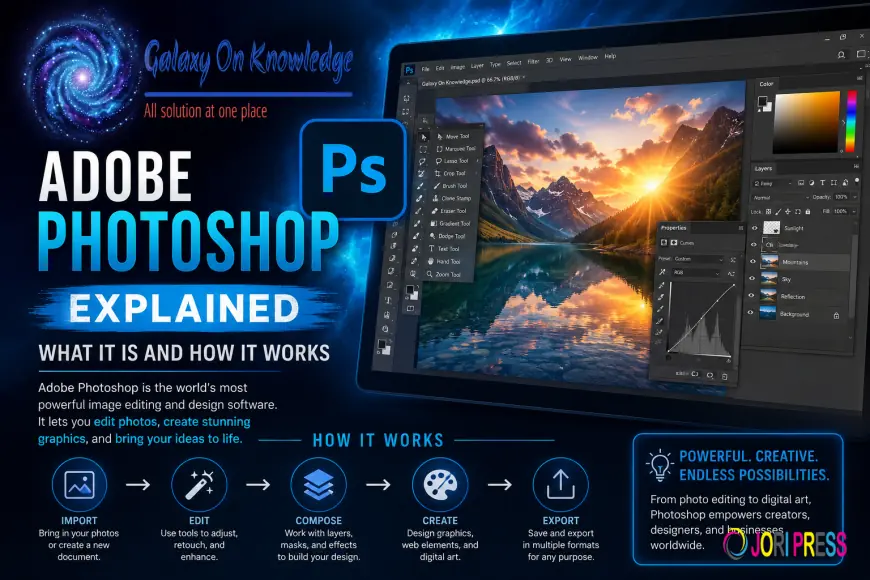
Adobe Photoshop Explained: What It Is and How It Works
Adobe Photoshop explained in simple words, what it does, key tools, layers, file types, and the basics beginners need to start editing.
Adobe Photoshop Explained: What It Is and How It Works
Adobe Photoshop is a program for editing pictures on a computer or tablet. You can use it to improve photos, change parts of an image, add text, or build new visuals from scratch.
If you've wondered What is Adobe Photoshop in Simple Words, the short answer is clear: it's Adobe's software for working with digital images. Photographers, designers, students, and marketers use it for different jobs. Once you understand the basic idea, the program feels far less intimidating.
The clearest place to start is with what Photoshop is and why so many people still rely on it.
What Adobe Photoshop is in simple words
Adobe Photoshop is image editing software made by Adobe. Its full name is Adobe Photoshop, although most people simply call it Photoshop. The name points to its roots in photo editing, but the program now does much more than fix photographs.
With Photoshop, you can remove unwanted objects, correct color, smooth skin, add words, combine several images, and design graphics from a blank canvas. In other words, it is both a repair tool and a creative studio. That range is why beginners ask which Adobe Photoshop version they need, while professionals often keep it at the center of their work.
What Adobe Photoshop is used for every day
People use Photoshop for common tasks you see every day. A photographer may retouch a portrait. A small business may create a social media post, ad, or flyer. A designer may build a poster, website banner, or product mockup. Artists also use it for digital painting and collage work.
Editing helps most when the original image already has good light, focus, exposure, framing, color, timing, and composition.
Why Adobe Photoshop became the industry standard
Photoshop became the standard because it is flexible and dependable. One program can handle simple fixes and advanced design work, so users do not need separate software for every task.
It also has a long history in creative fields. Because so many schools, studios, and freelancers use it, there are endless tutorials, shared files, and familiar workflows. That makes collaboration easier and results more consistent.
How Photoshop works behind the scenes
Photoshop works by changing the small parts that make up a digital image.
Every photo in Photoshop is built from tiny color squares called pixels.
Pixels, layers, and non-destructive editing
A pixel is a tiny square of color. When thousands or millions of pixels sit together, they form the picture you see on screen. Photoshop edits those pixels with tools, color controls, and adjustments.
Layers make this process far safer. Each layer is a separate part of the image, almost like stacked sheets. One layer might hold the photo, another the text, and another a color effect. Because of that, you can change one part without harming the whole design. Masks improve control even more, since they hide parts of a layer without deleting them.
Non-destructive editing means you keep the option to revise your work later. Instead of burning every change into the original image, Photoshop can save edits as adjustable instructions.
The main tools beginners should know
A few tools explain much of how Photoshop works:
- The Move Tool shifts layers, text, and objects into place.
- The Brush Tool paints color, shading, or detail onto an image.
- The Eraser Tool removes parts of a layer.
- The Crop Tool trims the frame and improves composition.
- The Lasso Tool selects an area with a freehand outline.
These five tools cover moving, drawing, trimming, and selecting, which are the core actions in most beginner projects.
How files, saving, and exports affect your edits
File choice matters because Photoshop saves work in different ways. A PSD file keeps layers, masks, and editable settings, so you can return and change the project later. That is the best format while you are still working.
Exported files are for sharing. JPG is common for photos and smaller file sizes. PNG is useful when you need transparency or crisp graphic edges. Once you export, some editing flexibility is lost, so save the PSD first.
Key features, editing basics, and beginner-friendly types of Photoshop
New users do not need every tool on day one. A small set of editing basics does most of the work.
The 5 basics of photo editing that Photoshop makes easy
Most beginners start with crop, brightness, contrast, color, and sharpening. Cropping improves the frame by cutting away distractions. Brightness lifts a dark image or tones down one that looks washed out. Contrast increases the difference between light and dark areas, which adds depth. Color adjustment corrects odd color casts and helps skin, sky, or products look natural. Sharpening adds clarity to soft details.
These edits do not replace strong photography, but they can turn a flat image into a polished one.
The 5 features of Photoshop that matter most
Five features matter most for daily work. Layers keep edits separate and organized. Selection tools isolate a subject, background, or object so you can edit only that area. Filters apply effects, blur, or stylized looks. Brush tools add paint, texture, retouching, and mask control. The Text Tool places titles, captions, and design elements directly onto the image.
Together, these features explain why Photoshop fits both photo correction and graphic design. They help users work with accuracy instead of changing the whole image at once.
What are the different types of Photoshop
Adobe offers several Photoshop options, and each fits a different kind of user.
| Version | Best for | Main idea |
|---|---|---|
| Photoshop | Professional work | Full desktop app with the deepest toolset |
| Photoshop Elements | Beginners and hobby users | Simpler editing with guided tools |
| Photoshop Express | Quick mobile edits | Fast fixes and social-ready changes |
| Photoshop on iPad | Portable editing | Touch-based work with many core tools |
| Web-based Photoshop | Browser access | Convenient editing without full desktop setup |
The full desktop version is the strongest choice for serious editing and design. Elements is easier for casual users. Express works well for quick changes, while iPad and web options help when mobility matters. If you want guided practice, this free Adobe Photoshop beginner course is a practical place to start.
Conclusion
Adobe Photoshop is a powerful image editor, but its main idea is simple. It changes pictures by editing pixels with tools, layers, masks, and adjustments.
That means Photoshop can be easy for basic photo fixes and still deep enough for advanced design work. Once you understand layers, a few core tools, and the right file format, the program stops feeling mysterious. You now know what Photoshop is, how it works, and why it still matters.
What's Your Reaction?
 Like
1
Like
1
 Dislike
0
Dislike
0
 Love
1
Love
1
 Funny
0
Funny
0
 Angry
0
Angry
0
 Sad
0
Sad
0
 Wow
0
Wow
0