








































What Is Project Management Software? A Complete Guide to Features, Benefits and Business Productivity
Discover how project management software helps businesses plan projects, organise tasks, manage teams, track progress and improve collaboration. Explore its essential features, key benefits and practical applications to understand how the right software can streamline workflows, increase productivity and support better business outcomes.
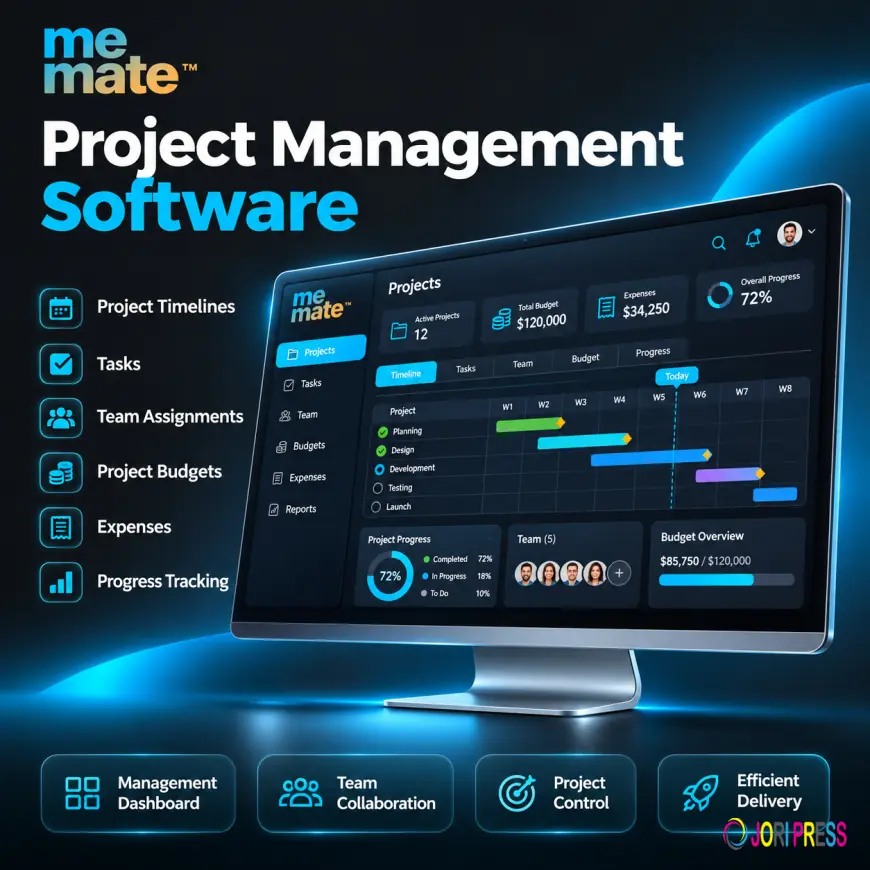
Modern businesses often manage multiple projects, employees, deadlines and customer expectations simultaneously. Without an organised approach, even relatively straightforward projects can become difficult to coordinate. Tasks get overlooked, communication becomes fragmented, resources are poorly allocated and deadlines are missed.
This is where project management software becomes valuable. It provides businesses with a centralised way to plan projects, organise tasks, coordinate teams and monitor progress. Instead of relying on disconnected spreadsheets, emails and manual updates, teams can manage their work through a structured digital environment.
Whether you run a small business, manage a growing team or oversee complex operations, understanding how project management software works can help you improve productivity, strengthen accountability and achieve more predictable business outcomes.
What Is Project Management Software?
Project management software is a digital solution that helps businesses plan, organise, execute and monitor projects from beginning to completion. It brings essential project information, tasks, schedules, responsibilities and progress updates together in one central location.
Rather than managing work through separate documents and communication channels, employees and managers can use a shared system to understand what needs to be completed, who is responsible and when each activity is due.
For example, a digital marketing agency managing a website development project can use project management software to assign design tasks, establish development deadlines, share documents, monitor revisions and track delivery milestones.
Depending on the platform, these solutions may also include reporting, budgeting, resource allocation and workflow automation.
How Does Project Management Software Work?
Most project management platforms follow a structured process that transforms business objectives into manageable activities.
A typical workflow involves:
-
Project planning: Define objectives, deliverables, budgets and expected completion dates.
-
Task organisation: Break larger projects into smaller activities with clear responsibilities.
-
Resource allocation: Assign employees, contractors, equipment and other resources.
-
Scheduling: Establish deadlines, milestones and task dependencies.
-
Execution and collaboration: Allow team members to communicate, share files and update progress.
-
Monitoring: Review project status, identify delays and evaluate performance.
-
Completion: Confirm deliverables, review outcomes and document important information.
This structured approach makes project responsibilities clearer and helps managers identify potential problems before they affect delivery.
Essential Features of Project Management Software
The capabilities of different project management tools vary, but several features are particularly valuable for businesses.
1. Task Management and Assignment
Task management allows managers to divide projects into smaller activities and assign them to specific employees or teams.
Users can establish priorities, add descriptions, set due dates and monitor completion status. This reduces confusion about individual responsibilities and helps employees focus on their immediate priorities.
2. Project Scheduling and Timeline Management
Scheduling features help businesses organise activities according to their deadlines and dependencies.
A project management timeline provides a visual overview of important milestones, upcoming tasks and expected completion dates. Managers can use this information to identify scheduling conflicts and adjust workloads when circumstances change.
3. Team Collaboration and Communication
Effective collaboration requires employees to access relevant information without constantly searching through emails or messaging applications.
Many platforms provide shared discussions, internal messaging, comments, notifications and document sharing. Keeping project-related communication organised makes it easier for everyone to understand decisions and follow updates.
4. Resource Allocation
Resource management helps businesses distribute work according to employee availability, skills and existing commitments.
Managers can identify overloaded team members, balance workloads and allocate contractors where additional support is required.
5. Reporting and Progress Tracking
Reporting features provide visibility into project performance, completed activities, outstanding tasks and potential delays.
Instead of manually collecting updates from different employees, managers can review available information through dashboards and reports to make informed operational decisions.
6. Workflow Automation
Workflow automation reduces repetitive administrative activities by triggering predefined actions when particular conditions are met.
For example, a system might automatically notify an employee when a task is assigned or alert a manager when an important deadline approaches.
Key Benefits of Project Management Software for Businesses
Implementing an appropriate project management system can improve several aspects of daily business operations.
Improved productivity: Employees spend less time searching for information, requesting updates and organising manual task lists.
Greater accountability: Clearly assigned responsibilities make it easier to understand who owns each activity and whether it has been completed.
Better communication: Centralised project information reduces misunderstandings and keeps relevant stakeholders informed.
Improved deadline management: Scheduling and progress tracking help managers recognise potential delays and take corrective action.
Greater operational transparency: Managers gain a clearer understanding of project progress, resource utilisation and outstanding work.
More informed decisions: Performance reports help businesses identify inefficiencies, evaluate workloads and improve future planning.
These benefits are particularly valuable for growing businesses where increasing workloads can make informal management processes difficult to maintain.
Why a Project Management Timeline Matters
A project management timeline is an important planning tool that illustrates how activities are organised over a specific period.
It typically includes project start and completion dates, individual tasks, milestones, dependencies and important deadlines.
Consider a business developing a new website. Its timeline might include:
-
Week 1: Requirements gathering and planning.
-
Week 2: Website design and approval.
-
Weeks 3–4: Development and content integration.
-
Week 5: Testing and revisions.
-
Week 6: Final approval and launch.
If the design approval is delayed, the development schedule may also need adjustment. A visible timeline helps managers understand these dependencies and communicate revised expectations.
It also encourages realistic planning rather than assigning deadlines without considering available resources.
Which Businesses Benefit from Project Management Solutions?
Project management solutions are useful across different industries and business sizes.
-
Small businesses: Organise daily operations, employee responsibilities and customer projects.
-
Marketing agencies: Coordinate campaigns, content production, creative approvals and client deliverables.
-
Construction companies: Manage work schedules, contractors, project expenses and deadlines.
-
IT teams: Coordinate software development, testing, maintenance and product launches.
-
Professional service providers: Manage customer assignments, resources and delivery schedules.
-
Operations teams: Monitor recurring activities, internal processes and departmental responsibilities.
The most important consideration is not business size but the complexity and coordination required to complete work successfully.
Common Project Management Challenges and How Software Helps
Businesses frequently encounter similar operational problems as their workloads increase.
|
Common challenge |
How software helps |
|---|---|
|
Unclear responsibilities |
Assigns tasks to specific individuals |
|
Missed deadlines |
Provides scheduling and reminders |
|
Poor communication |
Centralises project discussions |
|
Unbalanced workloads |
Improves resource visibility |
|
Limited progress visibility |
Provides dashboards and status updates |
|
Manual administration |
Supports automated workflows |
However, software cannot automatically resolve every management problem. Businesses still need realistic planning, clear processes, responsible leadership and consistent employee participation.
How to Choose the Right Project Management System
Selecting the right solution requires understanding your operational requirements rather than simply choosing the platform with the most features.
Consider these factors before making a decision:
-
Ease of use: Employees should be able to understand the system without extensive training.
-
Essential functionality: Look for task management, scheduling, collaboration and reporting capabilities relevant to your projects.
-
Scalability: Choose a solution that can accommodate additional employees and increasing workloads.
-
Integration: Consider whether it connects with your existing business applications.
-
Cost: Evaluate subscription fees against the operational value provided.
-
Support and onboarding: Check whether implementation assistance and training are available.
Avoid paying for unnecessary functionality. A straightforward solution that employees consistently use is often more valuable than a complicated platform that becomes difficult to maintain.
Practical Example: Improving a Team's Daily Workflow
Imagine a small service business managing several customer projects simultaneously.
Previously, employees received instructions through emails and messaging applications. Managers maintained separate spreadsheets for deadlines, expenses and employee assignments.
As workloads increased, the business experienced duplicated tasks, missed updates and difficulty understanding project profitability.
After implementing a centralised project management solution, managers could organise projects, assign responsibilities, schedule work and monitor progress from one place.
Employees gained clearer instructions, while managers could review outstanding activities and identify scheduling problems earlier.
This illustrates how the right software can improve operational coordination without requiring businesses to increase administrative workloads unnecessarily.
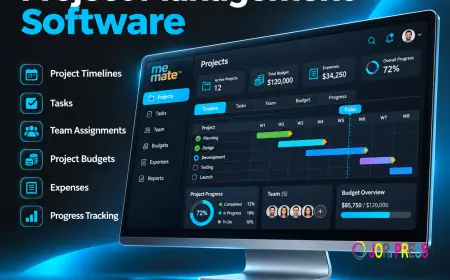
For businesses looking to connect project coordination with wider operational activities, meMate is one option worth evaluating. Its business management platform provides project timelines, task management, job scheduling, internal communication, expense tracking and profitability monitoring. These capabilities can help service-based businesses coordinate project activities alongside everyday business operations.
Businesses should assess the available features and subscription requirements to determine whether the platform matches their specific workflows.
Frequently Asked Questions
1. What is project management software used for?
Project management software is used to plan projects, assign tasks, organise schedules, coordinate employees, monitor progress and manage deadlines. It helps businesses maintain visibility and control throughout the project lifecycle.
2. What are the most important features of project management software?
Important features include task management, project scheduling, collaboration, file sharing, resource allocation, progress tracking and reporting. Workflow automation and budget management can also be valuable depending on business requirements.
3. How does project management software improve productivity?
It reduces manual administration, clarifies responsibilities and centralises project information. Employees can prioritise their work more effectively, while managers can identify delays and resolve operational bottlenecks.
4. What is the difference between project management software and task management tools?
Task management tools primarily organise individual activities, assignments and deadlines. Project management software provides broader capabilities, including project planning, resource allocation, scheduling, collaboration and performance monitoring.
5. Is project management software suitable for small businesses?
Yes. Small businesses can use it to coordinate employees, manage customer projects and organise daily responsibilities. Starting with essential features can improve organisation without introducing unnecessary complexity.
6. How do businesses choose the right project management system?
Businesses should evaluate usability, essential features, pricing, integrations, scalability and customer support. Testing the platform with a small team before wider implementation can help determine whether it suits existing workflows.
Conclusion
Effective project management requires more than assigning tasks and setting deadlines. Businesses need clear responsibilities, realistic schedules, effective communication and consistent progress monitoring.
The right project management software brings these activities together, helping teams organise their workloads, improve accountability and maintain better operational visibility.
For small businesses and growing organisations, investing in a suitable project management system can establish more structured workflows and support sustainable productivity. The key is to choose a solution that addresses genuine business challenges, supports employee adoption and grows alongside the organisation.
What's Your Reaction?
 Like
0
 Dislike
0
 Love
0
 Funny
0
 Angry
0
 Sad
0
 Wow
0