


































How to Extend Legacy ERP with Modern SaaS Applications Using Zoho Creator
Learn how businesses can extend legacy ERP systems with modern SaaS applications using Zoho Creator to automate workflows, improve integrations, and modernize operations without ERP replacement.

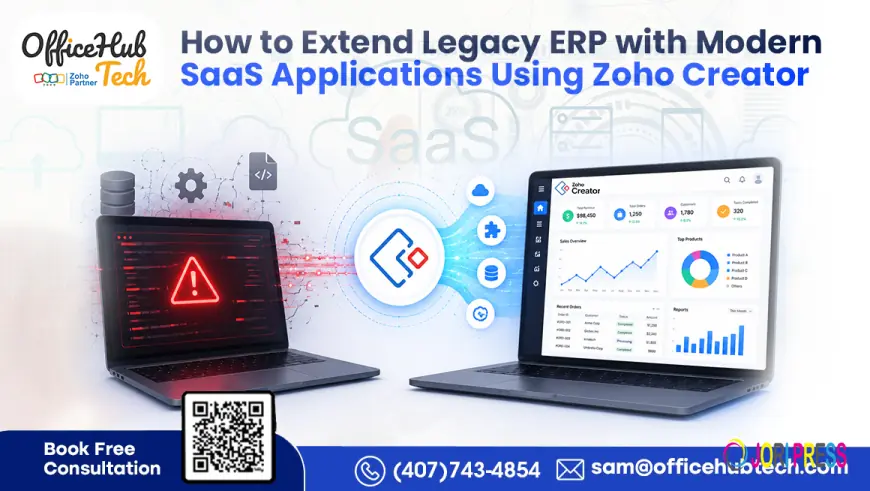
Legacy ERP systems often remain essential to business operations even when they no longer provide the flexibility required by modern organizations. Finance, inventory, procurement, manufacturing, and supply chain processes may still depend on an established ERP platform, while teams increasingly use cloud applications for CRM, HR, customer support, collaboration, analytics, and automation.
The challenge is not necessarily that the ERP has stopped working. The challenge is that it may not connect easily with the growing SaaS ecosystem around it.
Instead of replacing a stable ERP, businesses can extend legacy ERP systems by integrating modern SaaS applications using Zoho Creator as an application, integration, and workflow layer. This approach allows organizations to preserve their existing ERP investment while adding modern applications and automated processes around it.
Why Legacy ERP Systems Struggle in a SaaS-Driven Environment
Traditional ERP platforms were generally designed to centralize core business transactions. Modern SaaS applications, on the other hand, are designed for specialized functions, cloud connectivity, APIs, automation, and continuous updates.
As organizations add more applications, the gap between the ERP and the surrounding technology ecosystem can become more visible.
Common issues include:
- Duplicate data entry between systems
- Manual movement of information between departments
- Limited API or integration capabilities
- Delayed synchronization between applications
- Fragmented reporting
- Complex approval processes
- Dependence on spreadsheets and email-based workarounds
- Difficulty introducing new applications without custom ERP development
The result is often a collection of disconnected systems rather than one coordinated business environment.
For example, a sales team may work in a CRM, finance may use another application, inventory may remain inside the ERP, and customer support may depend on a separate helpdesk. Without an integration layer, employees may have to move information manually between each system.
This is where Legacy ERP System Extension becomes useful.
ERP Extension vs. Complete ERP Replacement
Replacing an ERP can be appropriate when the underlying platform can no longer support critical business requirements. However, replacement is not automatically the right answer whenever an ERP becomes difficult to extend.
A full ERP replacement can involve data migration, process redesign, integration rebuilding, user training, testing, and organizational change. For businesses with highly customized or deeply embedded ERP environments, the transition can be substantial.
ERP extension takes a different approach.
The existing ERP remains responsible for core transactions and authoritative business data. A modern application layer is added around it to handle new workflows, interfaces, integrations, portals, dashboards, and automation.
|
ERP Replacement |
ERP Extension with Zoho Creator |
|
Replaces the existing ERP |
Preserves the existing ERP |
|
Requires large-scale migration |
Uses existing ERP data and processes |
|
Major implementation project |
Can be implemented incrementally |
|
New applications are built around the replacement ERP |
New applications operate around the existing ERP |
|
Greater organizational change |
More gradual operational change |
|
Core ERP is redesigned or replaced |
Core ERP remains the system of record |
This makes extension particularly relevant for organizations that want to modernize specific operational areas without disrupting the ERP foundation.
How Zoho Creator Extends a Legacy ERP
Zoho Creator can operate as an external application and integration layer between the existing ERP and modern SaaS applications.
Instead of modifying the ERP every time the business needs a new application or workflow, organizations can use Creator to build the required functionality outside the ERP and connect it through available integration methods.
This creates a separation between the ERP's transactional responsibilities and the modern operational applications surrounding it.
Zoho Creator can support:
- Custom business applications
- API integrations
- Workflow automation
- Approval processes
- Mobile applications
- Customer and vendor portals
- Operational dashboards
- Data synchronization
- Third-party application connectivity
The ERP can continue managing financial records, inventory, procurement, manufacturing, or other core transactions while Zoho Creator handles processes that require greater flexibility.
This is the foundation of Zoho Creator for ERP extension.
Connecting Modern SaaS Applications to Legacy ERP
A modern ERP extension architecture can connect the existing ERP with the SaaS applications employees already use.
Depending on the organization's requirements, connected systems may include:
- CRM platforms
- Accounting and finance applications
- HR systems
- Inventory platforms
- Customer support software
- Project management tools
- Procurement applications
- Analytics platforms
- Collaboration applications
For example, when a sales opportunity is converted into an order in a CRM, an integration workflow can pass the required information through Zoho Creator. Creator can validate the data, check relevant ERP information, trigger approvals, and send the appropriate transaction or update to the ERP.
The same architecture can support reverse synchronization, allowing ERP information such as order status, inventory availability, invoice information, or payment status to become available to connected applications.
This is more than simple data transfer. The integration layer can also apply business rules and determine what should happen when specific events occur.
The Technical Architecture Behind Legacy ERP Extension
A practical architecture separates the ERP from the applications and workflows that need to evolve more frequently.
Legacy ERP → API / Connector → Zoho Creator → Business Logic & Automation → SaaS Applications / Portals / Dashboards
The responsibilities can be divided as follows:
Legacy ERP:
Maintains core transactional data and business records.
API or Integration Connector:
Provides controlled communication between the ERP and external systems.
Zoho Creator:
Handles application logic, data transformation, workflow orchestration, and custom applications.
Automation Layer:
Triggers approvals, notifications, updates, assignments, and other business actions.
SaaS Applications:
Provide specialized capabilities such as CRM, HR, finance, customer service, or analytics.
This architecture allows businesses to add functionality without repeatedly modifying the ERP core.
It also supports a phased modernization strategy. An organization can begin with one workflow or department and gradually expand the architecture as requirements evolve.
A Practical Process for Extending Legacy ERP with Zoho Creator
A successful extension project should begin with business and technical assessment rather than immediately building integrations.
Step 1: Assess the Existing ERP
Review the ERP modules, data structures, customizations, available APIs, integration limitations, and current workflows.
The objective is to identify which processes should remain inside the ERP and which can be handled more effectively through an external application layer.
Step 2: Identify the SaaS Integration Requirements
Map the applications that need to exchange information with the ERP.
For example:
CRM → ERP: Customers, orders, products, pricing, and transaction information.
ERP → CRM: Order status, invoices, payments, and fulfillment information.
HR → ERP: Employee or approval-related information where required.
ERP → Analytics: Operational and financial data required for reporting.
This mapping establishes the integration scope before development begins.
Step 3: Establish Secure Connectivity
The integration architecture can use APIs, webhooks, middleware, or other supported connectivity methods depending on the ERP.
Authentication, authorization, data validation, error handling, and synchronization rules should be defined before production deployment.
Step 4: Build the Required Applications and Workflows
Zoho Creator can then be used to develop the applications that address specific operational gaps.
Examples include:
- Approval applications
- Customer portals
- Vendor portals
- Field applications
- Internal dashboards
- Service request applications
- Custom operational workflows
This keeps business-specific functionality outside the ERP core.
Step 5: Automate Cross-System Processes
Once connectivity is established, repetitive processes can be automated.
A workflow could, for example:
New Request → Validation → Approval → ERP Update → Notification → Dashboard Update
The exact workflow depends on the organization's processes and the capabilities exposed by its ERP and connected applications.
Step 6: Monitor and Expand
After the first workflow is deployed, organizations can monitor synchronization, errors, user adoption, and business outcomes.
Successful workflows can then be extended to additional departments or applications.
This incremental approach allows ERP modernization to become an ongoing process rather than one large transformation project.
Where ERP Extension Creates the Most Value
The value of ERP extension becomes clearer when applied to specific business processes.
CRM and ERP Integration
Sales teams can work in their preferred CRM while operational and financial information remains connected to the ERP.
Potential integrations include customer records, orders, product information, invoices, payment status, and fulfillment data.
Procurement Automation
Procurement workflows can connect requests, approvals, vendor information, inventory requirements, and purchase orders.
Instead of manually checking multiple systems, employees can follow a structured workflow with automated notifications and approvals.
Customer Service Access
Support teams often need information stored inside the ERP.
A custom application or portal can expose relevant information such as order history, product information, warranty details, account records, or service information without requiring every employee to work directly inside the ERP.
Inventory and Warehouse Workflows
Inventory events can trigger notifications, reorder workflows, warehouse updates, and related actions across connected systems.
This can reduce repetitive data entry and improve visibility between inventory and other business functions.
Employee and Internal Workflows
Organizations can also use Creator to build internal applications for onboarding, approvals, requests, employee workflows, and department-specific processes while keeping relevant enterprise information synchronized.
Security and Governance Considerations
Connecting an ERP to multiple SaaS applications introduces additional data pathways, so security should be part of the architecture from the beginning.
Important considerations include:
- Secure API authentication
- Role-based access controls
- Encryption during data transmission
- Controlled application permissions
- Audit logging
- Data validation
- Error handling and retry mechanisms
- Backup and recovery planning
- Clear ownership of synchronized data
Not every application needs access to every ERP record. A well-designed integration should expose only the information required for a specific workflow.
This principle helps organizations maintain control while still making ERP data available where it creates operational value.
Business Benefits of Legacy ERP Extension
When properly designed, an extension architecture can provide several business benefits.
Preserve Existing ERP Investments
Businesses can continue using an ERP that reliably manages core transactions instead of replacing it simply because surrounding workflows need modernization.
Improve Operational Efficiency
Automated data exchange and workflow routing can reduce repetitive manual tasks and unnecessary system switching.
Connect Disconnected Applications
A centralized integration layer can coordinate information between ERP, CRM, finance, HR, inventory, support, and other SaaS platforms.
Improve Data Visibility
Connected systems can provide employees and decision-makers with more consistent operational information across departments.
Modernize Incrementally
Organizations can prioritize the processes that need attention most and expand the extension architecture over time.
Support Future Applications
Once the integration foundation is established, additional SaaS applications and custom workflows can be introduced without redesigning the entire ERP environment.
When Legacy ERP Extension Makes Sense
ERP extension is particularly relevant when:
- The existing ERP still handles core transactions reliably.
- Replacing the ERP would create significant operational disruption.
- Business teams need modern applications around the ERP.
- The ERP has limited flexibility for new workflows.
- Multiple SaaS applications need access to ERP data.
- The organization wants phased modernization.
- Custom applications are required without changing the ERP core.
However, extension should not be treated as a universal replacement for ERP modernization. If the ERP has fundamental functional, architectural, compliance, or scalability limitations, a broader modernization or replacement strategy may be necessary.
The right approach depends on the ERP's current capabilities, business requirements, integration landscape, security needs, and long-term technology roadmap.
Building a Modern SaaS Ecosystem Around Your Legacy ERP
Legacy ERP systems do not have to operate as isolated platforms.
With a carefully designed extension architecture, the ERP can continue serving as the system of record while modern SaaS applications, custom applications, and automated workflows operate around it.
Zoho Creator can provide the low-code layer required to connect these environments, develop business-specific applications, automate processes, and coordinate information across systems.
For organizations exploring Extend legacy ERP with Zoho Creator, the goal should not simply be to connect more software. The objective is to create a controlled architecture in which every system has a clear role and information moves reliably between them.
As an Authorized Zoho and n8n Partner, OfficeHub Tech helps organizations evaluate legacy ERP environments, design extension architectures, connect SaaS applications, develop custom Zoho Creator applications, and automate business workflows across the USA, India, UAE, and KSA.
If your existing ERP still works but is limiting how quickly your business can adopt modern applications, an extension-first approach can provide a practical path toward modernization without unnecessarily disturbing the systems your business already depends on.
What's Your Reaction?
 Like
0
Like
0
 Dislike
0
Dislike
0
 Love
0
Love
0
 Funny
0
Funny
0
 Angry
0
Angry
0
 Sad
0
Sad
0
 Wow
0
Wow
0